ब्लग

  • सजिलैसँग इमेल न्यूजलेटर साइनअप फारमहरू थप्नुहोस्

    Easily-Add-Email-Newsletter-Signup-FormsAdding an email newsletter sign up form to your site is a great way to grow your website’s following and to keep your website visitors interested in your site or product. And now you can easily add and customize newsletter sign up forms directly in your designs.

    preview-newsletterNew in Page Builder Sandwich is the Newsletter Element (check the short gif above). Now you can add a newsletter sign up form for your MailChimp, AWeber or MailPoet newsletter lists directly into your designs.

    सामान्यतया, तपाईंले अर्को प्लगइन स्थापना गर्नुपर्ने हुन्छ, त्यसपछि कतै सर्टकोड थप्नुपर्ने हुन सक्छ, वा पपअप मार्फत केही फिल्डहरू भर्नुपर्ने हुन सक्छ, वा तपाईंको न्यूजलेटर साइन अप फारमले काम गर्नको लागि विजेट सेटअप गर्नुपर्ने हुन सक्छ। अब, न्यूजलेटर साइनअप फारमहरू थप्ने सबै जटिलताहरू हटिसकेका छन्। केवल आफ्नो पृष्ठमा न्यूजलेटर एलिमेन्ट थप्नुहोस्, आफ्नो सूची API कुञ्जीहरू थप्नुहोस् र यसले तुरुन्तै काम गर्नुपर्छ।

    तपाईंले या त इमेल फिल्डमा क्लिक गरेर—जहाँ तपाईं यसको रङ, साइज, बोर्डर र अन्य धेरै कुराहरू परिवर्तन गर्न सक्नुहुन्छ, वा बटनमा क्लिक गरेर—आइकनहरू थप्न, आफ्नो बटनको साइज परिवर्तन गर्न, वा तपाईंको आगन्तुकले आफ्नो इमेल ठेगाना टाइप गर्न सुरु गरेपछि मात्र यसलाई देखा पर्ने बनाउन आफ्नो साइन अप फारमलाई अझ अनुकूलित गर्न सक्नुहुन्छ। तपाईं आफ्नो डिजाइन अनुसार यसको रूपलाई पूर्ण रूपमा अनुकूलित गर्न सक्नुहुन्छ। के तपाईं प्रयोगकर्ताले टाइप गर्दा फिल्डको रङ परिवर्तन होस् भन्ने चाहनुहुन्छ? तपाईं कलर पिकरको साथ सजिलै गर्न सक्नुहुन्छ। मिनिमलिस्ट डिजाइन चाहिन्छ र फिल्ड केवल एउटा बोर्डर मात्र होस्, कुनै समस्या छैन!

    एउटा राम्रो कुरा के हो भने न्यूजलेटर एलिमेन्टले तपाईंको साइट भित्र प्रयोगकर्ताको प्रवाहलाई बाधा पुर्याउँदैन। एक पटक उनीहरूले सदस्यता लिएपछि, पृष्ठ रिफ्रेस हुने छैन र साइनअप फारमलाई केवल “धन्यवाद” सन्देशले प्रतिस्थापन गरिनेछ। यो सन्देश र यसको रङहरू पनि अनुकूलन योग्य छन्।

    Page Builder Sandwich को बाँकी भाग जस्तै, तपाईं आफ्नो नयाँ न्यूजलेटर साइनअप फारम जहाँ चाहनुहुन्छ त्यहाँ राख्न सक्नुहुन्छ, केवल यसलाई आफ्नो पङ्क्तिहरू भित्र वा अर्को स्थानमा तान्नुहोस्।

    के मेलिङ सूचीहरू महत्त्वपूर्ण छन्?

    छोटो उत्तर हो हो। यदि तपाईंसँग ट्विटर खाता छ भने, अन्य ट्विटर प्रयोगकर्ताहरूले तपाईंलाई शाब्दिक रूपमा “फलो” गर्न सक्छन् र तिनीहरूले तपाईंका ट्वीटहरू देख्नेछन्, मेलिङ सूची त्यस्तै हो जसको माध्यमबाट आगन्तुकहरूले इमेल मार्फत तपाईंको साइटलाई फलो गर्न सक्छन्।

    अझै मेलिङ सूची छैन?

    If you don’t have a mailing list yet, now is a good time to get started. Getting a newsletter service like MailChimp or AWeber is good since they do the heavy lifting of managing your subscribers and blasting an email to your subscribers easily. They also have newsletter builders that will let you create a newsletter campaign easily. The good thing is they have free plans, so you won’t need to shell out cash in order to try it out.

    If you’re more of a I-like-to-handle-it-myself guy or gal, then you might consider using MailPoet. It’s downloadable free from wordpress.org and they have a paid model as well. With MailPoet, you’ll be able to see your subscribers within your dashboard and you can also send out emails from there. It’s easy to use as well and just takes literally less than 5 minutes to fully set up in your site (Yes, I’ve tried).

    Page Builder Sandwich को बारेमा थप जान्नुहोस्

  • तपाईंले WordFence को फायरवालमा URLs किन ह्वाइटलिस्ट गर्नुपर्छ (र यो कसरी गर्ने)

    If you’re using Page Builder Sandwich along with Wordfence Security, there’s a chance you might have encountered something called a 403 error.

    Now, according to WordPress resource site WPBeginner, 403 errors occur when server permissions don’t allow access to a specific page.

    तर 403 त्रुटिको अर्थ के हो, र यो सुरुमै Page Builder Sandwich मा किन भइरहेको छ?

    The 403 Error Explained

    403 त्रुटिको सबैभन्दा सामान्य कारण भनेको सुरक्षा प्लगइनहरू कुनै निश्चित तरिका वा मानक अनुसार कन्फिगर नगरिनु हो।

    Like WordFence, most security plugins from WordPress restrict some actions if they’re suspected or proven to be malicious. These scenarios usually occur on your WP Admin or WP Login page, or show up as pop-ups alerting you that you don’t have authorization to view your page.

    यदि तपाईंले Sandwich मा यो कहिल्यै देख्नुभयो भने पप-अप यस्तो देखिनेछ:

    So what does this mean? Is Sandwich safe to use? Is WordFence bad? And does the 403 error warrant bad points for both Wordfence and Page Builder Sandwich?

    खैर, होइन।

    All of this just means that Wordfence is extra careful when scanning your external plugins.

    And that’s actually a really good thing, especially since they’re a security plugin.

    WordFence is Legit…

    WordFence WordPress का लागि सबैभन्दा लोकप्रिय सुरक्षा प्लगइनहरू मध्ये एक हो। यसमा दश लाख भन्दा बढी सक्रिय इन्स्टलहरू छन्, त्यसैले सम्भवतः यो तपाईंको WP वेबसाइटमा पनि इन्स्टल गरिएको हुन सक्छ। तिनीहरू एक महान उद्देश्यका लागि अवस्थित छन्: तपाईंको वेबसाइट सुरक्षित राख्न मात्र होइन, सुरक्षा जोखिमहरू कम गर्न र समग्र रूपमा तपाईंको वेबसाइटको सुरक्षा सुधार गर्न पनि।

    tl;dr WordFence भरपर्दो छ।

    …And So is Sandwich. But Why Does It Need Whitelisting?

    WordFence ले ब्लक गर्ने Sandwich मात्र होइन।

    अन्य प्लगइनहरू र URL हरूलाई पनि WordFence मा ह्वाइटलिस्टिङ (ब्ल्याकलिस्टिङको उल्टो) गर्न आवश्यक हुन्छ। केही थप लोकप्रिय प्लगइनहरूलाई Wordfence द्वारा पहिले नै अनुमति दिइएको हुन सक्छ।

    त्यसो भए पर्दा पछाडि के भइरहेको छ, र 403 त्रुटि कहाँबाट आइरहेको छ?

    Ajax Functions and Page Builder Sandwich

    Page Builder Sandwich ले तपाईंको सम्पादन अनुभवभरि ajax प्रकार्यहरू सञ्चालन गर्दछ। निश्चित प्लगइनहरूले पनि त्यसो गर्छन्।

    W3Schools ले ajax को बारेमा अलि विस्तृत रूपमा व्याख्या गर्दछ:

    AJAX is a technique for creating fast and dynamic web pages. It allows web pages to be updated asynchronously by exchanging small amounts of data with the server behind the scenes. This means that it is possible to update parts of a web page, without reloading the whole page.

    Chart taken from W3Schools

    Page Builder Sandwich मा, ajax कलहरू सर्टकोड म्यापिङ प्राप्त गर्ने, सर्टकोडहरू रेन्डर गर्नेदेखि लिएर तपाईंका परिवर्तनहरू सुरक्षित गर्नेसम्मका हुन्छन्। यसले गर्दा तपाईंले 403 त्रुटि, तपाईंको आउटपुट सुरक्षित गर्नमा समस्या, वा रेन्डर नभएका सर्टकोडहरू जस्ता समस्याहरू अनुभव गर्न सक्नुहुन्छ। यो त्यस्तो समय हो जब तपाईंले Page Builder Sandwich सँग सम्बन्धित ajax कलहरूलाई ह्वाइटलिस्ट गर्नुपर्ने हुन सक्छ।

    Whitelisting Page Builder Sandwich on WordFence

    Wordfence को फायरवालमा PBS लाई ह्वाइटलिस्ट गर्न, यी प्यारामिटरहरूसहित Whitelisted URLs क्षेत्रमा एउटा प्रविष्टि थप्नुहोस्:

    URL: /wp-admin/admin-ajax.php

    Param Name: main-content

    Param: POST Body

    मल्टिसाइट WordPress इन्स्टलेसनहरूको लागि, माथिको URL मा तपाईंको साइटको फोल्डर नाम समावेश गर्नु राम्रो विचार हो। उदाहरणका लागि: /my-multisite/wp-admin/admin-ajax.php

    यी मानहरू थपेपछि, 403 त्रुटि राम्ररी समाधान हुनुपर्छ, र तपाईंले आफ्नो आउटपुट सुरक्षित गर्न र फेरि रेन्डर गरिएका सर्टकोडहरू उत्पन्न गर्न सक्षम हुनुपर्दछ।

    तपाईंको WordFence फायरवाल सेटिङहरू अन्तर्गत यो यस्तो देखिनुपर्छ:

    Ta-da!

    Conclusion

    हो, Page Builder Sandwich प्रयोग गर्न सुरक्षित छ।

    त्यति मात्र होइन, यसले सम्पादन मोडमा हुँदा मात्र ajax कार्यहरू सम्पादन गर्छ, र यो बाह्य प्लगइनहरू र थिमहरूसँग उपयुक्त छ (जबसम्म तिनीहरू WordPress का कोडिङ मानकहरू अनुरूप हुन्छन्)।

    WordFence Security पनि फरक छैन।

    तर तिनीहरूको बारेमा राम्रो कुरा के हो भने तिनीहरूले WordPress प्रयोगकर्ताहरूलाई कुन प्लगइनहरू सुरक्षित छन् र कुन छैनन् भनी निर्णय गर्न दिने अतिरिक्त विकल्पका साथ आफ्ना साइटहरू सुरक्षित र संरक्षित राख्ने अवसर दिन्छन्।

  • सामाजिक सञ्जाल रणनीति: साइट निर्माणमा यसको महत्त्वपूर्ण भूमिका

    social-media-strategy-its-important-role-in-site-building

    केही दशक अघि, वैज्ञानिकहरू र पेशेवरहरूले हुलाक-पत्र (स्नेल-मेल) को राम्रो विकल्प खोज्नको लागि धेरै दिमाग खियाए। केही समय हामीसँग बिपरहरू थिए, साथै ती धेरै ठूला सेलफोनहरू पनि थिए जुन हामी आफ्नो खल्तीमा राख्न सक्दैनथ्यौं। तर ती सम्झनका लागि जतिसुकै राम्रा भए पनि, विगतको प्रविधि २१ औं शताब्दीको सञ्चार माध्यमहरूसँग कुनै पनि हालतमा तुलनायोग्य छैन। अब, वर्ष २०१६ मा, हाम्रा साथीहरू, परिवार, र सहकर्मीहरूलाई एक सेकेन्डभन्दा अलिकति मात्र बढी समयमा सम्पर्क गर्न सकिन्छ। भनाइ नै छ: “सबै कुरा शाब्दिक रूपमै हाम्रो औंलाको टुप्पोमा छ”। साँच्चिकै नै।

    बिस्तारै परम्पराबाट टाढा जाँदै?

    आजका द्रुत गतिको आविष्कारहरूका कारण हामीले कति धेरै परम्परागत दिनचर्याहरू त्याग्नुपरेको छ भन्ने कुरालाई नकार्न गाह्रो छ। यसमा बानी पर्न हामीलाई केही समय लागेको छ (विशेष गरी पुराना पुस्ताहरूका लागि), तर साँचो भन्नुपर्दा, यो ठ्याक्कै नराम्रो कुरा भने होइन। वास्तवमा, यो त उल्टो हो।

    उदाहरणका लागि, सन् १९९३ मा, एउटा बेकरलाई नयाँ ओभन मोडेलको बारेमा सोधपुछ गर्न लाग्ने समय र प्रयास सामान्यतया हप्ताहरू, महिनाहरू नै नभए पनि, लाग्ने गर्थ्यो। अब, त्यही काम २०१६ मा ओभन निर्माताको वेबसाइट ब्राउज गरेर सजिलै पूरा गर्न सकिन्छ। यसका अतिरिक्त, यदि त्यही ओभन कम्पनीले अर्को सप्ताहन्तमा बिक्री (सेल) राख्न लागेको घोषणा गर्छ, र बेकरले आफ्ना साथीहरूलाई यसबारे बताउन चाहन्छ भने, उनीहरूले केवल फेसबुक, ट्विटर, वा अन्य लोकप्रिय सामाजिक सञ्जाल वेबसाइटहरूमा यसबारे पोस्ट गर्नुपर्ने हुन्छ। यो जमानामा, हामी सबै आफ्नो जीवनको कुनै न कुनै मोडमा यस दिनचर्यामा अभ्यस्त भइसकेका छौं, त्यसैले हामी पूर्ण विश्वस्त छौं कि तपाईं यो प्रक्रियासँग परिचित हुनुहुन्छ।

    उदाहरणका रूपमा, सामाजिक सञ्जाल लगभग कुनै पनि कुरालाई सार्वजनिक रूपमा फैलाउनको लागि एक उत्कृष्ट माध्यम हो। आज यसको प्रभाव अविश्वसनीय रूपमा शक्तिशाली छ, र यसै कारणले, तपाईंको अनलाइन उपस्थिति तपाईंको साइट निर्माण यात्राको सफलता, साथै यसको मर्मत सम्भारको लागि एक प्रमुख कारक हुन सक्छ। वास्तवमा, पत्रपत्रिका स्टलहरूमा नियमित रूपमा बिक्री हुने पत्रिकाहरू— जस्तै टाइम र द इकोनोमिस्ट– का सामग्रीहरू भौतिक प्रतिलिपिहरू र अनलाइन दुवै माध्यमबाट उपलब्ध छन्, जसले अझ व्यापक दर्शकहरूसम्म पहुँच सुनिश्चित गर्‍यो। त्यसै गरी, यदि कुनै प्रभावशाली व्यक्ति तपाईंको साइटमा आउँछ, र उनीहरूलाई तपाईंको सामग्री मनपर्छ (वा कम्तिमा साझा गर्न पर्याप्त सान्दर्भिक लाग्छ) भने, उनीहरूले प्रायः अन्य सामाजिक सञ्जालका माध्यमहरू मार्फत पनि तपाईंको सामग्री फैलाउनेछन्।

    यद्यपि यो ध्यानमा राख्नुहोस् कि तपाईंको साइटको बारेमा कुरा फैलाउन कुनै प्रभावशाली व्यक्ति नै चाहिन्छ भन्ने छैन; सामाजिक सञ्जाल मार्फत केवल आफैंले (वा केही अरूको सहयोगमा) आफ्ना कुराहरू सेयर गर्नाले पनि तपाईंको लागि धेरै ढोकाहरू खोल्न सक्छ, तपाईंको लक्षित दर्शक जोसुकै भए पनि। वास्तवमा, BrandWatch.com को एउटा लेखले उल्लेख गरेको छ कि २.३ अर्ब मानिसहरू (विश्वको कुल ३.१७ अर्ब जनसंख्या मध्ये) सामाजिक सञ्जालमा उपस्थित छन्।

    यो धेरै ठूलो संख्या हो। ढुक्क हुनुहोस्, तपाईंको लक्षित दर्शक त्यही जनसांख्यिकीभित्र हुनेछ।

    सामाजिक सञ्जालको कार्यक्षमता विस्तार गर्दै

    तपाईंको सामग्रीलाई सार्वजनिक रूपमा प्रस्तुत गर्नुका अतिरिक्त, सामाजिक सञ्जालको सान्दर्भिकता कुनै पनि दर्शक वा बजारमा नवीनतम ट्रेन्डहरूसँग अद्यावधिक रहन पनि विस्तार हुन्छ। तपाईंको दर्शकहरूको चाहना र आवश्यकताहरू के हुन् भनेर मूल्याङ्कन गर्दा यो विशेष गरी सत्य साबित हुनेछ, र तपाईं उनीहरूसम्म कसरी अझ राम्रोसँग पुग्न र सेवा दिन सक्नुहुन्छ भन्नेमा अझ विस्तार हुनेछ; सम्झनुहोस्, दर्शकहरूसम्म पुग्नु सधैं तपाईंको साइटको सफलताको लागि एक महत्त्वपूर्ण कारक हो।

    यद्यपि तपाईंले पहिलो महिनामा वा तपाईंको साइटको पहिलो वर्षहरूमा नै जादुई रूपमा १५,००० फलोअरहरू प्राप्त नगर्न सक्नुहुन्छ, सामाजिक सञ्जाल खाताहरूमा सक्रिय अनलाइन उपस्थिति हुनुले पक्कै पनि दीर्घकालीन रूपमा, कुनै न कुनै तरिकाले तपाईंलाई महत्त्वपूर्ण प्रोत्साहन दिनेछ। सम्झनुहोस्: रोम एकै दिनमा बनेको थिएन, त्यसैले दृढ रहनुहोस्!

    सम्भवतः अझ धेरै

    Treehouse.com मा रहेको एउटा प्रिमियम भिडियोले उल्लेख गरेको छ कि इ-मेल र परम्परागत प्रवर्द्धन कार्यक्रमहरूको तुलनामा, सामाजिक सञ्जाल दर्शकहरूसम्म पुग्ने अन्य कुनै पनि माध्यमभन्दा दुई गुणा बढी प्रभावकारी छ। वास्तवमा, सामाजिक सञ्जाल एक शक्तिशाली उपकरण बनेको छ जसले तपाईंको दर्शक पहुँचमा ठूलो फरक पार्न सक्छ। सामाजिक सञ्जालमा के अभूतपूर्व छ भने धेरैजसो समय, यो निःशुल्क हुन्छ (र यसका लागि भगवानलाई धन्यवाद)। त्यसैले यसलाई आफ्नो फाइदाको लागि प्रयोग गर्नुहोस्!

    साइट निर्माणको शुभकामना!

  • ल्यान्डिङ पेजहरू के हुन् (र जे भए पनि मलाई यो किन चाहिन्छ)?

    In a previous article, we mentioned that 84% of website conversions occur on the first visit. And during this first visit, the average site visitor is only going to stay on your website for about 10 seconds.

    That means that’s all the time you have to make a good impression, convince your visitors to stay on your site, and to (hopefully) convert that site visit into a lead.

    यस बारे सोच्दा अलि दबाब महसुस हुन्छ।

    But not to worry- landing pages help you do just that. More specifically though, well-crafted landing pages help you to do just that.

    So what are they?

    In the simplest terms, a landing page is any page that gets traffic from anywhere other than the usual pages on your site (like your Homepage, FAQ, or Contact Us page).

    The difference between these “usual pages” though, is that landing pages reel in your audience using content that creates a sense of urgency – like call-to-action buttons and promo pages, for example – and they do it all in one page with a specific goal set in mind: They make your audience take action.

    And if all goes as expected, you get to convert your audience and site visitors into leads. This is called lead generation.

    ल्यान्डिङ पृष्ठहरू कुनै पनि वेबसाइटको महत्त्वपूर्ण भाग हुन्, विशेष गरी जब तपाईं दर्शकहरू निर्माण गर्न र लिडहरू सिर्जना गर्न खोज्दै हुनुहुन्छ। तिनीहरू राजस्व उत्पन्न गर्नमा पनि एक ठूलो कारक हुन्।

    What do they look like and when do I start making one?

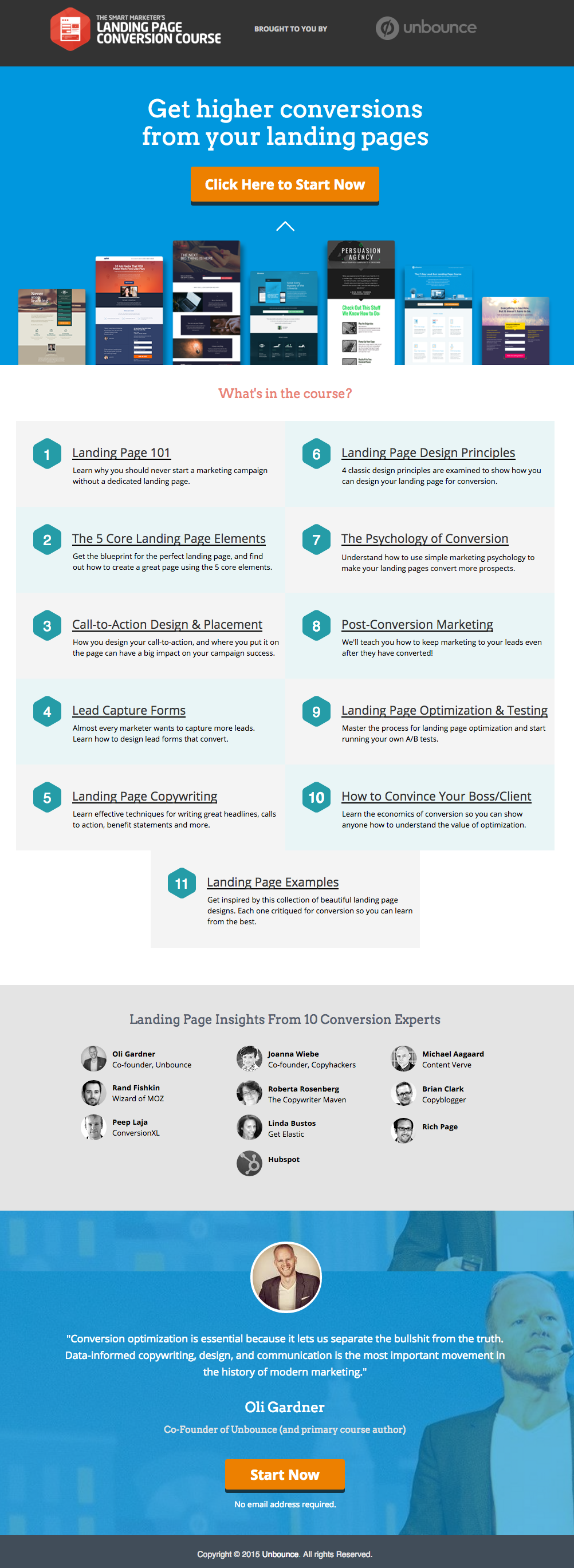
    यहाँ Unbounce बाट एउटा उत्कृष्ट ल्यान्डिङ पृष्ठको उदाहरण छ, जुन हामीलाई धेरै मन पर्छ:
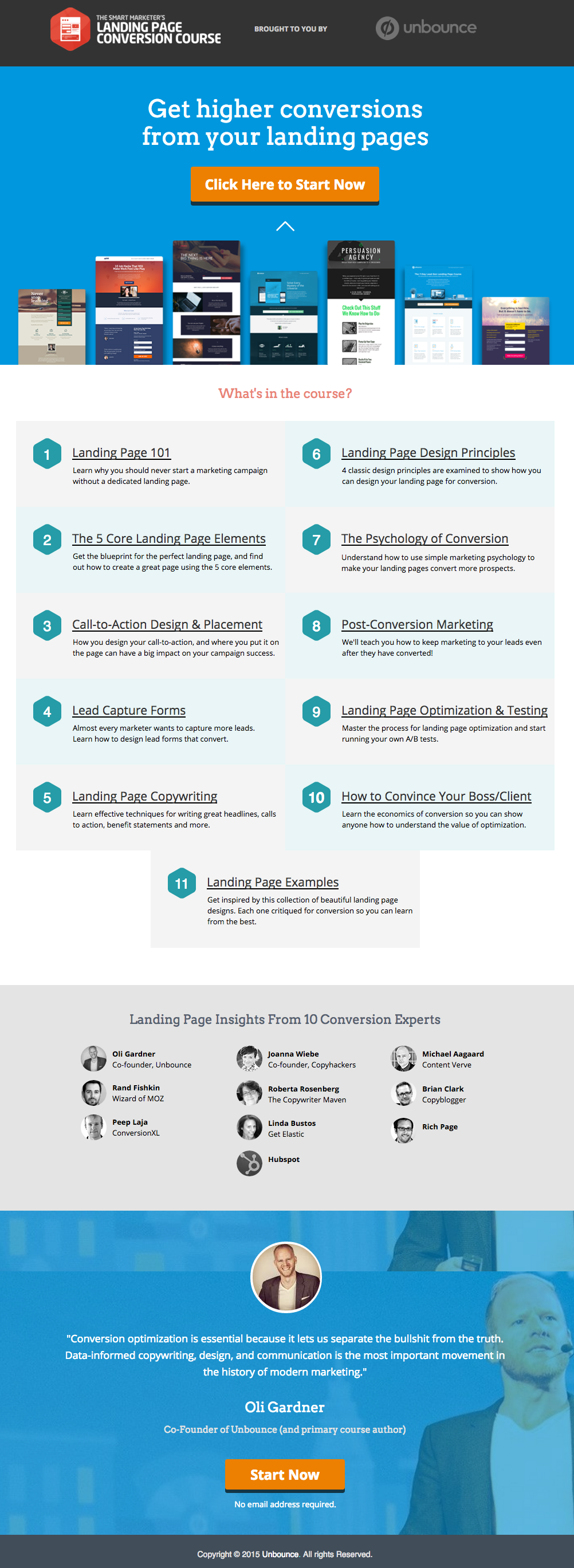
    This has all of the right elements you need to execute the perfect landing page: it’s got just the right amount of text (which is really helpful for boosting SEO), and it’s packaged in a way that it’s not too heavy or intimidating for site visitors.

    The imagery is great as well, and the placement of the two call-to-action (or CTA) buttons give the visitors just enough cues to sign up for their service. Not too little, but not too much either.

    (सुझाव: Unbounce ल्यान्डिङ पृष्ठ निकै आकर्षक देखिन्छ – यदि तपाईं आफ्नै ल्यान्डिङ पृष्ठमा यस्तै शैली बनाउने प्रयास गर्दै हुनुहुन्छ भने सायद थोरै डरलाग्दो पनि लाग्न सक्छ – तर तपाईं वास्तवमा PBS प्रयोग गरेर यस्तै र उत्तिकै उत्कृष्ट देखिने पृष्ठ सिर्जना गर्न सक्नुहुन्छ)।

    MAKE YOUR OWN LANDING PAGE: If you’re new to design, First Site Guide’s Elements & Principles of Design Cheat Sheet proves to be friendly and reliable for beginners.

    Take note though, that Unbounce’s example isn’t the only way you can create your landing page.

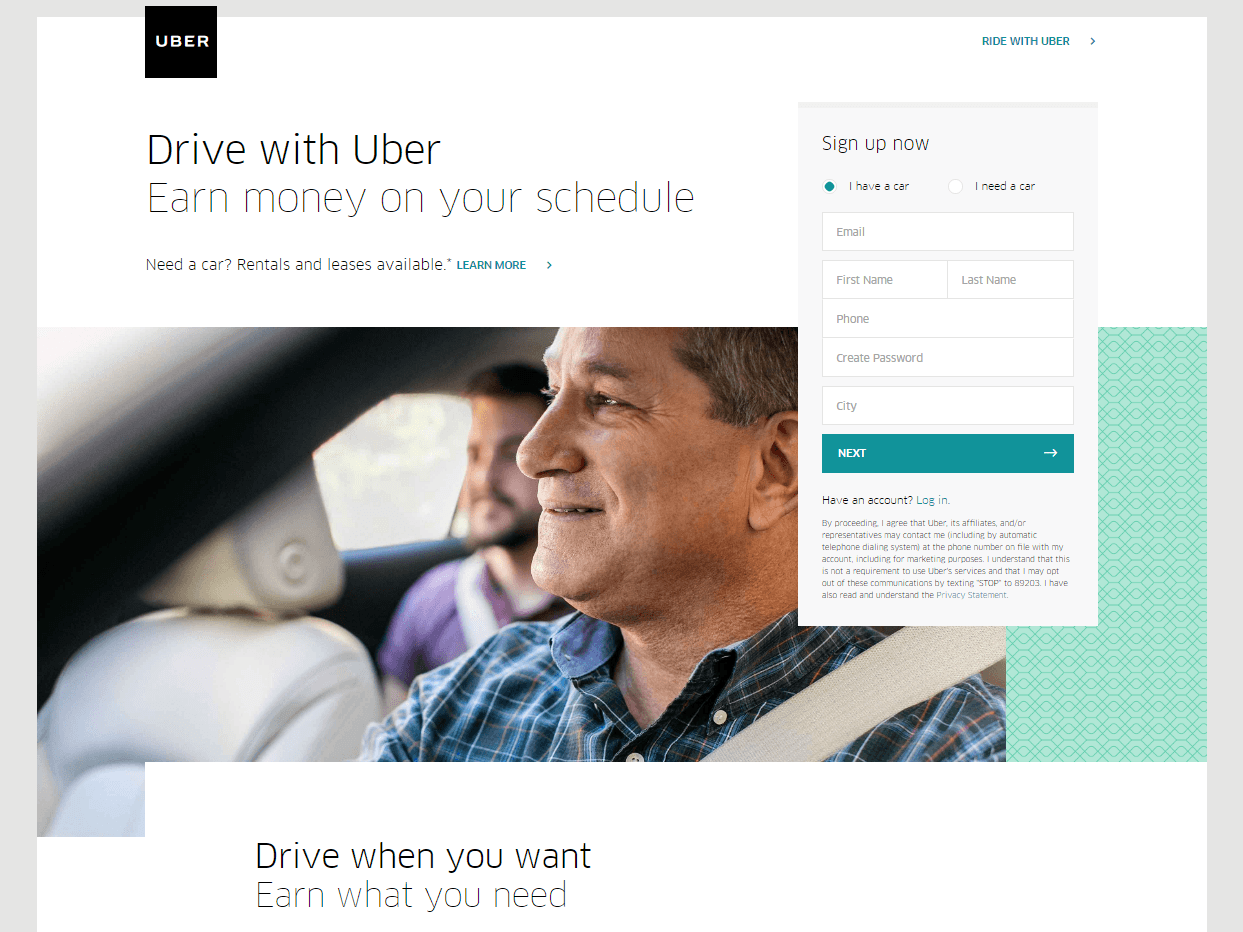
    You can always go for a simpler, cleaner look, like Uber’s landing page below:
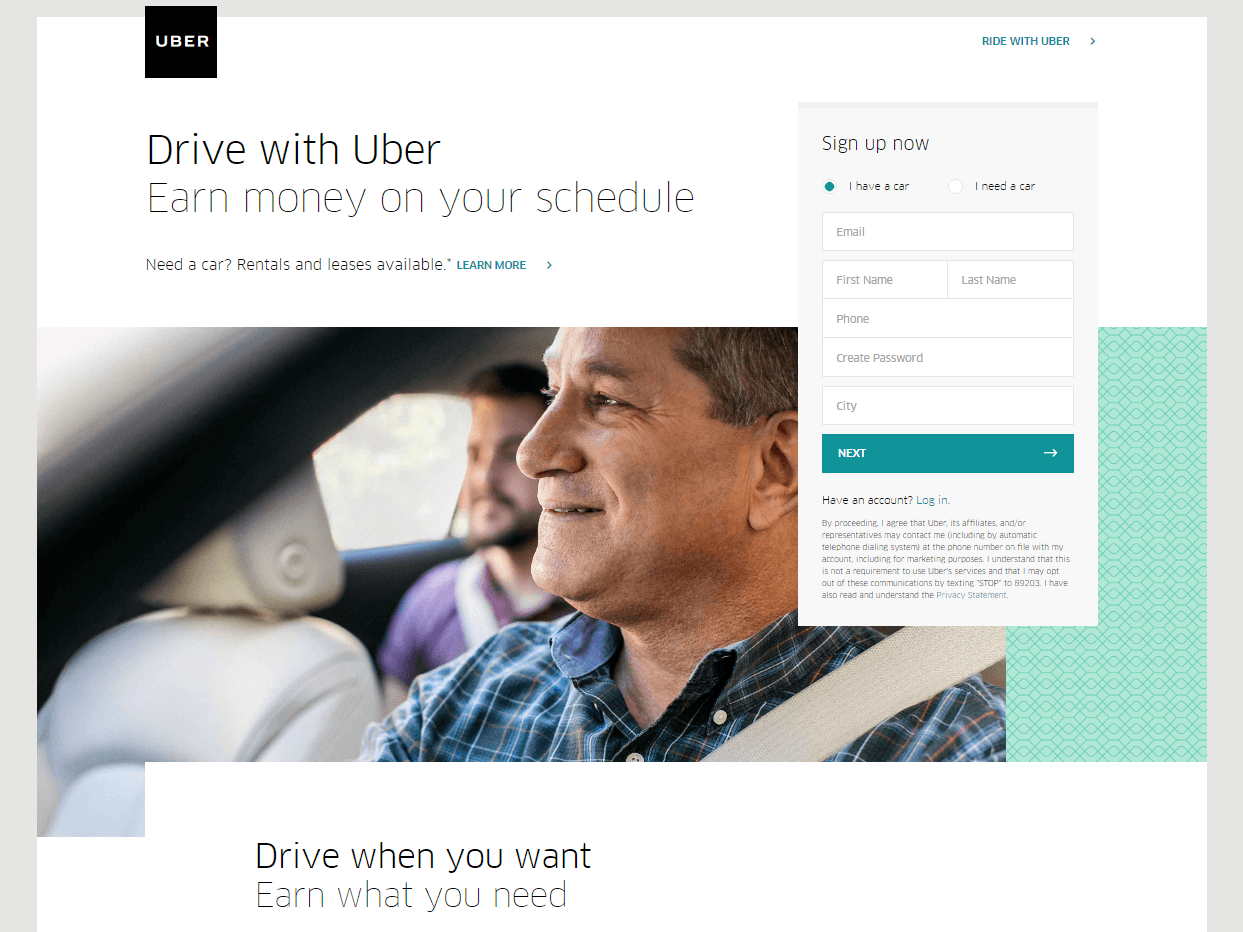
    The text’s placement, along with the sign-up forms look crisp and clean. There’s also minimal distractions on this landing page, which prompts its visitors to sign up right away.

    MAKE YOUR OWN LANDING PAGE: First Site Guide’s Psychology of Color Cheat Sheet is a huge helA, which can help you balance out the right kind of colors that create a minimal yet classy effect for your landing pages.

    You can have more than one

    This is a little tricky because you have to learn how to strike a balance, but if you think it’ll help generate more leads,  you can actually build more than one landing page. Again, different landing pages cater to different needs.

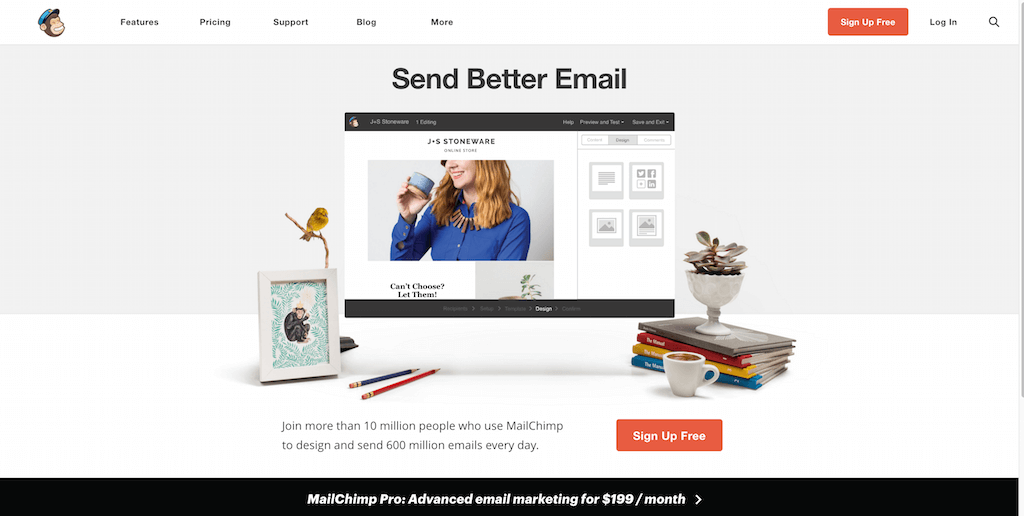
    उदाहरणका लागि MailChimp बाट यो एउटा (धेरैमध्ये) लिनुहोस्, जसले आफ्ना दर्शकहरूलाई निःशुल्क रूपमा तिनीहरूका सेवाहरूमा साइन अप गर्न आग्रह गर्दछ:
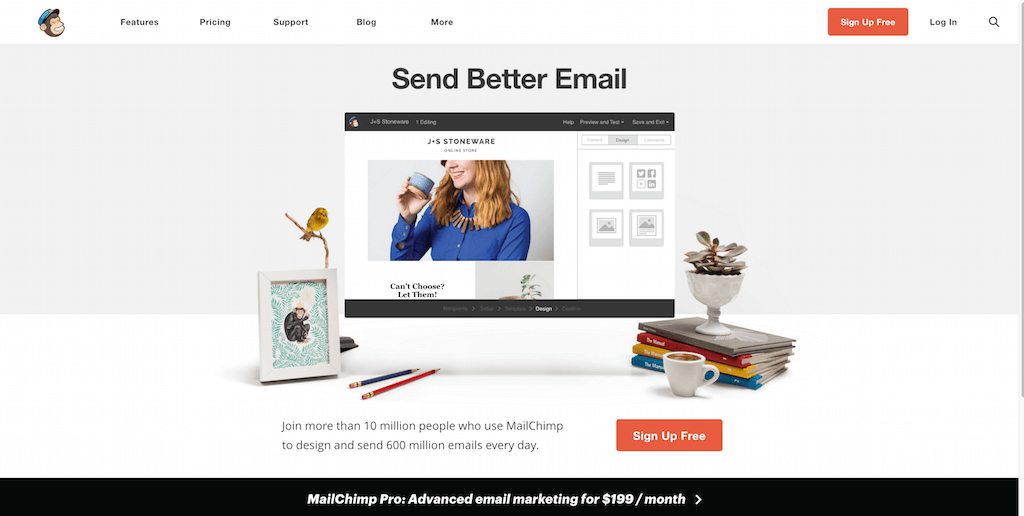
    (It worked by the way, as we use MailChimp for our newsletter service, too).

    Take note of the text – it’s straight to the point, and addresses the target’s audience needs in just three simple, albeit powerful words; enough to catch the visitor’s attention, and convert into a lead.
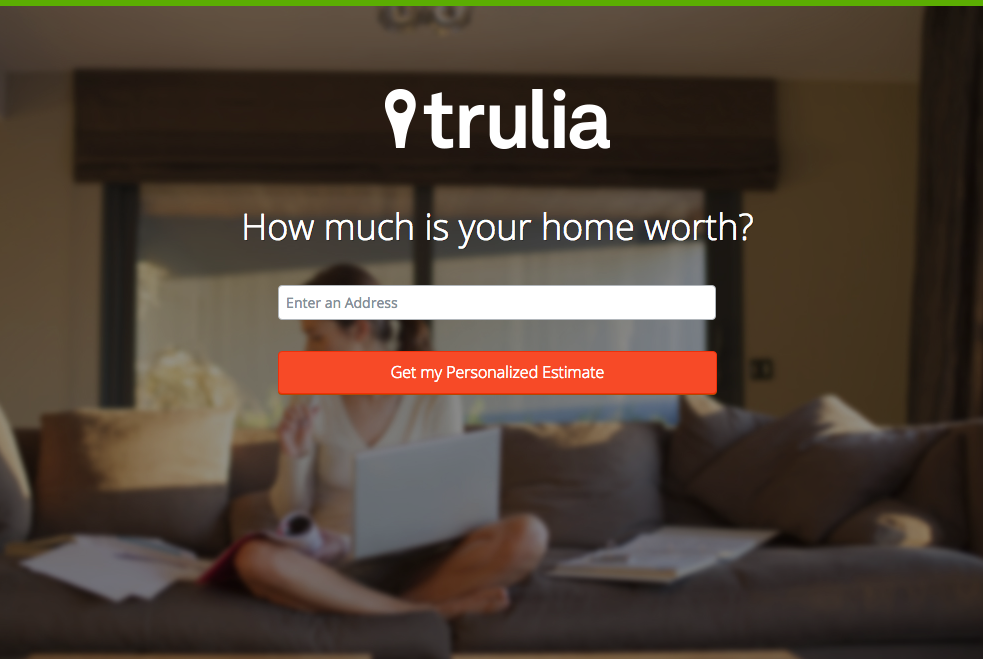
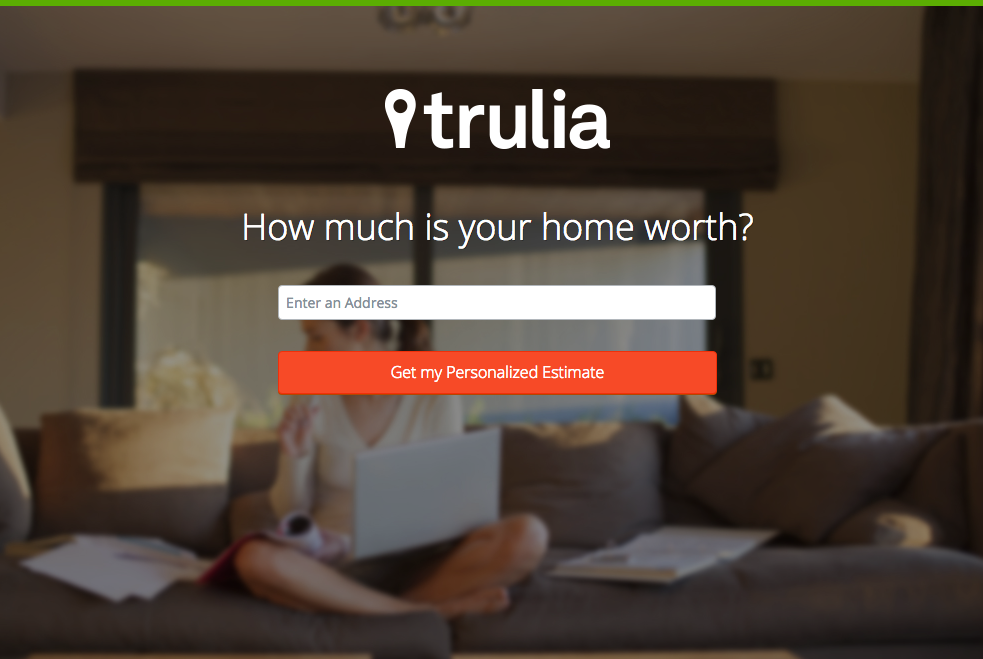
    Here’s another from Truila, which helps its users get an estimate of how much their houses are worth.

    Unlike the previous examples, Truilia doesn’t offer a catch to their customers in this particular landing page. They simply offer to give the visitor a chance to test out their service.

    Again, take note of the copy: no fluff, and it gets straight to the point.

    Usually, landing pages like these direct you towards another, one that has more information about what the website is offering. This is also a great technique used to capture more leads.

    MAKE YOUR OWN LANDING PAGE: Did you know that “Under Construction” pages count as landing pages, too? This blog post by First Site Guide teaches you how to make one.

    More doesn’t always mean merrier

    It’s important to remember that the problem isn’t the lack of landing pages per se – but the lack of well-created, successful landing pages.

    कुनै पनि वेबसाइटले तीमध्ये धेरै बनाउन सक्छ, तर त्यसले स्वतः सफल लिड रूपान्तरण दिँदैन।

    फेरि पनि, ल्यान्डिङ पृष्ठहरूको काम निकै जटिल हुन्छ– त्यसैले यदि तपाईं यस पछाडिको कला र विज्ञानको अध्ययनमा लगानी गर्न सक्नुहुन्छ भने, त्यसो गर्न अत्यधिक सिफारिस गरिन्छ।

    Here are some websites that’ll be really helpful in your journey to creating landing pages

    Landing Folio

    http://www.landingfolio.com/

    Landing Folio is an extensive gallery that’s really useful when it comes to getting inspiration for landing page designs. They also offer some kick-ass, friendly courses on how to perfect the art of creating landing pages. Plus, all the designs are pretty and fun to look at as well.

    First Site Guide

    http://firstsiteguide.com

    First Site Guide इन्टरनेटमा सबैभन्दा धेरै स्रोतसाधन भएको वेबसाइटहरू मध्ये एक हो, विशेष गरी यदि तपाईं वेबमा नयाँ हुनुहुन्छ र यसबाट केही गर्न चाहनुहुन्छ भने। तिनीहरूसँग सामग्री सिर्जना गर्ने उपकरणहरूको सूची, उत्पादन समीक्षा र तुलना, इन्फोग्राफिक्स, उपयोगी भिडियो ट्यूटोरियलहरू, र थप स्रोतहरू छन्। यदि तपाईं भर्खरै आफ्नो पहिलो ल्यान्डिङ पृष्ठ सिर्जना गर्न सुरु गर्दै हुनुहुन्छ भने पक्कै पनि उपयोगी हुन्छ।

    Conversion Lab

    http://conversionlab.no/
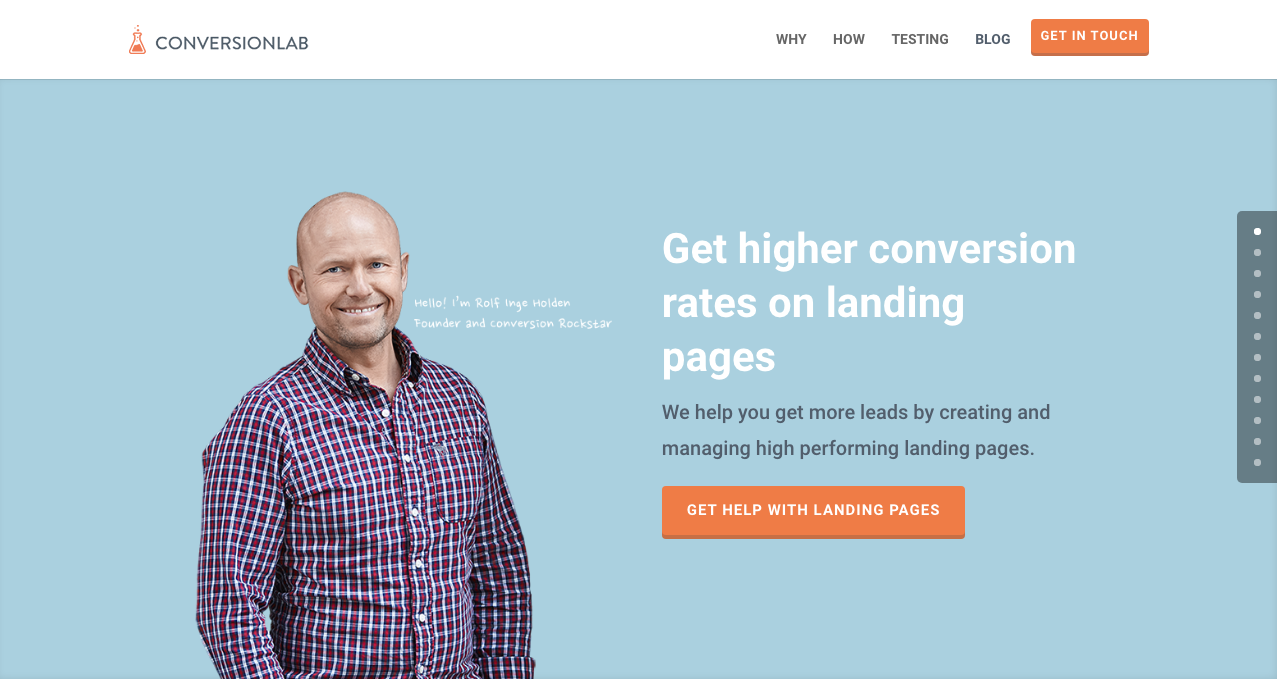
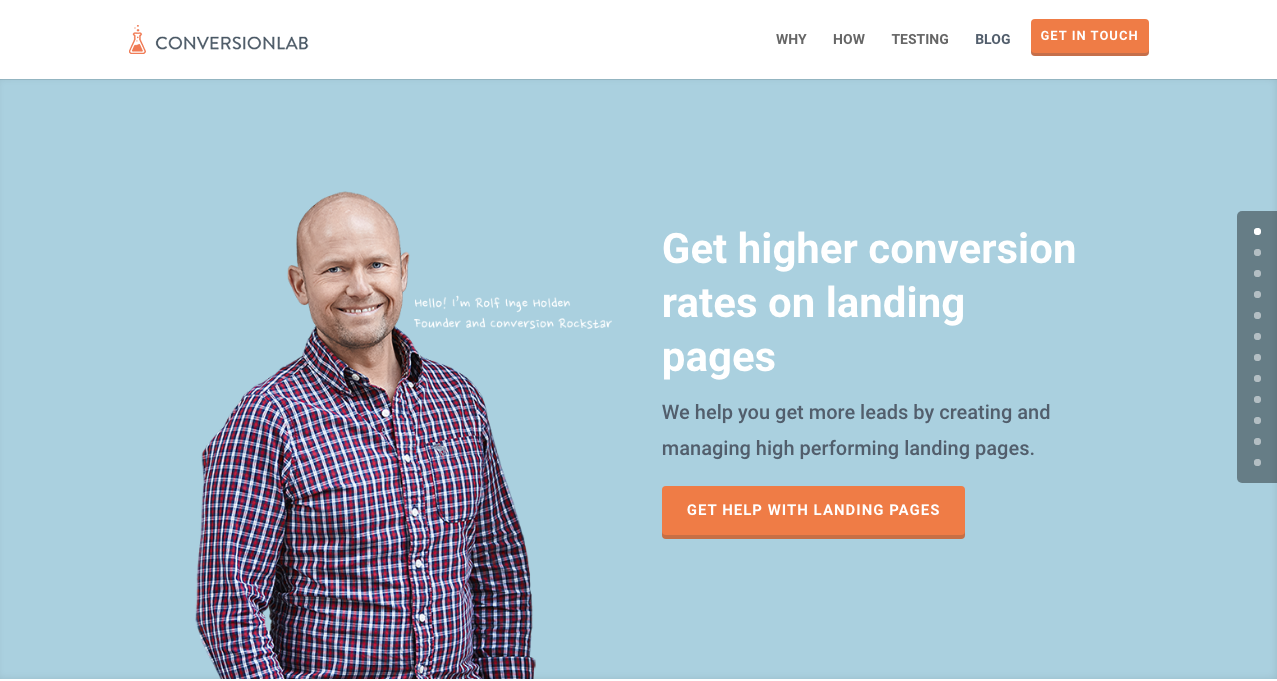
    Apart from the fact that their own landing page is pretty well-crafted itself, Conversion Lab does exactly what they say they do: they help you get conversions. They also help out with testing too, which is crucial to any website that’s trying to raise their conversion rates.

    Hubspot

    https://blog.hubspot.com/marketing
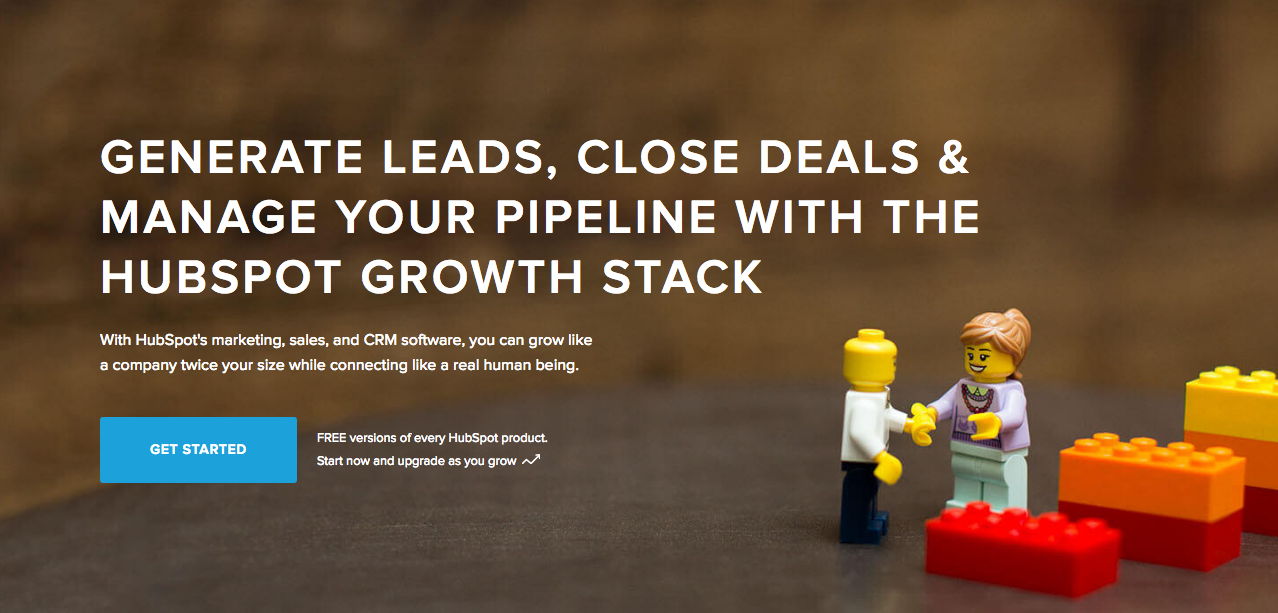
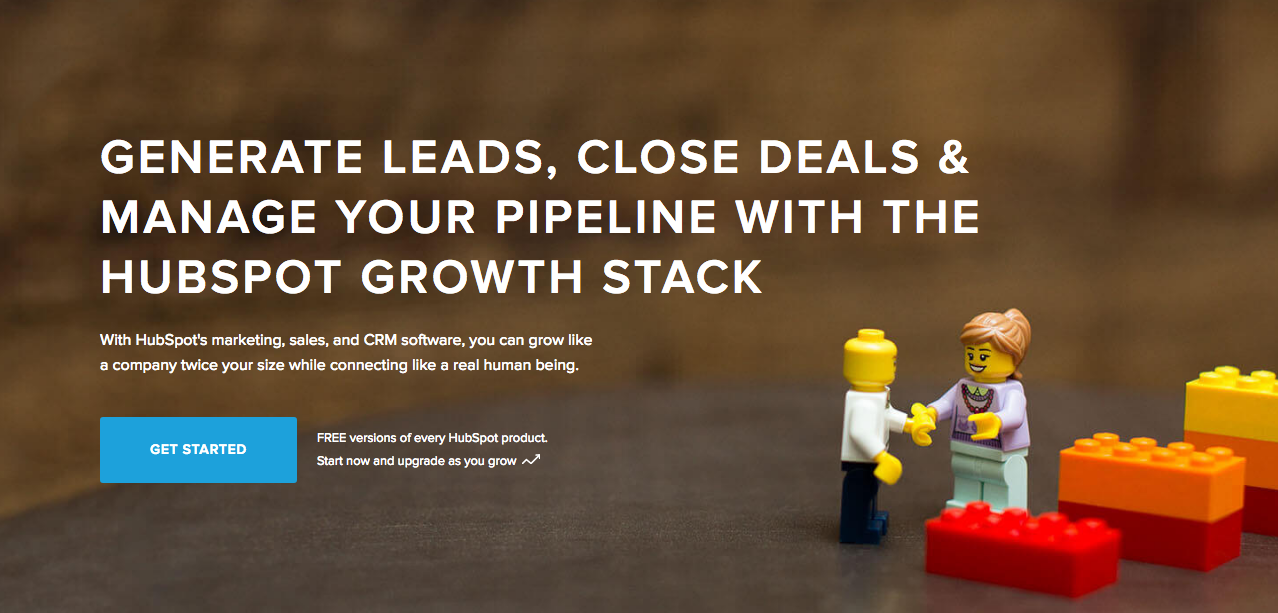
    Hubspot is an all-around help site that lends you a hand in almost anything and everything related to online marketing.

    तिनीहरूसँग व्यवसाय योजनाहरू सिर्जना गर्नेदेखि लिएर सामग्री र इनबाउन्ड मार्केटिङ, र अवश्य पनि- ल्यान्डिङ पृष्ठहरू सम्मका लेखहरूको विविध संग्रह छ। डिजिटल मार्केटिङको क्षेत्रमा अझै नयाँ भएका जो कोहीका लागि यो एउटा उत्कृष्ट स्रोत हो।

    निष्कर्ष

    ल्यान्डिङ पृष्ठहरू साँच्चै जटिल हुन सक्छन्, विशेष गरी यदि तपाईं कुनै पनि प्रकारको व्यवसायमा भर्खरै सुरु गर्दै हुनुहुन्छ भने।

    तर याद गर्नुहोस् कि तिनीहरूले कसरी काम गर्छन् र तिनीहरूलाई कसरी बनाउने भनेर सिक्न समय लगानी गर्नु सार्थक छ। किन? किनभने तिनीहरूले लिडहरू उत्पन्न गर्छन्, र लिडहरूले राजस्व उत्पन्न गर्छन्।

    Take note that digital marketing trends are changing rapidly. You have to keep with these trends in order for your business to not only survive, but to also thrive.

    Do you have any other tips or resources that you’d like to share with us? Comment below, or send us an email at [email protected] if you’d like to get featured as a resource in one of our articles.

    पृष्ठ निर्माणको शुभकामना!

  • सर्टकोड म्यापर प्लगइन सुविधा: Modern Tribe द्वारा The Events Calendar

    shortcode-mapper-plugin-feature-the-events-calendar-by-modern-tribePlugins of the same category, but with respective features, are developed and enhanced every day. This gave birth to the variety of WordPress-powered websites – and later on, websites catering to several functions. For instance, there is a number of plugins which enables a developer and/or user to create, schedule, invite an interested person to an event.

    The Events Calendar is the events calendar you’ll need

    There are a lot of available events calendar in the WordPress market. So how do you choose? There are recommendation blogs, plugin face-off blogs, and of course testimonials from different users. All of these have one thing in common: they include The Events Calendar by Modern Tribe in their list.

    screenshot-2016-10-05-20-00-09
    An example of a minimal event post of The Events Calendar

    आखिर The Events Calendar मा त्यस्तो के छ त?

    Modern Tribe द्वारा निर्मित The Events Calendar उक्त वर्गको अग्रणी प्लगइन हो। यसले कार्यक्रम पोस्टहरूको व्यावसायिक गुणस्तर प्रदान गर्दछ। यसको इन्टरफेस निकै सरल छ, जसमा शीर्षमा शीर्षक, मिति र समय, लागू भएमा मूल्य, एउटा फिचर्ड छवि र/वा नक्सा, र कार्यक्रमको बारेमा थप विवरणहरू हुन्छन्। यदि प्रो (Pro) संस्करण हो भने तपाईंले आफ्ना सबै कार्यक्रमहरू मिति, किवर्ड, र स्थान अनुसार हेर्न सक्नुहुन्छ।

    You can do much more with The Events Calendars Pro and its official add-ons:

    The Events Calendar PRO

    • Recurring events
    • Week view
    • Photo view
    • Location search
    • Map view
    • Venue and organizer view
    • Advanced widgets
    • Additional fields

    The Events Calendar ADD-ONs

    • RSVP tickets
    • Event ticket plus via WooCommerce, Shopp, WPeCommerce, Easy Digital Downloads)
    • Community Events
    • Community Tickets
    • Filter Bar
    • Facebook Events
    • iCal Importer
    • Eventbrite Tickets

    यसलाई Page Builder Sandwich सँग एकीकृत गर्दा यो अझ उत्कृष्ट बन्दछ

    screenshot-2016-10-04-17-46-04Recent posts were made to highlight the benefits of using PBS and its Shortcode Mapper. This is to make sure that you guys are taking advantage of the latest innovation that the Sandwich Team can develop plus notify the plugin developers that their creation gave birth to another awesome feature.

    The Events Calendar प्लगइनको सन्दर्भमा, यो संयोजन किन हुनु आवश्यक छ भन्नेबारे हामीले २ वटा अचम्मलाग्दा कारणहरू प्रस्तुत गरेका छौँ:

    १.      WordPress प्लगइनका दिग्गजहरूद्वारा समीक्षा गरिएको

    The Modern Tribe assured their customers that the product and service they offered was of quality. Creator of Easy Digital Downloads, Pippin Williamson gave his inputs about The Events Calendar. Alongside him was Mark Jaquith, one of the leading WordPress developers, who made sure that the plugin was secure.

    Page Builder Sandwich was also reviewed recently by Pippin, together with the other established and rising page builders in the market. In his in-depth critique, he concluded that indeed, PBS is one of the most powerful drag-and-drop page builders. He highlighted that only  Page Builder Sandwich was able to create a functioning Shortcode Mapper.

    २.      सर्टकोड विकल्पहरू: ब्याकइन्डदेखि फ्रन्टइन्ड सम्पादनसम्म

    पूर्वनिर्धारित रूपमा, प्लगइनका सर्टकोड विकल्पहरू ब्याकइन्ड एडमिन प्यानलमार्फत पहुँच गर्न सकिन्छ। त्यसपछि, ब्याकइन्ड प्लगइनहरूको उही प्रक्रिया अपनाउनुपर्ने हुन्छ: ब्याकइन्ड सम्पादकमा जानुहोस्, इच्छित परिवर्तनहरू प्रविष्ट गर्नुहोस् र त्यसपछि सेभ गर्नुहोस्। रिफ्रेस बटन क्लिक गरेपछि मात्र सम्पादित सामग्री देखिनेछ। समग्रमा, त्यो ४ चरणको प्रक्रिया हो.

    तर त्यो लामो प्रक्रियालाई Page Builder Sandwich ले वास्तविक समयको फ्रन्टइन्ड सम्पादनमा रूपान्तरण गरिदिएको छ – केवल २ चरणमा:

    1. Instead of going to the backend panel to access the shortcode options, click on the Shortcode Mapper and select on The Events Calendar. You’d be redirected to a pop-up window as seen below. Click on The Events Calendar.
      screenshot-2016-10-04-17-43-37
      View of The Events Calendar in the Page Builder Sandwich Shortcode Mapper
    2. screenshot-2016-10-05-19-57-11
      Close look at The Events Calendar Shortcode Properties
      The Inspector on the left displays the initial properties of the shortcode. Clicking on the “Open Editor” button, the shortcode controls displayed at the backend can now be accessed on the frontend via a pop-up window.
    screenshot-2016-10-06-13-25-04
    See? The Events Calendar looks like you’re just making an event post.

    screenshot-2016-10-06-14-37-52

    धेरै फाइदाहरू छन्, होइन त?

    With the integration of a page builder that doesn’t lock you in and leaves shortcode mess, and the most popular events calendar, your workflow would not only smoothen but also increase in productivity. Additionally, you can look into what Modern Tribe offers: the bundle of plugins that go with The Events Calendar.

    अहिलेसम्म, Modern Tribe को The Events Calendar प्लगइन हाम्रो Shortcode Mapper मा म्याप गरिएको एक मात्र प्लगइन थियो। यद्यपि यसको मतलब यो होइन कि म्यापिङ त्यहीँ रोकिन्छ। तपाईं हाम्रो Shortcode Mapper मा Modern Tribe को कुन प्लगइन हेर्न चाहनुहुन्छ, कमेन्ट गर्नुहोस्।

  • पेज बिल्डर स्यान्डविच संस्करण ३ को एक भ्रमण

    a-tour-of-page-builder-sandwich-version-3

    हामीले Page Builder Sandwich संस्करण ३ मा धेरै कुराहरू परिवर्तन गरेका छौँ। यदि तपाईंले केही समयदेखि Page Builder Sandwich प्रयोग गर्दै आउनुभएको छ भने, तपाईंले याद गर्नुहुनेछ कि परिवर्तनहरू निकै व्यापक छन्। संस्करण १, संस्करण २, र हालको संस्करण बीच ठूलो भिन्नता छ। अघिल्ला संस्करणहरूमा, सबै कुरा छेउमा रहेको इन्स्पेक्टरमा अवस्थित थियो। त्यसपछि हामीले यसका कम्पोनेन्टहरूलाई फरक, थप तार्किक विभाजनहरूमा छुट्याएका छौँ। हामीले यस अपग्रेडका कारणहरू अघिल्लो ब्लग पोस्टमा सूचीबद्ध गरेका छौँ।

    हालका प्रयोगकर्ताहरूलाई सुरुमा यी परिवर्तनहरू झन्झटिलो लाग्न सक्छन्। यसलाई केही मिनेट प्रयोग गरेर हेर्नुहोस्, र हामीलाई विश्वास छ कि तपाईंले एकदम सहज महसुस गर्नुहुनेछ। वर्ड प्रोसेसरहरूमा तपाईंको स्वाभाविक बानीले वेबसाइट निर्माणमा पनि काम गरोस् भनेर हामीले इन्टरफेसको प्रत्येक पक्षलाई ध्यानपूर्वक डिजाइन गरेका छौँ।

    नयाँ इन्टरफेसको टुर हेर्नुहोस्

  • हलिडे सेल: सीमित समयका लागि सबै लाइसेन्सहरूमा ३०% छुट पाउनुहोस्!

    हो, तपाईंले सही सुन्नुभयो! Page Builder Sandwich ले आज, १७ डिसेम्बर २०१६ देखि १ जनवरी २०१७ सम्मका लागि चाँडै छुट्टी सुरु गर्दैछ! यो एकदम सही हो- हामी लगातार १५ दिनसम्म सबै इजाजतपत्रहरू (licenses) मा ३०% छुट दिँदैछौं! कुनै कुपन कोड आवश्यक पर्दैन। साँच्चै नै बिदाको शुभकामना।

    "Christmas ornaments - HBW" by Bhavna Sayana is licensed under CC BY
    “Christmas ornaments – HBW” by Bhavna Sayana is licensed under CC BY

    यसका साथै, हामी १४ जनवरी मा हुन लागेको PBS को आगामी पहिलो वार्षिकोत्सव घोषणा गर्ने यो अवसर पनि लिन चाहन्छौं। हामीसँग तपाईंहरूका लागि धेरै उत्कृष्ट सुविधाहरू छन्, र हामी आशा गर्दछौं कि तपाईं पनि हामी जस्तै यसबारे उत्साहित हुनुहुन्छ! यहाँ ती मध्ये केही प्रस्तुत छन्:

    • Parallax Scrolling
    • Video Backgrounds
    • One-Pager Templates
    • Responsive Controls
    • Custom CSS Styling

    हामी छिट्टै वार्षिकोत्सव अपडेटका लागि अपेक्षा गरिएका नयाँ सुविधाहरूको सम्पूर्ण सूचीसहितको एउटा लेख प्रकाशित गर्नेछौं। नयाँ अपडेटबारे जानकारी प्राप्त गर्न तल हाम्रो न्यूजलेटरको सदस्यता लिनुहोस्!

    बिदाको शुभकामना र वेबसाइट निर्माणको शुभकामना!


  • पेज बिल्डर स्यान्डविच संस्करण ४.० प्रस्तुत गर्दै

    जब हामीले सन् २०१५ को सुरुतिर PBS विकास गर्न थालेका थियौं, हामीले आफ्ना सीमाहरू पार गर्न सक्ने यसको सम्भावनामा सधैं विश्वास गरेका थियौं। यसको विमोचन भएदेखिको विगत एक वर्षमा, PBS ले ठ्याक्कै त्यही गर्न सकोस् भन्नका खातिर हाम्रो टोलीले सधैं थप मिहिनेत गर्दै धेरै कडा परिश्रम गरिरहेको छ।

    In 2016, we’ve managed to release three versions of PBS, each one surpassing their predecessors with more advantageous updates after the next. Today, in 2017, we’re finally releasing Page Builder Sandwich Version 4.0 in commemoration of its very first birthday.

    हामी इमानदार हुनेछौं: यो सजिलो थिएन।

    तर सन् २०१५ मा यसको सामान्य सुरुवातको तुलनामा, हामी अब विश्वस्त भएर भन्न सक्छौं कि Page Builder Sandwich ले बिटाका दिनहरूदेखि पक्कै पनि लामो यात्रा तय गरेको छ।

    Then vs Now

    Taking a step back and looking at the different versions that PBS went through, it has really changed for the better.  Some learning mistakes just made us cringe and laugh!

    Enhanced User Interface

    For versions 3.0 and 4.0, we’ve made some major improvements with regards to the user interface. Pippin’s insight really made a wake-up call to us!

    The old interface of PBS Version 2.0  (left) vs Version 4.0’s cleaner, more efficient UI (right)

    Engaging in conversation and taking note of feedback has always been important to us, and is (and always will be) an integral part of Page Builder Sandwich’s continued growth. Out of all of PBS’ features though, we’ve received quite a number of critiques regarding the previous versions’ UI’s. All of them had one common denominator that many believed was detrimental to PBS’ functionality: the color scheme. According to most, it was too aggressive and did not compliment WordPress’ color palette. We’ve since addressed this issue in Version 4.0, constructing an improved UI with toned-down colors, all while still keeping PBS’ signature drag-and-drop UI intact.

    Mobile Responsiveness

    अर्को साझा विशेषता जसमा अधिकांश पेज बिल्डरहरू सहमत हुन सक्छन्, त्यो मोबाइल रेस्पोन्सिभनेसको आवश्यकता हो, किनकि ट्याब्लेट र सेलफोन जस्ता उपकरणहरूले बजारमा तीव्र गतिमा प्रभुत्व जमाइरहेका छन्।

    Because of this, we’ve tackled mobile responsiveness in Version 4.0’s release. Viewing pages built with PBS now becomes a smoother, more efficient experience, with your page’s UI adapting to your device’s screen resolutions.

    यसका अतिरिक्त, PBS ले अब डेस्कटपमा मोबाइल पूर्वावलोकनलाई पनि समर्थन गर्दछ। यसरी, तपाईंले मोबाइल वा ट्याब्लेट कुनै पनि प्रयोग नगरीकन आफूलाई आवश्यक परेको जुनसुकै मोडमा तपाईंको पृष्ठ कस्तो देखिन्छ भनेर सजिलैसँग पूर्वावलोकन हेर्न सक्नुहुनेछ।

    यति मात्र होइन, PBS ले अब प्रयोगकर्ताहरूलाई अन्य स्क्रिन आकारहरूलाई असर नगरी डेस्कटप, मोबाइल र ट्याब्लेटमा परिवर्तनहरू गर्न अनुमति दिन्छ।

    What’s New: Features

    Full Page Templates

    PBS को सुरुवातदेखि हामीले ध्यान दिएको अर्को कुरा के थियो भने प्रयोगकर्ताहरूले विशेष निचमा आधारित पृष्ठहरू निर्माण गर्ने प्रवृत्ति राख्छन्। पृष्ठहरू बनाउने सन्दर्भमा यो स्वभाविक कुरा हो, तर प्रयोगकर्ताका लागि यी निच-आधारित पृष्ठहरू निर्माण गर्दा केही समस्या उत्पन्न हुन्छ। उदाहरणका लागि, Page Builder Sandwich बाट सुरुदेखि नै बनाइने eCommerce साइटहरूलाई फोटो ग्यालेरी भएको तपाईंको सामान्य, दैनिक ब्लगको तुलनामा बनाउन सम्भवतः बढी समय लाग्नेछ। त्यसैले यस प्रकारका वेबसाइटहरूको आवश्यकता निरन्तर बढ्दै गएकाले, हामीले अन्ततः PBS को Full Page Templates प्रस्तुत गर्ने समाधान निकालेका छौं..

    Full Page Templates हरू Pre-Designed Sections भन्दा कसरी फरक छन्?

    PBS actually has a feature similar to the Full Page Templates, the Pre-Designed Sections. Since our team has been aware that there are users who lack the time to design and layout their pages and sites, the Pre-Designed Sections were built for this specific purpose. The Pre-Designed Sections are small, individual layouts professionally designed to be mixed and matched together to build a page. However, while they are pre-designed, they aren’t full page, and are not niche-based.

    The Full Page Templates are different in that they’re designed to be used for an entire landing page, and they’re laden with features that commonly go with a particular niche. For example, upon accessing PBS’ Hotel Template, you’ll find that with it comes a map, contact details, and sections specifically designed for enumerating the hotel’s amenities. Similarly, the PBS Fashion Template includes a carousel feature for showcasing fashion ensembles for modern shops. These templates can also be tweaked and adjusted to suit the user’s needs and taste, of course.

    तेस्रो-पक्ष प्लगइनहरूमा सजिलो पहुँच

    WooCommerce, Advanced Custom Fields, Events Calendar, Instagram Feed, Contact Form 7, NextGen Gallery, among others, are now more accessible with Version 4.0. This means that if you have these plugins activated in your PBS-run site, you can now add them with more ease.

    अत्यधिक अनुरोध गरिएका तत्व र सुविधाहरू: परिष्कृत कार्यक्षमता र थप डिजाइन सुविधाहरू

    In the span of a year, we would regularly receive suggestions and requests for features that are currently in-demand in the page builder market. Among these include Parallax Scrolling, Video Backgrounds, Ken Burns Backgrounds, features that increase the aesthetic value of your page; and elements such as Pricing Tables, Testimonials, Countdowns, and Milestones to enhance your page’s functionality. With the release of Version 4.0, we’ve finally accomplished these and more. We’re sure your PBS experience will be even more worthwhile this time around.

    PBS का लागि अब के?

    जनवरी २०१६ मा हाम्रो प्रारम्भिक सुरुवातदेखि हामीले लामो यात्रा तय गरेका छौं। हामीले ठूला सुधारहरू गरेका छौं, र यो कार्य सजिलो नभए तापनि, यो पक्कै पनि निकै फलदायी छ। संस्करण ४.० PBS मा अझ बढी सुधारहरूको सुरुवात मात्र हो, र यो २०१७ मा, PBS अझ राम्रो र उत्कृष्ट बनिरहोस् भन्ने सुनिश्चित गर्न हामी कडा परिश्रम जारी राख्नेछौं। अहिलेका लागि भने, हामी आशा गर्दछौं कि तपाईंले यी नयाँ सुविधाहरूको पूर्ण उपयोग गर्न सक्नुहुनेछ, र यिनीहरूले PBS सँगको तपाईंको अनुभवलाई अझ बढी सार्थक बनाउनेछन्।

    साइट-निर्माणको शुभकामना!

  • सर्टकोड म्यापर प्लगइन फिचर: Automattic द्वारा WP Job Manager

    how-to-create-a-website-from-scratch-for-under-100हामीले Page Builder Sandwich को नयाँ सुविधा – Shortcode Mapper सार्वजनिक गरेको एक महिना बितिसकेको छ। हामीले तिनीहरूमा भएका सर्टकोडहरूको संख्यालाई ध्यान नदिई १०० भन्दा बढी प्लगइनहरू (ठ्याक्कै भन्नुपर्दा १४४ प्लगइनहरू) एकीकृत गरेका छौं। यो एक थकाइलाग्दो काम थियो तर हामीले यो गरेर देखायौं!

    यसको बारेमा तपाईंलाई थप जानकारी दिनका लागि, हामीले Page Builder Sandwich सँग पूर्ण रूपमा एकीकृत गरिएका प्लगइनहरू प्रस्तुत गर्न थालेका छौं। पहिलो गन्तव्य: Automattic द्वारा WP Job Manager.

    WP Job Manager एक नजरमा

    screenshot-2016-09-16-03-21-46

    मूल रूपमा WP Job Manager ले तपाईंलाई पैसा कमाउन मद्दत गर्ने प्लगइनको रूपमा काम गर्दछ – चाहे तपाईंसँग यस्तो ग्राहक होस् जसलाई आफ्नो वेबसाइटको लागि जब बोर्ड प्रकार्य चाहिन्छ वा तपाईंले आफ्नो बढ्दो कम्पनीमा थप व्यक्तिहरूको आवश्यकता पाउनुभएको होस्।

    यो प्लगइन किन्न लायक हुनुको मुख्य कारण भनेको तपाईंका सम्भावित कर्मचारीहरू ल्यापटप प्रयोग गर्नमा मात्र सीमित हुनुपर्दैन। WP Job Manager मा मोबाइल सपोर्ट सुविधा छ जसले आम्दानीको प्रवाहलाई सहज बनाउँछ। यो खोज र फिल्टर इन्टरफेसको साथ प्रयोग गर्न पनि सजिलो छ। यसको साथमा जागिर र कम्पनीको जानकारी पनि छ, जसको अर्थ कम्पनीको आधिकारिकता खोजिरहनु पर्दैन। एकै जागिर खोजमा सबै कुरा उपलब्ध हुन्छ।

    यदि तपाईंलाई पदपूर्ति गर्नु परेमा, WP Job Manager ले आवेदनहरू स्वीकार गर्ने कामलाई सजिलो बनाउँछ।

    Page Builder Sandwich ले WP Job Manager को प्रयोगलाई अझ सजिलो बनाउँछ

    पेज बिल्डर र प्लगइनलाई जोड्नका लागि तपाईंले आँखा खुम्च्याउनु पर्दैन र कुनै पनि कुराबाट जबरजस्ती जानकारी निकाल्नु पर्दैन। यी दुई एकअर्कासँग किन उपयुक्त छन् भन्ने ३ वटा कारणहरू यहाँ छन्:

    screenshot-2016-09-16-03-24-32
    Page Builder Sandwich र WP Job Manager ले कसरी सँगै काम गर्छन् भन्ने अवलोकन

    जागिरका सर्टकोडहरू छिटो घुसाउनुहोस्

    PBS Shortcode Mapper ले प्लगइनमा प्रयोग गरिएका ६ वटा सर्टकोडहरू पत्ता लगायो, र हामीले ती सबैलाई एकीकृत गरेका छौं। प्रत्येक सर्टकोडमा फरक आर्गुमेन्टहरू हुन्छन् जसले तपाईंलाई जागिर खोज फारम वा जागिर प्लेसमेन्टको विवरण प्रदर्शन गर्न अनुमति दिन्छ। प्रत्येक सर्टकोडको विवरण तिनीहरूको साइटको सर्टकोड सन्दर्भमा उपलब्ध छ। अब तपाईंले यी सर्टकोडहरूलाई कसरी अनुकूलित गर्ने भन्ने बारे कागजातहरू हेरिरहनु पर्दैन, सबै सर्टकोडहरू र तिनीहरूका विशेषताहरू PBS मा विवरणसहित प्रस्तुत गरिएका छन्।

    screenshot-2016-09-15-18-58-29
    WP Job Manager बाट उपलब्ध सर्टकोडहरू

    screenshot-2016-09-15-18-54-362
    जागिरका सर्टकोड विशेषताहरू

    यसले जुनसुकै थिमसँग काम गर्छ

    Page Builder Sandwich लाई आफ्नो पेज बिल्डर सम्पादकको रूपमा प्रयोग गर्दा, पूर्वनिर्धारित रूपमा, तपाईंले रोज्नुभएको थिम बिग्रँदैन। साथै पूर्ण वेबसाइट अप्टिमाइजेसन सुनिश्चित गर्न, हामीले PBS Shortcode Mapper बनाएका छौं। यही सिद्धान्त WP Job Manager मा पनि लागू हुन्छ! ThemeForest का थिम विकासकर्ताहरू मध्ये एक, Astoundify ले आफ्नो Listify – WordPress Directory Theme मा उक्त प्लगइनलाई समर्थन गर्दछ। WP Job Manager पूर्ण रूपमा एकीकृत भएका थप थिमहरूका लागि, तिनीहरूको आधिकारिक सूची.

    फ्रन्टइन्डमा जागिरहरू प्रबन्ध गर्नुहोस्

    फ्रन्टइन्ड र ब्याकइन्ड बीच स्विच गर्ने झन्झट घटाउने र गरिएका परिवर्तनहरू हेर्नको लागि पेज रिफ्रेस गर्नुपर्ने कुराको हामी विरुद्धमा छौं। PBS को साथ, तपाईंले ब्याकइन्ड जाँच नगरीकन आफूले रोजेका जागिरहरू सम्पादन गर्न सक्नुहुन्छ, तपाईं आफ्नो पेज सम्पादन गर्दागर्दै प्लगइनका सेटिङहरू पनि सम्पादन गर्न सक्षम हुनुहुनेछ। PBS बिना, प्रयोगकर्ताहरूले थप प्रयास गर्नुपर्ने हुन्छ, र यसले धेरै समय लिन्छ जुन अन्य WordPress परियोजनाहरू विकास गर्नका लागि छुट्याउन सकिन्थ्यो। WP Job Manager को यो सुविधा हामीलाई सबैभन्दा मनपर्ने सुविधा हो!

    अन्तिम विचारहरू

    WordPress.com बनाउने उही कम्पनीद्वारा निर्मित भएकोले, यो प्लगइन पहिले नै चर्चामा रहने फाइदामा छ। तर यसले WordPress विकासकर्ताहरूदेखि लिएर वफादार WordPress उत्साहीहरूसम्मबाट धेरै अपेक्षाहरू पनि बोकेको छ। अहिलेसम्म, यसले सबैका आवश्यकताहरू पूरा गरेको छ – जहाँसम्म हल्का जब-बोर्ड कार्यक्षमताको कुरा आउँछ। WordPress विकासकर्ताहरूले यो प्लगइनलाई यति धेरै मन पराए कि उनीहरूले प्लगइनको उपयोगिता बढाउन एक्स्टेन्सनहरू समेत बनाए।

    आगामी हप्ताहरूमा थप प्लगइनहरू प्रस्तुत गरिनेछ! यदि हामीले पछि कसको बारेमा र के लेख्नुपर्छ भन्ने बारे तपाईंसँग कुनै सुझावहरू छन् भने, तल प्रतिक्रिया दिनुहोस्।

    छिट्टै भेटौला!

  • PBS ब्ल्याक फ्राइडे सेल: सबै लाइसेन्सहरूमा ३०% छुट!

    page-builder-sandwich-black-friday-deals

    वर्षको फेरि त्यही समय आएको छ जहाँ हामी ती सबै महान् कुराहरूको गणना गर्छौं जसका लागि हामी कृतज्ञ छौं– र पक्कै पनि त्यस सूचीमा थपिँदैछ, सधैं प्रख्यात ब्ल्याक फ्राइडे सेल! यस अवधिमा साइबर बजारका सबै छुटहरू, कुपनहरू, र आश्चर्यजनक अफरहरू प्राप्त गर्न सकिन्छ, र यसमा आज, नोभेम्बर २४ देखि नोभेम्बर २९, २०१६ सम्म सुरु हुने Page Builder Sandwich को विशाल ब्ल्याक फ्राइडे र साइबर मन्डे सेल

    हो, एकदम सही। हामी ५ दिनका लागि सबै Page Builder Sandwich लाइसेन्सहरूमा ३०% छुट दिइरहेका छौं! त्यसैले हतार गर्नुहोस् र यो डिल रहुन्जेल यसको लाभ लिनुहोस्! आखिर, ब्ल्याक फ्राइडे साँच्चै वर्षमा एक पटक मात्र आउँछ। यो प्रोमोको लाभ लिन कुपन कोड BLACKFRIDAY2016 प्रयोग गर्नुहोस्!

    त्यतिन्जेलसम्म, शुभ किनमेल, शुभ साइट-निर्माण, र धेरै धेरै ह्याप्पी थ्याङ्क्सगिभिङ!