Author: Neil Lock

  • ਤੁਹਾਨੂੰ WordFence ਦੇ ਫਾਇਰਵਾਲ ‘ਤੇ URLs ਨੂੰ ਵ੍ਹਾਈਟਲਿਸਟ ਕਿਉਂ ਕਰਨਾ ਚਾਹੀਦਾ ਹੈ (ਅਤੇ ਇਹ ਕਿਵੇਂ ਕਰਨਾ ਹੈ)

    If you’re using Page Builder Sandwich along with Wordfence Security, there’s a chance you might have encountered something called a 403 error.

    Now, according to WordPress resource site WPBeginner, 403 errors occur when server permissions don’t allow access to a specific page.

    ਪਰ 403 ਐਰਰ ਦਾ ਕੀ ਮਤਲਬ ਹੈ, ਅਤੇ ਇਹ ਪਹਿਲੀ ਥਾਂ ‘ਤੇ ਪੇਜ ਬਿਲਡਰ ਸੈਂਡਵਿਚ (Page Builder Sandwich) ਵਿੱਚ ਕਿਉਂ ਆ ਰਹੀ ਹੈ?

    The 403 Error Explained

    403 ਐਰਰ ਦਾ ਸਭ ਤੋਂ ਆਮ ਕਾਰਨ ਇਹ ਹੁੰਦਾ ਹੈ ਜਦੋਂ ਸੁਰੱਖਿਆ ਪਲੱਗਇਨ ਕਿਸੇ ਖਾਸ ਤਰੀਕੇ ਜਾਂ ਮਿਆਰ ਵਿੱਚ ਕੌਂਫਿਗਰ ਨਹੀਂ ਹੁੰਦੇ ਹਨ।

    Like WordFence, most security plugins from WordPress restrict some actions if they’re suspected or proven to be malicious. These scenarios usually occur on your WP Admin or WP Login page, or show up as pop-ups alerting you that you don’t have authorization to view your page.

    ਜੇਕਰ ਤੁਸੀਂ ਕਦੇ ਸੈਂਡਵਿਚ ‘ਤੇ ਇਸ ਦਾ ਸਾਹਮਣਾ ਕਰਦੇ ਹੋ ਤਾਂ ਇਹ ਪੌਪ-ਅੱਪ ਇਸ ਤਰ੍ਹਾਂ ਦਿਖਾਈ ਦੇਵੇਗਾ:

    So what does this mean? Is Sandwich safe to use? Is WordFence bad? And does the 403 error warrant bad points for both Wordfence and Page Builder Sandwich?

    ਖੈਰ, ਨਹੀਂ।

    All of this just means that Wordfence is extra careful when scanning your external plugins.

    And that’s actually a really good thing, especially since they’re a security plugin.

    WordFence is Legit…

    WordFence ਵਰਡਪਰੈਸ ਲਈ ਸਭ ਤੋਂ ਪ੍ਰਸਿੱਧ ਸੁਰੱਖਿਆ ਪਲੱਗਇਨਾਂ ਵਿੱਚੋਂ ਇੱਕ ਹੈ। ਇਸਦੇ ਇੱਕ ਮਿਲੀਅਨ ਤੋਂ ਵੱਧ ਐਕਟਿਵ ਇੰਸਟਾਲ ਹਨ, ਇਸ ਲਈ ਸੰਭਾਵਨਾ ਹੈ ਕਿ ਇਹ ਸ਼ਾਇਦ ਤੁਹਾਡੀ WP ਵੈੱਬਸਾਈਟ ‘ਤੇ ਵੀ ਇੰਸਟਾਲ ਹੈ। ਇਹ ਇੱਕ ਵਧੀਆ ਮਕਸਦ ਲਈ ਮੌਜੂਦ ਹਨ: ਨਾ ਸਿਰਫ਼ ਤੁਹਾਡੀ ਵੈੱਬਸਾਈਟ ਨੂੰ ਸੁਰੱਖਿਅਤ ਰੱਖਣ ਲਈ, ਬਲਕਿ ਸੁਰੱਖਿਆ ਖਤਰਿਆਂ ਨੂੰ ਘਟਾਉਣ ਅਤੇ ਕੁੱਲ ਮਿਲਾ ਕੇ ਤੁਹਾਡੀ ਵੈੱਬਸਾਈਟ ਦੀ ਸੁਰੱਖਿਆ ਨੂੰ ਬਿਹਤਰ ਬਣਾਉਣ ਲਈ।

    ਸੰਖੇਪ ਵਿੱਚ: WordFence ਬਿਲਕੁਲ ਜਾਇਜ਼ ਅਤੇ ਭਰੋਸੇਮੰਦ ਹੈ।

    …And So is Sandwich. But Why Does It Need Whitelisting?

    ਇਹ ਸਿਰਫ਼ ਸੈਂਡਵਿਚ ਹੀ ਨਹੀਂ ਹੈ ਜਿਸਨੂੰ WordFence ਬਲਾਕ ਕਰਦਾ ਹੈ।

    ਹੋਰ ਪਲੱਗਇਨਾਂ ਅਤੇ URL ਨੂੰ ਵੀ WordFence ‘ਤੇ ਵ੍ਹਾਈਟਲਿਸਟ (ਬਲੈਕਲਿਸਟ ਦੇ ਉਲਟ) ਕਰਨ ਦੀ ਲੋੜ ਹੁੰਦੀ ਹੈ। ਕੁਝ ਹੋਰ ਪ੍ਰਸਿੱਧ ਪਲੱਗਇਨਾਂ ਨੂੰ ਸ਼ਾਇਦ Wordfence ਦੁਆਰਾ ਪਹਿਲਾਂ ਹੀ ਇਜਾਜ਼ਤ ਦਿੱਤੀ ਜਾ ਚੁੱਕੀ ਹੋਵੇ।

    ਤਾਂ ਪਰਦੇ ਦੇ ਪਿੱਛੇ ਕੀ ਹੋ ਰਿਹਾ ਹੈ, ਅਤੇ 403 ਐਰਰ ਕਿੱਥੋਂ ਆ ਰਹੀ ਹੈ?

    Ajax Functions and Page Builder Sandwich

    ਪੇਜ ਬਿਲਡਰ ਸੈਂਡਵਿਚ ਤੁਹਾਡੇ ਸੰਪਾਦਨ (editing) ਅਨੁਭਵ ਦੌਰਾਨ ajax ਫੰਕਸ਼ਨ ਚਲਾਉਂਦਾ ਹੈ। ਕੁਝ ਖਾਸ ਪਲੱਗਇਨ ਵੀ ਅਜਿਹਾ ਕਰਦੇ ਹਨ।

    W3Schools ajax ਬਾਰੇ ਥੋੜ੍ਹਾ ਹੋਰ ਵਿਸਥਾਰ ਨਾਲ ਦੱਸਦਾ ਹੈ:

    AJAX is a technique for creating fast and dynamic web pages. It allows web pages to be updated asynchronously by exchanging small amounts of data with the server behind the scenes. This means that it is possible to update parts of a web page, without reloading the whole page.

    Chart taken from W3Schools

    ਪੇਜ ਬਿਲਡਰ ਸੈਂਡਵਿਚ ਵਿੱਚ, ajax ਕਾਲਾਂ ਸ਼ਾਰਟਕੋਡ ਮੈਪਿੰਗ ਪ੍ਰਾਪਤ ਕਰਨ, ਸ਼ਾਰਟਕੋਡ ਰੈਂਡਰ ਕਰਨ ਤੋਂ ਲੈ ਕੇ ਤੁਹਾਡੀਆਂ ਤਬਦੀਲੀਆਂ ਨੂੰ ਸੁਰੱਖਿਅਤ ਕਰਨ ਤੱਕ ਫੈਲੀਆਂ ਹੋਈਆਂ ਹਨ। ਇਸ ਨਾਲ ਤੁਹਾਨੂੰ ਸਮੱਸਿਆਵਾਂ ਦਾ ਸਾਹਮਣਾ ਕਰਨਾ ਪੈ ਸਕਦਾ ਹੈ, ਜਿਵੇਂ ਕਿ 403 ਐਰਰ, ਤੁਹਾਡੇ ਆਉਟਪੁੱਟ ਨੂੰ ਸੇਵ ਕਰਨ ਵਿੱਚ ਸਮੱਸਿਆਵਾਂ, ਜਾਂ ਅਣ-ਰੈਂਡਰ ਕੀਤੇ ਸ਼ਾਰਟਕੋਡ। ਇਹ ਉਹ ਸਮਾਂ ਹੈ ਜਦੋਂ ਤੁਹਾਨੂੰ ਪੇਜ ਬਿਲਡਰ ਸੈਂਡਵਿਚ ਲਈ ਖਾਸ ajax ਕਾਲਾਂ ਨੂੰ ਵ੍ਹਾਈਟਲਿਸਟ ਕਰਨ ਦੀ ਲੋੜ ਹੋ ਸਕਦੀ ਹੈ।

    Whitelisting Page Builder Sandwich on WordFence

    Wordfence ਦੇ ਫਾਇਰਵਾਲ ਵਿੱਚ PBS ਨੂੰ ਵ੍ਹਾਈਟਲਿਸਟ ਕਰਨ ਲਈ, ਇਹਨਾਂ ਮਾਪਦੰਡਾਂ (parameters) ਨਾਲ Whitelisted URLs ਖੇਤਰ ਵਿੱਚ ਇੱਕ ਐਂਟਰੀ ਸ਼ਾਮਲ ਕਰੋ:

    URL: /wp-admin/admin-ajax.php

    Param Name: main-content

    Param: POST Body

    ਮਲਟੀਸਾਈਟ ਵਰਡਪਰੈਸ ਇੰਸਟਾਲੇਸ਼ਨਾਂ ਲਈ, ਉੱਪਰ ਦਿੱਤੇ URL ਵਿੱਚ ਆਪਣੀ ਸਾਈਟ ਦਾ ਫੋਲਡਰ ਨਾਮ ਸ਼ਾਮਲ ਕਰਨਾ ਇੱਕ ਚੰਗਾ ਵਿਚਾਰ ਹੈ। ਉਦਾਹਰਨ ਲਈ: /my-multisite/wp-admin/admin-ajax.php

    ਇਹਨਾਂ ਮੁੱਲਾਂ ਨੂੰ ਜੋੜਨ ਤੋਂ ਬਾਅਦ, 403 ਐਰਰ ਨੂੰ ਸਹੀ ਢੰਗ ਨਾਲ ਹੱਲ ਕੀਤਾ ਜਾਣਾ ਚਾਹੀਦਾ ਹੈ, ਅਤੇ ਤੁਹਾਨੂੰ ਆਪਣਾ ਆਉਟਪੁੱਟ ਸੇਵ ਕਰਨ ਅਤੇ ਰੈਂਡਰ ਕੀਤੇ ਸ਼ਾਰਟਕੋਡ ਦੁਬਾਰਾ ਜਨਰੇਟ ਕਰਨ ਦੇ ਯੋਗ ਹੋਣਾ ਚਾਹੀਦਾ ਹੈ।

    ਇਹ ਤੁਹਾਡੀਆਂ WordFence ਫਾਇਰਵਾਲ ਸੈਟਿੰਗਾਂ ਦੇ ਅਧੀਨ ਇਸ ਤਰ੍ਹਾਂ ਦਿਖਾਈ ਦੇਣਾ ਚਾਹੀਦਾ ਹੈ:

    Ta-da!

    Conclusion

    ਹਾਂ, ਪੇਜ ਬਿਲਡਰ ਸੈਂਡਵਿਚ ਵਰਤਣ ਲਈ ਸੁਰੱਖਿਅਤ ਹੈ।

    ਸਿਰਫ਼ ਇੰਨਾ ਹੀ ਨਹੀਂ, ਇਹ ਕੇਵਲ ਸੰਪਾਦਨ ਮੋਡ ਵਿੱਚ ਹੋਣ ‘ਤੇ ਹੀ ajax ਕਾਰਵਾਈਆਂ ਕਰਦਾ ਹੈ, ਅਤੇ ਇਹ ਬਾਹਰੀ ਪਲੱਗਇਨਾਂ ਅਤੇ ਥੀਮਾਂ ਨਾਲ ਅਨੁਕੂਲ ਹੈ (ਜਦੋਂ ਤੱਕ ਉਹ ਵਰਡਪਰੈਸ ਦੇ ਕੋਡਿੰਗ ਮਿਆਰਾਂ ਦੇ ਬਰਾਬਰ ਹਨ)।

    WordFence Security ਵੀ ਕੋਈ ਵੱਖਰੀ ਨਹੀਂ ਹੈ।

    ਪਰ ਉਹਨਾਂ ਬਾਰੇ ਸਭ ਤੋਂ ਵਧੀਆ ਗੱਲ ਇਹ ਹੈ ਕਿ ਉਹ ਵਰਡਪਰੈਸ ਉਪਭੋਗਤਾਵਾਂ ਨੂੰ ਆਪਣੀਆਂ ਸਾਈਟਾਂ ਨੂੰ ਸੁਰੱਖਿਅਤ ਰੱਖਣ ਦਾ ਮੌਕਾ ਦਿੰਦੇ ਹਨ, ਨਾਲ ਹੀ ਇਹ ਫੈਸਲਾ ਕਰਨ ਦਾ ਵਾਧੂ ਵਿਕਲਪ ਵੀ ਦਿੰਦੇ ਹਨ ਕਿ ਕਿਹੜੇ ਪਲੱਗਇਨ ਸੁਰੱਖਿਅਤ ਹਨ ਅਤੇ ਕਿਹੜੇ ਨਹੀਂ।

  • ਈਮੇਲ ਨਿਊਜ਼ਲੈਟਰ ਸਾਈਨਅੱਪ ਫ਼ਾਰਮ ਆਸਾਨੀ ਨਾਲ ਜੋੜੋ

    Easily-Add-Email-Newsletter-Signup-FormsAdding an email newsletter sign up form to your site is a great way to grow your website’s following and to keep your website visitors interested in your site or product. And now you can easily add and customize newsletter sign up forms directly in your designs.

    preview-newsletterNew in Page Builder Sandwich is the Newsletter Element (check the short gif above). Now you can add a newsletter sign up form for your MailChimp, AWeber or MailPoet newsletter lists directly into your designs.
    ਆਮ ਤੌਰ ‘ਤੇ, ਤੁਹਾਨੂੰ ਕੋਈ ਹੋਰ ਪਲੱਗਇਨ ਇੰਸਟਾਲ ਕਰਨੀ ਪੈਂਦੀ ਸੀ, ਫਿਰ ਸ਼ਾਇਦ ਕਿਤੇ ਸ਼ਾਰਟਕੋਡ ਸ਼ਾਮਲ ਕਰਨਾ ਪੈਂਦਾ ਸੀ, ਜਾਂ ਤੁਹਾਨੂੰ ਇੱਕ ਪੌਪਅੱਪ ਵਿੱਚੋਂ ਲੰਘਣਾ ਪੈਂਦਾ ਸੀ ਅਤੇ ਕੁਝ ਫੀਲਡ ਭਰਨੇ ਪੈਂਦੇ ਸਨ, ਜਾਂ ਸ਼ਾਇਦ ਤੁਹਾਡੇ ਨਿਊਜ਼ਲੈਟਰ ਸਾਈਨ ਅੱਪ ਫਾਰਮ ਦੇ ਕੰਮ ਕਰਨ ਲਈ ਤੁਹਾਨੂੰ ਇੱਕ ਵਿਜੇਟ ਸੈੱਟ ਅੱਪ ਕਰਨਾ ਪੈਂਦਾ ਸੀ। ਹੁਣ, ਨਿਊਜ਼ਲੈਟਰ ਸਾਈਨਅੱਪ ਫਾਰਮ ਸ਼ਾਮਲ ਕਰਨ ਦੀਆਂ ਸਾਰੀਆਂ ਜਟਿਲਤਾਵਾਂ ਖਤਮ ਹੋ ਗਈਆਂ ਹਨ। ਬਸ ਆਪਣੇ ਪੰਨੇ ‘ਤੇ ਨਿਊਜ਼ਲੈਟਰ ਐਲੀਮੈਂਟ ਸ਼ਾਮਲ ਕਰੋ, ਆਪਣੀਆਂ ਸੂਚੀ API ਕੁੰਜੀਆਂ ਸ਼ਾਮਲ ਕਰੋ ਅਤੇ ਇਹ ਤੁਰੰਤ ਕੰਮ ਕਰਨਾ ਸ਼ੁਰੂ ਕਰ ਦੇਵੇਗਾ।

    ਤੁਸੀਂ ਈਮੇਲ ਫੀਲਡ ‘ਤੇ ਕਲਿੱਕ ਕਰਕੇ ਆਪਣੇ ਸਾਈਨ ਅੱਪ ਫਾਰਮ ਨੂੰ ਹੋਰ ਵੀ ਕਸਟਮਾਈਜ਼ ਕਰ ਸਕਦੇ ਹੋ – ਜਿੱਥੇ ਤੁਸੀਂ ਇਸਦੇ ਰੰਗ, ਆਕਾਰ, ਬਾਰਡਰ ਅਤੇ ਹੋਰ ਬਹੁਤ ਕੁਝ ਬਦਲ ਸਕਦੇ ਹੋ, ਜਾਂ ਬਟਨ ‘ਤੇ ਕਲਿੱਕ ਕਰਕੇ – ਫਿਰ ਆਈਕਨ ਸ਼ਾਮਲ ਕਰ ਸਕਦੇ ਹੋ, ਆਪਣੇ ਬਟਨ ਦਾ ਆਕਾਰ ਬਦਲ ਸਕਦੇ ਹੋ, ਜਾਂ ਇਸਨੂੰ ਸਿਰਫ਼ ਉਦੋਂ ਹੀ ਦਿਖਾਈ ਦੇਣ ਵਾਲਾ ਬਣਾ ਸਕਦੇ ਹੋ ਜਦੋਂ ਤੁਹਾਡਾ ਵਿਜ਼ਿਟਰ ਆਪਣਾ ਈਮੇਲ ਪਤਾ ਟਾਈਪ ਕਰਨਾ ਸ਼ੁਰੂ ਕਰਦਾ ਹੈ। ਤੁਸੀਂ ਆਪਣੇ ਡਿਜ਼ਾਈਨ ਦੇ ਅਨੁਕੂਲ ਦਿੱਖ ਨੂੰ ਪੂਰੀ ਤਰ੍ਹਾਂ ਕਸਟਮਾਈਜ਼ ਕਰ ਸਕਦੇ ਹੋ। ਕੀ ਤੁਸੀਂ ਚਾਹੁੰਦੇ ਹੋ ਕਿ ਜਦੋਂ ਉਪਭੋਗਤਾ ਟਾਈਪ ਕਰ ਰਿਹਾ ਹੋਵੇ ਤਾਂ ਫੀਲਡ ਦਾ ਰੰਗ ਬਦਲ ਜਾਵੇ? ਤੁਸੀਂ ਕਲਰ ਪਿਕਰ ਨਾਲ ਆਸਾਨੀ ਨਾਲ ਅਜਿਹਾ ਕਰ ਸਕਦੇ ਹੋ। ਇੱਕ ਮਿਨੀਮਲਿਸਟ ਡਿਜ਼ਾਈਨ ਦੀ ਲੋੜ ਹੈ ਅਤੇ ਫੀਲਡ ਸਿਰਫ਼ ਇੱਕ ਬਾਰਡਰ ਹੈ, ਕੋਈ ਸਮੱਸਿਆ ਨਹੀਂ!

    ਇੱਕ ਵਧੀਆ ਗੱਲ ਇਹ ਹੈ ਕਿ ਨਿਊਜ਼ਲੈਟਰ ਐਲੀਮੈਂਟ ਤੁਹਾਡੀ ਸਾਈਟ ਦੇ ਅੰਦਰ ਤੁਹਾਡੇ ਉਪਭੋਗਤਾ ਦੇ ਪ੍ਰਵਾਹ ਵਿੱਚ ਵਿਘਨ ਨਹੀਂ ਪਾਉਂਦਾ ਹੈ। ਇੱਕ ਵਾਰ ਜਦੋਂ ਉਹ ਗਾਹਕ ਬਣ ਜਾਂਦੇ ਹਨ (ਸਬਸਕ੍ਰਾਈਬ ਕਰਦੇ ਹਨ), ਪੰਨਾ ਰਿਫ੍ਰੈਸ਼ ਨਹੀਂ ਹੋਵੇਗਾ ਅਤੇ ਸਾਈਨਅੱਪ ਫਾਰਮ ਦੀ ਥਾਂ ਸਿਰਫ਼ ਇੱਕ “ਧੰਨਵਾਦ” ਸੁਨੇਹਾ ਆ ਜਾਵੇਗਾ। ਇਹ ਸੁਨੇਹਾ ਅਤੇ ਇਸਦੇ ਰੰਗ ਵੀ ਕਸਟਮਾਈਜ਼ ਕਰਨ ਯੋਗ ਹਨ।

    Page Builder Sandwich ਦੇ ਬਾਕੀ ਹਿੱਸਿਆਂ ਵਾਂਗ, ਤੁਸੀਂ ਆਪਣਾ ਬਿਲਕੁਲ ਨਵਾਂ ਨਿਊਜ਼ਲੈਟਰ ਸਾਈਨਅੱਪ ਫਾਰਮ ਜਿੱਥੇ ਚਾਹੋ ਉੱਥੇ ਰੱਖ ਸਕਦੇ ਹੋ, ਬਸ ਇਸਨੂੰ ਆਪਣੀਆਂ ਕਤਾਰਾਂ ਦੇ ਅੰਦਰ ਜਾਂ ਕਿਸੇ ਹੋਰ ਥਾਂ ‘ਤੇ ਡਰੈਗ ਕਰੋ।

    ਕੀ ਮੇਲਿੰਗ ਸੂਚੀਆਂ ਮਹੱਤਵਪੂਰਨ ਹਨ?

    ਸੰਖੇਪ ਜਵਾਬ ਹਾਂ ਹੈ। ਤੁਸੀਂ ਜਾਣਦੇ ਹੀ ਹੋ ਕਿ ਜੇਕਰ ਤੁਹਾਡੇ ਕੋਲ ਟਵਿੱਟਰ ਖਾਤਾ ਹੈ, ਤਾਂ ਹੋਰ ਟਵਿੱਟਰ ਉਪਭੋਗਤਾ ਤੁਹਾਨੂੰ ਸੱਚਮੁੱਚ “ਫਾਲੋ” ਕਰ ਸਕਦੇ ਹਨ ਅਤੇ ਉਹ ਤੁਹਾਡੇ ਟਵੀਟਸ ਦੇਖ ਸਕਣਗੇ, ਇੱਕ ਮੇਲਿੰਗ ਸੂਚੀ ਇੱਕ ਅਜਿਹਾ ਤਰੀਕਾ ਹੈ ਜਿਸ ਰਾਹੀਂ ਤੁਹਾਡੇ ਵਿਜ਼ਿਟਰ ਈਮੇਲ ਰਾਹੀਂ ਤੁਹਾਡੀ ਸਾਈਟ ਨੂੰ ਫਾਲੋ ਕਰ ਸਕਦੇ ਹਨ।

    ਕੀ ਤੁਹਾਡੇ ਕੋਲ ਅਜੇ ਤੱਕ ਮੇਲਿੰਗ ਸੂਚੀ ਨਹੀਂ ਹੈ?

    If you don’t have a mailing list yet, now is a good time to get started. Getting a newsletter service like MailChimp or AWeber is good since they do the heavy lifting of managing your subscribers and blasting an email to your subscribers easily. They also have newsletter builders that will let you create a newsletter campaign easily. The good thing is they have free plans, so you won’t need to shell out cash in order to try it out.

    If you’re more of a I-like-to-handle-it-myself guy or gal, then you might consider using MailPoet. It’s downloadable free from wordpress.org and they have a paid model as well. With MailPoet, you’ll be able to see your subscribers within your dashboard and you can also send out emails from there. It’s easy to use as well and just takes literally less than 5 minutes to fully set up in your site (Yes, I’ve tried).

    Page Builder Sandwich ਬਾਰੇ ਹੋਰ ਜਾਣੋ

  • ਸੋਸ਼ਲ ਮੀਡੀਆ ਰਣਨੀਤੀ: ਸਾਈਟ ਬਣਾਉਣ ਵਿੱਚ ਇਸਦੀ ਮਹੱਤਵਪੂਰਨ ਭੂਮਿਕਾ

    social-media-strategy-its-important-role-in-site-building

    ਕੁਝ ਦਹਾਕੇ ਪਹਿਲਾਂ, ਵਿਗਿਆਨੀ ਅਤੇ ਪੇਸ਼ੇਵਰ ਰਵਾਇਤੀ ਡਾਕ (ਸਨੇਲ-ਮੇਲ) ਦਾ ਇੱਕ ਬਿਹਤਰ ਬਦਲ ਲੱਭਣ ਦੀ ਕੋਸ਼ਿਸ਼ ਵਿੱਚ ਆਪਣਾ ਦਿਮਾਗ ਖਪਾਉਂਦੇ ਰਹੇ। ਕੁਝ ਸਮੇਂ ਲਈ ਸਾਡੇ ਕੋਲ ਬੀਪਰ ਸਨ, ਨਾਲ ਹੀ ਉਹ ਬਹੁਤ ਵੱਡੇ ਸੈੱਲਫੋਨ ਵੀ ਸਨ ਜਿਨ੍ਹਾਂ ਨੂੰ ਅਸੀਂ ਆਪਣੀਆਂ ਜੇਬਾਂ ਵਿੱਚ ਨਹੀਂ ਰੱਖ ਸਕਦੇ ਸੀ। ਪਰ ਪੁਰਾਣੀਆਂ ਯਾਦਾਂ ਤਾਜ਼ਾ ਕਰਨ ਤੋਂ ਇਲਾਵਾ, ਅਤੀਤ ਦੀ ਤਕਨਾਲੋਜੀ 21ਵੀਂ ਸਦੀ ਦੇ ਸੰਚਾਰ ਤਰੀਕਿਆਂ ਦਾ ਕਿਸੇ ਵੀ ਤਰ੍ਹਾਂ ਮੁਕਾਬਲਾ ਨਹੀਂ ਕਰ ਸਕਦੀ। ਹੁਣ, ਸਾਲ 2016 ਵਿੱਚ, ਸਾਡੇ ਦੋਸਤਾਂ, ਪਰਿਵਾਰ ਅਤੇ ਸਹਿਕਰਮੀਆਂ ਨਾਲ ਇੱਕ ਸਕਿੰਟ ਤੋਂ ਥੋੜ੍ਹੇ ਜਿਹੇ ਵੱਧ ਸਮੇਂ ਵਿੱਚ ਸੰਪਰਕ ਕੀਤਾ ਜਾ ਸਕਦਾ ਹੈ। ਜਿਵੇਂ ਕਿ ਆਮ ਕਹਾਵਤ ਹੈ: “ਹਰ ਚੀਜ਼ ਅਸਲ ਵਿੱਚ ਸਾਡੀਆਂ ਉਂਗਲਾਂ ਦੇ ਪੋਟਿਆਂ ‘ਤੇ ਹੈ”। ਬਿਲਕੁਲ ਸੱਚਮੁੱਚ।

    ਕੀ ਹੌਲੀ-ਹੌਲੀ ਰਵਾਇਤਾਂ ਤੋਂ ਦੂਰ ਹੋ ਰਹੇ ਹਾਂ?

    ਇਸ ਗੱਲ ਤੋਂ ਇਨਕਾਰ ਕਰਨਾ ਔਖਾ ਹੈ ਕਿ ਅੱਜ ਦੀਆਂ ਤੇਜ਼ ਰਫ਼ਤਾਰ ਕਾਢਾਂ ਕਾਰਨ ਸਾਨੂੰ ਕਿੰਨੇ ਰਵਾਇਤੀ ਰੁਟੀਨ ਛੱਡਣੇ ਪਏ ਹਨ। ਇਸ ਦੇ ਆਦੀ ਹੋਣ ਵਿੱਚ ਸਾਨੂੰ ਥੋੜ੍ਹਾ ਸਮਾਂ ਲੱਗਿਆ ਹੈ (ਖਾਸ ਕਰਕੇ ਪੁਰਾਣੀ ਪੀੜ੍ਹੀ ਲਈ), ਪਰ ਸੱਚ ਤਾਂ ਇਹ ਹੈ ਕਿ ਇਹ ਬਿਲਕੁਲ ਵੀ ਕੋਈ ਮਾੜੀ ਗੱਲ ਨਹੀਂ ਹੈ। ਅਸਲ ਵਿੱਚ, ਇਹ ਇਸਦੇ ਉਲਟ ਹੈ।

    ਉਦਾਹਰਣ ਵਜੋਂ, 1993 ਵਿੱਚ, ਇੱਕ ਨਵੇਂ ਓਵਨ ਮਾਡਲ ਬਾਰੇ ਪੁੱਛਗਿੱਛ ਕਰਨ ਲਈ ਇੱਕ ਬੇਕਰ ਨੂੰ ਜਿੰਨਾ ਸਮਾਂ ਅਤੇ ਕੋਸ਼ਿਸ਼ ਲੱਗਦੀ ਸੀ, ਉਸ ਵਿੱਚ ਮਹੀਨੇ ਨਹੀਂ ਤਾਂ ਹਫ਼ਤੇ ਜ਼ਰੂਰ ਲੱਗ ਜਾਂਦੇ ਸਨ। ਹੁਣ, ਇਹੀ ਕੰਮ 2016 ਵਿੱਚ ਸਿਰਫ਼ ਓਵਨ ਬਣਾਉਣ ਵਾਲੇ ਦੀ ਵੈੱਬਸਾਈਟ ਬ੍ਰਾਊਜ਼ ਕਰਕੇ ਪੂਰਾ ਕੀਤਾ ਜਾ ਸਕਦਾ ਹੈ। ਇਸ ਤੋਂ ਇਲਾਵਾ, ਜੇਕਰ ਉਹੀ ਓਵਨ ਕੰਪਨੀ ਐਲਾਨ ਕਰਦੀ ਹੈ ਕਿ ਉਹ ਅਗਲੇ ਵੀਕੈਂਡ ‘ਤੇ ਸੇਲ ਲਗਾਉਣ ਜਾ ਰਹੇ ਹਨ, ਅਤੇ ਬੇਕਰ ਆਪਣੇ ਦੋਸਤਾਂ ਨੂੰ ਇਸ ਬਾਰੇ ਦੱਸਣਾ ਚਾਹੁੰਦਾ ਹੈ, ਤਾਂ ਉਸ ਨੂੰ ਸਿਰਫ਼ ਫੇਸਬੁੱਕ, ਟਵਿੱਟਰ, ਜਾਂ ਹੋਰ ਪ੍ਰਸਿੱਧ ਸੋਸ਼ਲ ਮੀਡੀਆ ਵੈੱਬਸਾਈਟਾਂ ‘ਤੇ ਇਸ ਬਾਰੇ ਪੋਸਟ ਕਰਨ ਦੀ ਲੋੜ ਹੋਵੇਗੀ। ਅੱਜ ਦੇ ਦੌਰ ਵਿੱਚ, ਅਸੀਂ ਸਾਰੇ ਆਪਣੀ ਜ਼ਿੰਦਗੀ ਵਿੱਚ ਕਿਸੇ ਨਾ ਕਿਸੇ ਮੋੜ ‘ਤੇ ਇਸ ਰੁਟੀਨ ਦੇ ਆਦੀ ਹੋ ਚੁੱਕੇ ਹਾਂ, ਇਸ ਲਈ ਸਾਨੂੰ ਪੂਰਾ ਭਰੋਸਾ ਹੈ ਕਿ ਤੁਸੀਂ ਇਸ ਪ੍ਰਕਿਰਿਆ ਤੋਂ ਜਾਣੂ ਹੋ।

    ਮਿਸਾਲ ਦੇ ਤੌਰ ‘ਤੇ, ਸੋਸ਼ਲ ਮੀਡੀਆ ਲਗਭਗ ਕਿਸੇ ਵੀ ਚੀਜ਼ ਬਾਰੇ ਲੋਕਾਂ ਤੱਕ ਗੱਲ ਪਹੁੰਚਾਉਣ ਦਾ ਇੱਕ ਵਧੀਆ ਤਰੀਕਾ ਹੈ। ਅੱਜ ਇਸਦਾ ਪ੍ਰਭਾਵ ਅਵਿਸ਼ਵਾਸ਼ਯੋਗ ਤੌਰ ‘ਤੇ ਸ਼ਕਤੀਸ਼ਾਲੀ ਹੈ, ਅਤੇ ਇਸਦੇ ਕਾਰਨ, ਤੁਹਾਡੀ ਆਨਲਾਈਨ ਮੌਜੂਦਗੀ ਤੁਹਾਡੀ ਸਾਈਟ-ਨਿਰਮਾਣ ਯਾਤਰਾ ਦੀ ਸਫ਼ਲਤਾ ਦੇ ਨਾਲ-ਨਾਲ ਇਸਦੇ ਰੱਖ-ਰਖਾਅ ਲਈ ਇੱਕ ਮਹੱਤਵਪੂਰਨ ਕਾਰਕ ਹੋ ਸਕਦੀ ਹੈ। ਦਰਅਸਲ, ਨਿਊਜ਼ਸਟੈਂਡਾਂ ‘ਤੇ ਨਿਯਮਿਤ ਤੌਰ ‘ਤੇ ਵਿਕਣ ਵਾਲੇ ਮੈਗਜ਼ੀਨ— ਜਿਵੇਂ ਕਿ ਟਾਈਮ ਅਤੇ ਦ ਇਕਨਾਮਿਸਟ– ਆਪਣੀ ਸਮੱਗਰੀ ਭੌਤਿਕ ਕਾਪੀਆਂ ਅਤੇ ਆਨਲਾਈਨ ਦੋਵਾਂ ਰਾਹੀਂ ਉਪਲਬਧ ਕਰਵਾਉਂਦੇ ਹਨ, ਜਿਸ ਨਾਲ ਹੋਰ ਵੀ ਵੱਡੇ ਦਰਸ਼ਕਾਂ ਤੱਕ ਪਹੁੰਚ ਯਕੀਨੀ ਬਣਾਈ ਜਾਂਦੀ ਹੈ। ਇਸੇ ਤਰ੍ਹਾਂ, ਜੇਕਰ ਕੋਈ ਪ੍ਰਭਾਵਸ਼ਾਲੀ ਵਿਅਕਤੀ ਤੁਹਾਡੀ ਸਾਈਟ ‘ਤੇ ਆਉਂਦਾ ਹੈ, ਅਤੇ ਦੇਖਦਾ ਹੈ ਕਿ ਉਹਨਾਂ ਨੂੰ ਤੁਹਾਡੀ ਸਮੱਗਰੀ ਪਸੰਦ ਆਈ ਹੈ (ਜਾਂ ਘੱਟੋ-ਘੱਟ ਇਸਨੂੰ ਸਾਂਝਾ ਕਰਨ ਦੇ ਯੋਗ ਸਮਝਦਾ ਹੈ), ਤਾਂ ਬਹੁਤ ਸੰਭਾਵਨਾ ਹੈ ਕਿ ਉਹ ਤੁਹਾਡੀ ਸਮੱਗਰੀ ਨੂੰ ਹੋਰ ਸੋਸ਼ਲ ਮੀਡੀਆ ਪਲੇਟਫਾਰਮਾਂ ਰਾਹੀਂ ਵੀ ਫੈਲਾਉਣਗੇ।

    ਹਾਲਾਂਕਿ ਇਹ ਧਿਆਨ ਵਿੱਚ ਰੱਖੋ ਕਿ ਤੁਹਾਡੀ ਸਾਈਟ ਬਾਰੇ ਗੱਲ ਫੈਲਾਉਣ ਲਈ ਕਿਸੇ ਪ੍ਰਭਾਵਸ਼ਾਲੀ ਵਿਅਕਤੀ ਦਾ ਹੋਣਾ ਹੀ ਜ਼ਰੂਰੀ ਨਹੀਂ ਹੈ; ਸੋਸ਼ਲ ਮੀਡੀਆ ਰਾਹੀਂ ਸਿਰਫ਼ ਖ਼ੁਦ (ਜਾਂ ਕੁਝ ਹੋਰ ਲੋਕਾਂ ਦੀ ਮਦਦ ਨਾਲ) ਆਪਣੀ ਸਮੱਗਰੀ ਨੂੰ ਸਾਂਝਾ ਕਰਨਾ ਵੀ ਤੁਹਾਡੇ ਲਈ ਬਹੁਤ ਸਾਰੇ ਦਰਵਾਜ਼ੇ ਖੋਲ੍ਹ ਸਕਦਾ ਹੈ, ਚਾਹੇ ਤੁਹਾਡੇ ਨਿਸ਼ਾਨੇ ਵਾਲੇ ਦਰਸ਼ਕ ਕੋਈ ਵੀ ਹੋਣ। ਅਸਲ ਵਿੱਚ, BrandWatch.com ਦਾ ਇੱਕ ਲੇਖ ਦੱਸਦਾ ਹੈ ਕਿ (ਦੁਨੀਆ ਦੀ ਕੁੱਲ 3.17 ਅਰਬ ਦੀ ਆਬਾਦੀ ਵਿੱਚੋਂ) 2.3 ਅਰਬ ਲੋਕ ਸੋਸ਼ਲ ਮੀਡੀਆ ‘ਤੇ ਮੌਜੂਦ ਹਨ।

    ਇਹ ਬਹੁਤ ਸਾਰੇ ਲੋਕ ਹਨ। ਨਿਸ਼ਚਿੰਤ ਰਹੋ, ਤੁਹਾਡੇ ਨਿਸ਼ਾਨੇ ਵਾਲੇ ਦਰਸ਼ਕ ਉਸ ਜਨਸੰਖਿਆ ਵਿੱਚ ਹੀ ਹੋਣਗੇ।

    ਸੋਸ਼ਲ ਮੀਡੀਆ ਦੀ ਕਾਰਜਕੁਸ਼ਲਤਾ ਦਾ ਵਿਸਤਾਰ ਕਰਨਾ

    ਆਪਣੀ ਸਮੱਗਰੀ ਨੂੰ ਲੋਕਾਂ ਸਾਹਮਣੇ ਲਿਆਉਣ ਤੋਂ ਇਲਾਵਾ, ਸੋਸ਼ਲ ਮੀਡੀਆ ਦੀ ਪ੍ਰਸੰਗਿਕਤਾ ਕਿਸੇ ਵੀ ਦਰਸ਼ਕ ਜਾਂ ਮਾਰਕੀਟ ਵਿੱਚ ਨਵੀਨਤਮ ਰੁਝਾਨਾਂ ਨਾਲ ਅੱਪ-ਟੂ-ਡੇਟ ਰਹਿਣ ਤੱਕ ਵੀ ਫੈਲੀ ਹੋਈ ਹੈ। ਇਹ ਖਾਸ ਤੌਰ ‘ਤੇ ਉਦੋਂ ਸੱਚ ਸਾਬਤ ਹੋਵੇਗਾ ਜਦੋਂ ਇਹ ਅੰਦਾਜ਼ਾ ਲਗਾਇਆ ਜਾਵੇਗਾ ਕਿ ਤੁਹਾਡੇ ਦਰਸ਼ਕ ਕੀ ਚਾਹੁੰਦੇ ਹਨ ਅਤੇ ਉਹਨਾਂ ਦੀਆਂ ਕੀ ਲੋੜਾਂ ਹਨ, ਅਤੇ ਇਹ ਅੱਗੇ ਇਸ ਗੱਲ ਤੱਕ ਵੀ ਫੈਲੇਗਾ ਕਿ ਤੁਸੀਂ ਉਹਨਾਂ ਤੱਕ ਬਿਹਤਰ ਤਰੀਕੇ ਨਾਲ ਕਿਵੇਂ ਪਹੁੰਚ ਸਕਦੇ ਹੋ ਅਤੇ ਉਹਨਾਂ ਦੀਆਂ ਲੋੜਾਂ ਪੂਰੀਆਂ ਕਰ ਸਕਦੇ ਹੋ; ਯਾਦ ਰੱਖੋ, ਲੋਕਾਂ ਤੱਕ ਪਹੁੰਚਣਾ ਹਮੇਸ਼ਾ ਤੁਹਾਡੀ ਸਾਈਟ ਦੀ ਸਫ਼ਲਤਾ ਲਈ ਇੱਕ ਮਹੱਤਵਪੂਰਨ ਕਾਰਕ ਹੁੰਦਾ ਹੈ।

    ਭਾਵੇਂ ਤੁਸੀਂ ਆਪਣੀ ਸਾਈਟ ਦੇ ਪਹਿਲੇ ਮਹੀਨੇ ਜਾਂ ਪਹਿਲੇ ਸਾਲਾਂ ਵਿੱਚ ਵੀ ਜਾਦੂਈ ਢੰਗ ਨਾਲ 15,000 ਫਾਲੋਅਰਜ਼ ਪ੍ਰਾਪਤ ਨਾ ਕਰ ਸਕੋ, ਪਰ ਸੋਸ਼ਲ ਮੀਡੀਆ ਖਾਤਿਆਂ ‘ਤੇ ਇੱਕ ਸਰਗਰਮ ਆਨਲਾਈਨ ਮੌਜੂਦਗੀ ਹੋਣਾ ਤੁਹਾਨੂੰ ਲੰਬੇ ਸਮੇਂ ਵਿੱਚ, ਕਿਸੇ ਨਾ ਕਿਸੇ ਤਰੀਕੇ ਨਾਲ ਇੱਕ ਮਹੱਤਵਪੂਰਨ ਹੁਲਾਰਾ ਜ਼ਰੂਰ ਦੇਵੇਗਾ। ਯਾਦ ਰੱਖੋ: ਰੋਮ ਇੱਕ ਦਿਨ ਵਿੱਚ ਨਹੀਂ ਸੀ ਬਣਿਆ, ਇਸ ਲਈ ਦ੍ਰਿੜ ਰਹੋ!

    ਸੰਭਵ ਤੌਰ ‘ਤੇ ਹੋਰ ਵੀ ਬਹੁਤ ਕੁਝ

    Treehouse.com ‘ਤੇ ਇੱਕ ਪ੍ਰੀਮੀਅਮ ਵੀਡੀਓ ਵਿੱਚ ਦੱਸਿਆ ਗਿਆ ਹੈ ਕਿ ਈ-ਮੇਲ ਅਤੇ ਰਵਾਇਤੀ ਪ੍ਰਚਾਰ ਸਮਾਗਮਾਂ ਦੇ ਮੁਕਾਬਲੇ, ਸੋਸ਼ਲ ਮੀਡੀਆ ਦਰਸ਼ਕਾਂ ਤੱਕ ਪਹੁੰਚਣ ਦੇ ਕਿਸੇ ਵੀ ਹੋਰ ਸਾਧਨ ਨਾਲੋਂ ਦੁੱਗਣਾ ਪ੍ਰਭਾਵਸ਼ਾਲੀ ਹੈ। ਵਾਸਤਵ ਵਿੱਚ, ਸੋਸ਼ਲ ਮੀਡੀਆ ਇੱਕ ਸ਼ਕਤੀਸ਼ਾਲੀ ਸਾਧਨ ਬਣਿਆ ਹੋਇਆ ਹੈ ਜੋ ਤੁਹਾਡੀ ਦਰਸ਼ਕਾਂ ਤੱਕ ਪਹੁੰਚ ਵਿੱਚ ਇੱਕ ਵੱਡਾ ਫ਼ਰਕ ਲਿਆ ਸਕਦਾ ਹੈ। ਸੋਸ਼ਲ ਮੀਡੀਆ ਬਾਰੇ ਸਭ ਤੋਂ ਕ੍ਰਾਂਤੀਕਾਰੀ ਗੱਲ ਇਹ ਹੈ ਕਿ ਜ਼ਿਆਦਾਤਰ ਸਮਾਂ, ਇਹ ਮੁਫ਼ਤ ਹੁੰਦਾ ਹੈ (ਅਤੇ ਇਸ ਲਈ ਰੱਬ ਦਾ ਸ਼ੁਕਰ ਹੈ)। ਇਸ ਲਈ ਇਸਨੂੰ ਆਪਣੇ ਫ਼ਾਇਦੇ ਲਈ ਵਰਤੋ!

    ਸਾਈਟ-ਨਿਰਮਾਣ ਮੁਬਾਰਕ!

  • ਲੈਂਡਿੰਗ ਪੇਜ ਕੀ ਹੁੰਦੇ ਹਨ (ਅਤੇ ਵੈਸੇ ਵੀ ਮੈਨੂੰ ਇਸਦੀ ਲੋੜ ਕਿਉਂ ਹੈ)?

    In a previous article, we mentioned that 84% of website conversions occur on the first visit. And during this first visit, the average site visitor is only going to stay on your website for about 10 seconds.

    That means that’s all the time you have to make a good impression, convince your visitors to stay on your site, and to (hopefully) convert that site visit into a lead.

    ਜਦੋਂ ਤੁਸੀਂ ਇਸ ਬਾਰੇ ਸੋਚਦੇ ਹੋ ਤਾਂ ਇਹ ਇੱਕ ਤਰ੍ਹਾਂ ਦਾ ਦਬਾਅ ਪਾਉਂਦਾ ਹੈ।

    But not to worry- landing pages help you do just that. More specifically though, well-crafted landing pages help you to do just that.

    So what are they?

    In the simplest terms, a landing page is any page that gets traffic from anywhere other than the usual pages on your site (like your Homepage, FAQ, or Contact Us page).

    The difference between these “usual pages” though, is that landing pages reel in your audience using content that creates a sense of urgency – like call-to-action buttons and promo pages, for example – and they do it all in one page with a specific goal set in mind: They make your audience take action.

    And if all goes as expected, you get to convert your audience and site visitors into leads. This is called lead generation.

    ਲੈਂਡਿੰਗ ਪੇਜ ਕਿਸੇ ਵੀ ਵੈੱਬਸਾਈਟ ਦਾ ਇੱਕ ਅਹਿਮ ਹਿੱਸਾ ਹੁੰਦੇ ਹਨ, ਖ਼ਾਸ ਕਰਕੇ ਜਦੋਂ ਤੁਸੀਂ ਦਰਸ਼ਕ ਬਣਾਉਣ ਅਤੇ ਲੀਡਾਂ ਹਾਸਲ ਕਰਨ ਦੀ ਕੋਸ਼ਿਸ਼ ਕਰ ਰਹੇ ਹੋਵੋ। ਉਹ ਕਮਾਈ ਪੈਦਾ ਕਰਨ ਵਿੱਚ ਵੀ ਇੱਕ ਵੱਡਾ ਕਾਰਕ ਹਨ।

    What do they look like and when do I start making one?

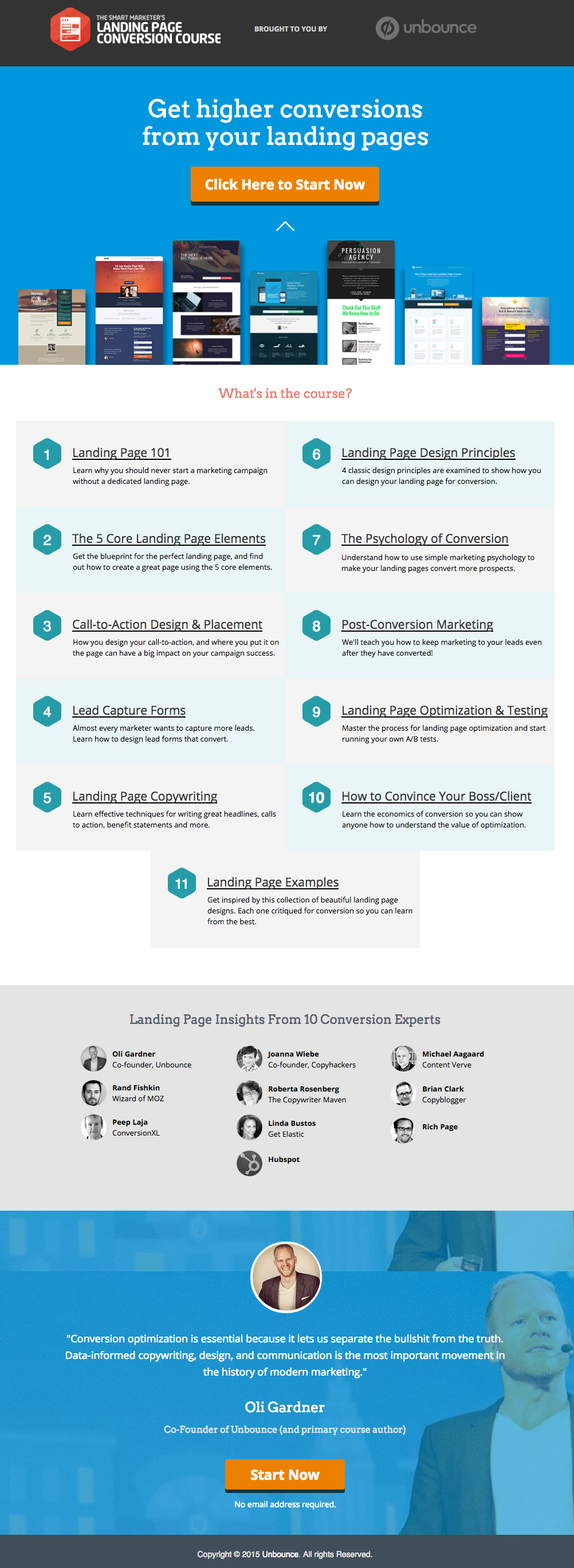
    ਇੱਥੇ Unbounce ਵੱਲੋਂ ਇੱਕ ਸ਼ਾਨਦਾਰ ਲੈਂਡਿੰਗ ਪੇਜ ਦੀ ਉਦਾਹਰਨ ਹੈ, ਜੋ ਸਾਨੂੰ ਬਹੁਤ ਪਸੰਦ ਹੈ:

    This has all of the right elements you need to execute the perfect landing page: it’s got just the right amount of text (which is really helpful for boosting SEO), and it’s packaged in a way that it’s not too heavy or intimidating for site visitors.

    The imagery is great as well, and the placement of the two call-to-action (or CTA) buttons give the visitors just enough cues to sign up for their service. Not too little, but not too much either.

    (ਸੁਝਾਅ: Unbounce ਲੈਂਡਿੰਗ ਪੇਜ ਬਹੁਤ ਸ਼ਾਨਦਾਰ ਦਿਖਾਈ ਦਿੰਦਾ ਹੈ – ਸ਼ਾਇਦ ਥੋੜ੍ਹਾ ਡਰਾਉਣਾ ਵੀ ਜੇਕਰ ਤੁਸੀਂ ਆਪਣੇ ਖ਼ੁਦ ਦੇ ਲੈਂਡਿੰਗ ਪੇਜ ‘ਤੇ ਇਸੇ ਤਰ੍ਹਾਂ ਦੀ ਸ਼ੈਲੀ ਬਣਾਉਣ ਦੀ ਕੋਸ਼ਿਸ਼ ਕਰ ਰਹੇ ਹੋ – ਪਰ ਤੁਸੀਂ ਅਸਲ ਵਿੱਚ PBS ਦੀ ਵਰਤੋਂ ਕਰਕੇ ਇੱਕ ਅਜਿਹਾ ਪੇਜ ਬਣਾ ਸਕਦੇ ਹੋ ਜੋ ਇਸਦੇ ਸਮਾਨ ਅਤੇ ਬਹੁਤ ਵਧੀਆ ਦਿਖਾਈ ਦੇਵੇ)।

    MAKE YOUR OWN LANDING PAGE: If you’re new to design, First Site Guide’s Elements & Principles of Design Cheat Sheet proves to be friendly and reliable for beginners.

    Take note though, that Unbounce’s example isn’t the only way you can create your landing page.

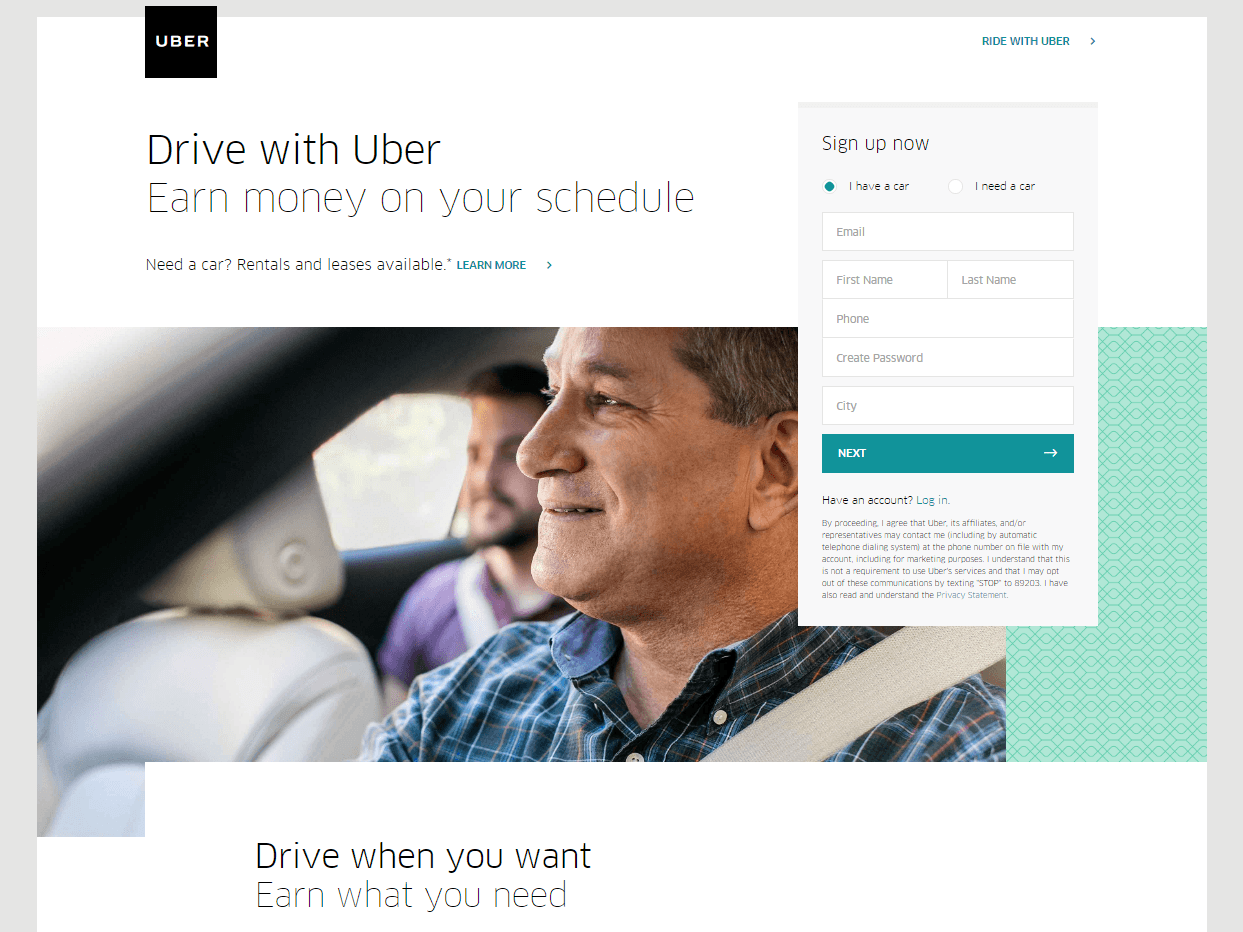
    You can always go for a simpler, cleaner look, like Uber’s landing page below:

    The text’s placement, along with the sign-up forms look crisp and clean. There’s also minimal distractions on this landing page, which prompts its visitors to sign up right away.

    MAKE YOUR OWN LANDING PAGE: First Site Guide’s Psychology of Color Cheat Sheet is a huge helA, which can help you balance out the right kind of colors that create a minimal yet classy effect for your landing pages.

    You can have more than one

    This is a little tricky because you have to learn how to strike a balance, but if you think it’ll help generate more leads,  you can actually build more than one landing page. Again, different landing pages cater to different needs.

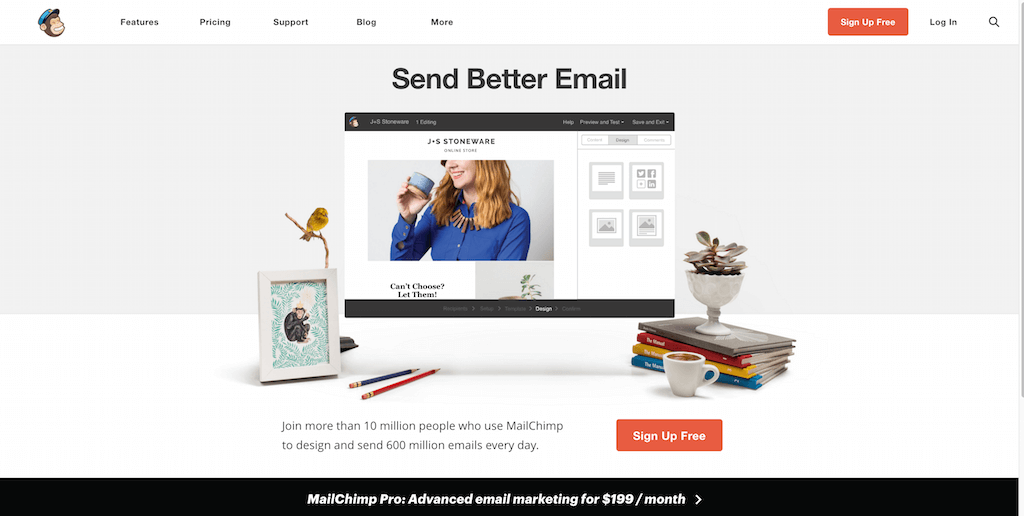
    ਉਦਾਹਰਨ ਲਈ MailChimp ਤੋਂ ਇਹ ਇੱਕ (ਕਈਆਂ ਵਿੱਚੋਂ) ਲਵੋ, ਜੋ ਆਪਣੇ ਦਰਸ਼ਕਾਂ ਨੂੰ ਉਨ੍ਹਾਂ ਦੀਆਂ ਸੇਵਾਵਾਂ ਲਈ ਮੁਫ਼ਤ ਵਿੱਚ ਸਾਈਨ ਅੱਪ ਕਰਨ ਦੀ ਅਪੀਲ ਕਰਦਾ ਹੈ:

    (It worked by the way, as we use MailChimp for our newsletter service, too).

    Take note of the text – it’s straight to the point, and addresses the target’s audience needs in just three simple, albeit powerful words; enough to catch the visitor’s attention, and convert into a lead.

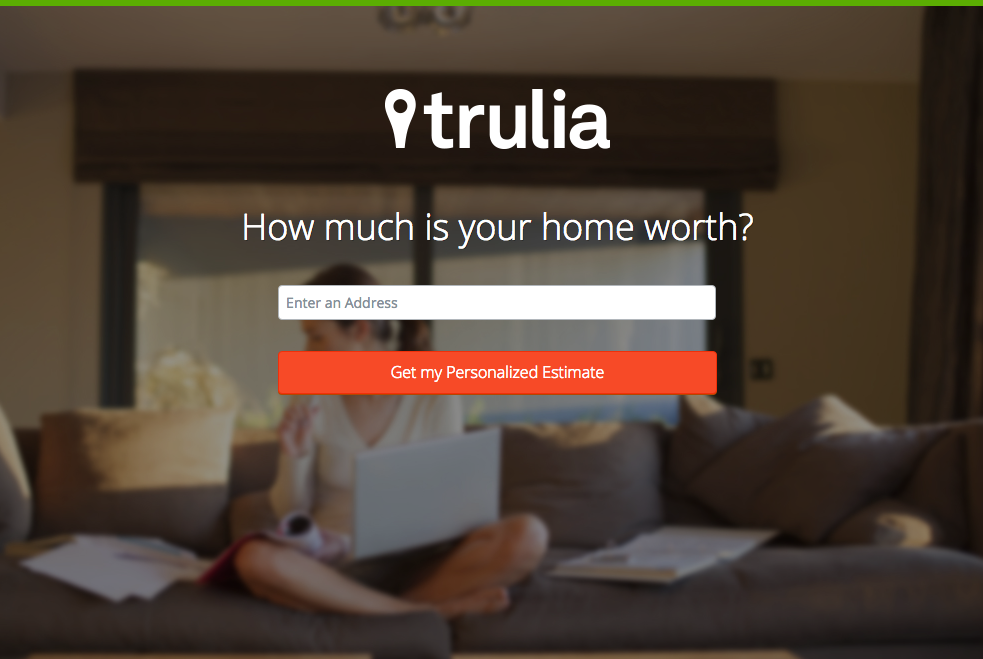
    Here’s another from Truila, which helps its users get an estimate of how much their houses are worth.

    Unlike the previous examples, Truilia doesn’t offer a catch to their customers in this particular landing page. They simply offer to give the visitor a chance to test out their service.

    Again, take note of the copy: no fluff, and it gets straight to the point.

    Usually, landing pages like these direct you towards another, one that has more information about what the website is offering. This is also a great technique used to capture more leads.

    MAKE YOUR OWN LANDING PAGE: Did you know that “Under Construction” pages count as landing pages, too? This blog post by First Site Guide teaches you how to make one.

    More doesn’t always mean merrier

    It’s important to remember that the problem isn’t the lack of landing pages per se – but the lack of well-created, successful landing pages.

    ਕੋਈ ਵੀ ਵੈੱਬਸਾਈਟ ਇਹਨਾਂ ਵਿੱਚੋਂ ਬਹੁਤ ਸਾਰੇ ਬਣਾ ਸਕਦੀ ਹੈ, ਪਰ ਇਹ ਆਪਣੇ ਆਪ ਸਫਲ ਲੀਡ ਰੂਪਾਂਤਰਣ ਨਹੀਂ ਦਿੰਦਾ।

    ਦੁਬਾਰਾ, ਲੈਂਡਿੰਗ ਪੇਜਾਂ ਦਾ ਕੰਮ ਬਹੁਤ ਗੁੰਝਲਦਾਰ ਹੈ– ਇਸ ਲਈ ਜੇਕਰ ਤੁਸੀਂ ਇਸਦੇ ਪਿੱਛੇ ਦੀ ਕਲਾ ਅਤੇ ਵਿਗਿਆਨ ਦਾ ਅਧਿਐਨ ਕਰਨ ਵਿੱਚ ਨਿਵੇਸ਼ ਕਰ ਸਕਦੇ ਹੋ, ਤਾਂ ਤੁਹਾਨੂੰ ਅਜਿਹਾ ਕਰਨ ਦੀ ਜ਼ੋਰਦਾਰ ਸਿਫਾਰਸ਼ ਕੀਤੀ ਜਾਂਦੀ ਹੈ।

    Here are some websites that’ll be really helpful in your journey to creating landing pages

    Landing Folio

    http://www.landingfolio.com/

    Landing Folio is an extensive gallery that’s really useful when it comes to getting inspiration for landing page designs. They also offer some kick-ass, friendly courses on how to perfect the art of creating landing pages. Plus, all the designs are pretty and fun to look at as well.

    First Site Guide

    http://firstsiteguide.com

    First Site Guide ਇੰਟਰਨੈੱਟ ‘ਤੇ ਸਭ ਤੋਂ ਵੱਧ ਸਾਧਨਾਂ ਨਾਲ ਭਰਪੂਰ ਵੈੱਬਸਾਈਟਾਂ ਵਿੱਚੋਂ ਇੱਕ ਹੈ, ਖ਼ਾਸ ਕਰਕੇ ਜੇਕਰ ਤੁਸੀਂ ਵੈੱਬ ਲਈ ਨਵੇਂ ਹੋ ਅਤੇ ਇਸ ਤੋਂ ਕੁਝ ਬਣਾਉਣਾ ਚਾਹੁੰਦੇ ਹੋ। ਉਨ੍ਹਾਂ ਕੋਲ ਸਮੱਗਰੀ ਤਿਆਰ ਕਰਨ ਵਾਲੇ ਸਾਧਨਾਂ ਦੀਆਂ ਸੂਚੀਆਂ, ਉਤਪਾਦ ਸਮੀਖਿਆਵਾਂ ਅਤੇ ਤੁਲਨਾਵਾਂ, ਇਨਫੋਗ੍ਰਾਫਿਕਸ, ਸਰਲ ਵੀਡੀਓ ਟਿਊਟੋਰੀਅਲ ਅਤੇ ਹੋਰ ਬਹੁਤ ਕੁਝ ਸ਼ਾਮਲ ਹਨ। ਜੇਕਰ ਤੁਸੀਂ ਆਪਣਾ ਪਹਿਲਾ ਲੈਂਡਿੰਗ ਪੇਜ ਬਣਾਉਣਾ ਸ਼ੁਰੂ ਕਰ ਰਹੇ ਹੋ ਤਾਂ ਇਹ ਯਕੀਨੀ ਤੌਰ ‘ਤੇ ਮਦਦਗਾਰ ਹੈ।

    Conversion Lab

    http://conversionlab.no/

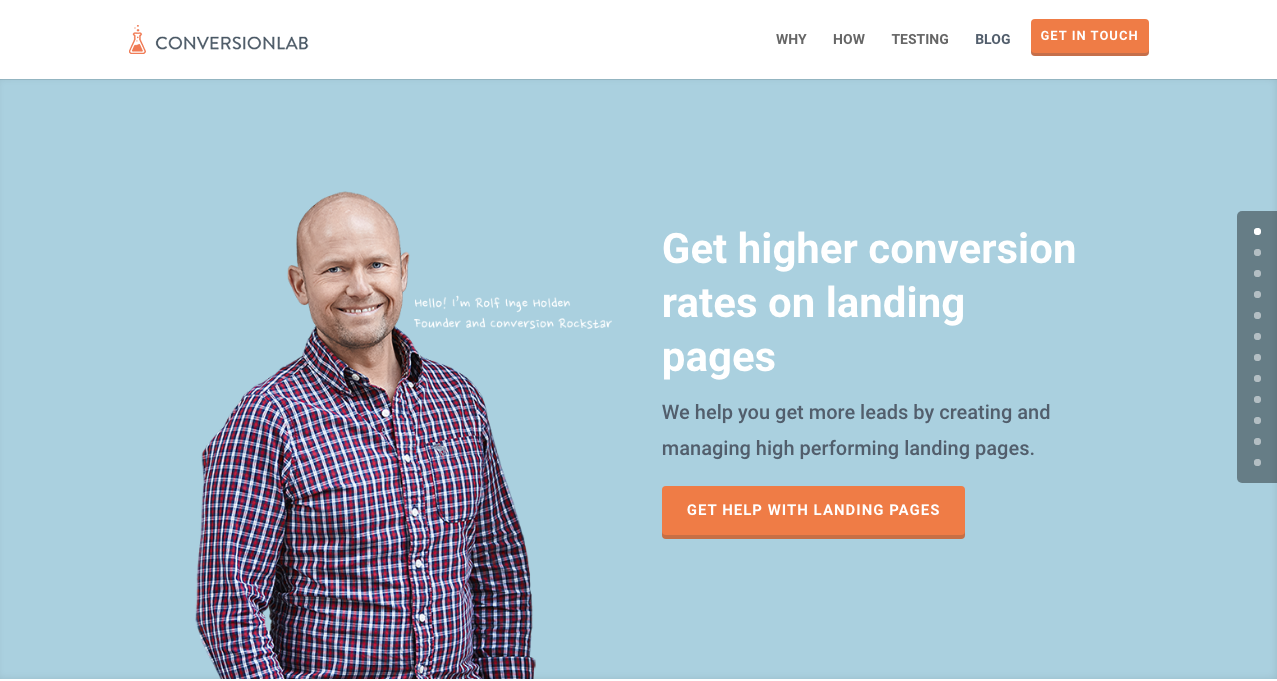
    Apart from the fact that their own landing page is pretty well-crafted itself, Conversion Lab does exactly what they say they do: they help you get conversions. They also help out with testing too, which is crucial to any website that’s trying to raise their conversion rates.

    Hubspot

    https://blog.hubspot.com/marketing

    Hubspot is an all-around help site that lends you a hand in almost anything and everything related to online marketing.

    ਉਹਨਾਂ ਕੋਲ ਲੇਖਾਂ ਦਾ ਇੱਕ ਵਿਭਿੰਨ ਸੰਗ੍ਰਹਿ ਹੈ ਜਿਸ ਵਿੱਚ ਵਪਾਰਕ ਯੋਜਨਾਵਾਂ ਬਣਾਉਣ ਤੋਂ ਲੈ ਕੇ ਸਮੱਗਰੀ ਅਤੇ ਇਨਬਾਊਂਡ ਮਾਰਕੀਟਿੰਗ, ਅਤੇ ਬੇਸ਼ੱਕ- ਲੈਂਡਿੰਗ ਪੇਜ ਸ਼ਾਮਲ ਹਨ। ਇਹ ਡਿਜੀਟਲ ਮਾਰਕੀਟਿੰਗ ਦੇ ਖੇਤਰ ਵਿੱਚ ਅਜੇ ਵੀ ਨਵੇਂ ਕਿਸੇ ਵੀ ਵਿਅਕਤੀ ਲਈ ਇੱਕ ਵਧੀਆ ਸਰੋਤ ਹੈ।

    ਸਿੱਟਾ

    ਲੈਂਡਿੰਗ ਪੇਜ ਸੱਚਮੁੱਚ ਗੁੰਝਲਦਾਰ ਹੋ ਸਕਦੇ ਹਨ, ਖ਼ਾਸ ਕਰਕੇ ਜੇਕਰ ਤੁਸੀਂ ਕਿਸੇ ਵੀ ਕਿਸਮ ਦੇ ਕਾਰੋਬਾਰ ਵਿੱਚ ਹੁਣੇ ਸ਼ੁਰੂਆਤ ਕਰ ਰਹੇ ਹੋ।

    ਪਰ ਯਾਦ ਰੱਖੋ ਕਿ ਇਹ ਸਿੱਖਣ ਵਿੱਚ ਆਪਣਾ ਸਮਾਂ ਲਗਾਉਣਾ ਫਾਇਦੇਮੰਦ ਹੈ ਕਿ ਉਹ ਕਿਵੇਂ ਕੰਮ ਕਰਦੇ ਹਨ ਅਤੇ ਉਹਨਾਂ ਨੂੰ ਕਿਵੇਂ ਬਣਾਉਣਾ ਹੈ। ਕਿਉਂ? ਕਿਉਂਕਿ ਉਹ ਲੀਡ ਪੈਦਾ ਕਰਦੇ ਹਨ, ਅਤੇ ਲੀਡਾਂ ਆਮਦਨ ਪੈਦਾ ਕਰਦੀਆਂ ਹਨ।

    Take note that digital marketing trends are changing rapidly. You have to keep with these trends in order for your business to not only survive, but to also thrive.

    Do you have any other tips or resources that you’d like to share with us? Comment below, or send us an email at [email protected] if you’d like to get featured as a resource in one of our articles.

    ਪੇਜ ਬਣਾਉਣ ਦੀਆਂ ਮੁਬਾਰਕਾਂ!

  • ਸ਼ਾਰਟਕੋਡ ਮੈਪਰ ਪਲੱਗਇਨ ਵਿਸ਼ੇਸ਼ਤਾ: ਮਾਡਰਨ ਟ੍ਰਾਈਬ ਦੁਆਰਾ ਦ ਈਵੈਂਟਸ ਕੈਲੰਡਰ

    shortcode-mapper-plugin-feature-the-events-calendar-by-modern-tribePlugins of the same category, but with respective features, are developed and enhanced every day. This gave birth to the variety of WordPress-powered websites – and later on, websites catering to several functions. For instance, there is a number of plugins which enables a developer and/or user to create, schedule, invite an interested person to an event.

    The Events Calendar is the events calendar you’ll need

    There are a lot of available events calendar in the WordPress market. So how do you choose? There are recommendation blogs, plugin face-off blogs, and of course testimonials from different users. All of these have one thing in common: they include The Events Calendar by Modern Tribe in their list.

    screenshot-2016-10-05-20-00-09
    An example of a minimal event post of The Events Calendar

    ਆਖ਼ਰ The Events Calendar ਵਿੱਚ ਕੀ ਖ਼ਾਸ ਹੈ?

    Modern Tribe ਦੁਆਰਾ The Events Calendar ਇਸ ਸ਼੍ਰੇਣੀ ਵਿੱਚ ਸਭ ਤੋਂ ਮੋਹਰੀ ਪਲੱਗਇਨ ਹੈ। ਇਹ ਇਵੈਂਟ ਪੋਸਟਾਂ ਦੀ ਪੇਸ਼ੇਵਰ ਗੁਣਵੱਤਾ ਪ੍ਰਦਾਨ ਕਰਦਾ ਹੈ। ਇਸਦਾ ਇੰਟਰਫੇਸ ਕਾਫ਼ੀ ਸਰਲ ਹੈ, ਜਿਸ ਵਿੱਚ ਸਿਖਰ ‘ਤੇ ਸਿਰਲੇਖ, ਮਿਤੀ ਅਤੇ ਸਮਾਂ, ਜੇਕਰ ਲਾਗੂ ਹੋਵੇ ਤਾਂ ਕੀਮਤ, ਇੱਕ ਵਿਸ਼ੇਸ਼ ਚਿੱਤਰ ਅਤੇ ਜਾਂ ਨਕਸ਼ਾ, ਅਤੇ ਇਵੈਂਟ ਬਾਰੇ ਵਧੀਕ ਵੇਰਵੇ ਸ਼ਾਮਲ ਹਨ। ਜੇਕਰ Pro ਹੈ, ਤਾਂ ਤੁਸੀਂ ਆਪਣੇ ਸਾਰੇ ਇਵੈਂਟਾਂ ਨੂੰ ਮਿਤੀ, ਕੀਵਰਡ ਅਤੇ ਸਥਾਨ ਅਨੁਸਾਰ ਦੇਖ ਸਕਦੇ ਹੋ।

    You can do much more with The Events Calendars Pro and its official add-ons:

    The Events Calendar PRO

    • Recurring events
    • Week view
    • Photo view
    • Location search
    • Map view
    • Venue and organizer view
    • Advanced widgets
    • Additional fields

    The Events Calendar ADD-ONs

    • RSVP tickets
    • Event ticket plus via WooCommerce, Shopp, WPeCommerce, Easy Digital Downloads)
    • Community Events
    • Community Tickets
    • Filter Bar
    • Facebook Events
    • iCal Importer
    • Eventbrite Tickets

    ਇਸਨੂੰ Page Builder Sandwich ਨਾਲ ਜੋੜਨਾ ਇਸਨੂੰ ਹੋਰ ਵੀ ਵਧੀਆ ਬਣਾਉਂਦਾ ਹੈ

    screenshot-2016-10-04-17-46-04Recent posts were made to highlight the benefits of using PBS and its Shortcode Mapper. This is to make sure that you guys are taking advantage of the latest innovation that the Sandwich Team can develop plus notify the plugin developers that their creation gave birth to another awesome feature.

    The Events Calendar ਪਲੱਗਇਨ ਦੇ ਮਾਮਲੇ ਵਿੱਚ, ਅਸੀਂ 2 ਸ਼ਾਨਦਾਰ ਕਾਰਨ ਲੈ ਕੇ ਆਏ ਹਾਂ ਕਿ ਇਹ ਸੁਮੇਲ ਕਿਉਂ ਮੌਜੂਦ ਹੋਣਾ ਚਾਹੀਦਾ ਹੈ:

    1.      ਵਰਡਪ੍ਰੈਸ ਪਲੱਗਇਨ ਮਾਹਿਰਾਂ ਦੁਆਰਾ ਸਮੀਖਿਆ ਕੀਤੀ ਗਈ

    The Modern Tribe assured their customers that the product and service they offered was of quality. Creator of Easy Digital Downloads, Pippin Williamson gave his inputs about The Events Calendar. Alongside him was Mark Jaquith, one of the leading WordPress developers, who made sure that the plugin was secure.

    Page Builder Sandwich was also reviewed recently by Pippin, together with the other established and rising page builders in the market. In his in-depth critique, he concluded that indeed, PBS is one of the most powerful drag-and-drop page builders. He highlighted that only  Page Builder Sandwich was able to create a functioning Shortcode Mapper.

    2.      ਸ਼ਾਰਟਕੋਡ ਵਿਕਲਪ: ਬੈਕਐਂਡ ਤੋਂ ਫਰੰਟਐਂਡ ਐਡੀਟਿੰਗ ਤੱਕ

    ਮੂਲ ਰੂਪ ਵਿੱਚ, ਪਲੱਗਇਨ ਦੇ ਸ਼ਾਰਟਕੋਡ ਵਿਕਲਪਾਂ ਨੂੰ ਬੈਕਐਂਡ ਐਡਮਿਨ ਪੈਨਲ ਰਾਹੀਂ ਐਕਸੈਸ ਕੀਤਾ ਜਾ ਸਕਦਾ ਹੈ। ਫਿਰ, ਬੈਕਐਂਡ ਪਲੱਗਇਨਾਂ ਦੀ ਉਹੀ ਪ੍ਰਕਿਰਿਆ ਹੁੰਦੀ ਹੈ: ਬੈਕਐਂਡ ਐਡੀਟਰ ‘ਤੇ ਜਾਓ, ਲੋੜੀਂਦੇ ਬਦਲਾਅ ਦਰਜ ਕਰੋ ਅਤੇ ਫਿਰ ਸੇਵ ਕਰੋ। ਰਿਫ੍ਰੈਸ਼ ਬਟਨ ‘ਤੇ ਕਲਿੱਕ ਕਰਨ ‘ਤੇ ਹੀ ਸੰਪਾਦਿਤ ਸਮੱਗਰੀ ਦਿਖਾਈ ਦਿੰਦੀ ਹੈ। ਕੁੱਲ ਮਿਲਾ ਕੇ, ਇਹ 4 ਕਦਮ ਹਨ.

    ਪਰ Page Builder Sandwich ਦੁਆਰਾ ਉਸ ਲੰਬੀ ਪ੍ਰਕਿਰਿਆ ਨੂੰ ਰੀਅਲ ਟਾਈਮ ਫਰੰਟਐਂਡ ਐਡੀਟਿੰਗ ਵਿੱਚ ਬਦਲ ਦਿੱਤਾ ਗਿਆ ਹੈ – ਸਿਰਫ਼ 2 ਕਦਮਾਂ:

    1. Instead of going to the backend panel to access the shortcode options, click on the Shortcode Mapper and select on The Events Calendar. You’d be redirected to a pop-up window as seen below. Click on The Events Calendar.
      screenshot-2016-10-04-17-43-37
      View of The Events Calendar in the Page Builder Sandwich Shortcode Mapper
    2. screenshot-2016-10-05-19-57-11
      Close look at The Events Calendar Shortcode Properties
      The Inspector on the left displays the initial properties of the shortcode. Clicking on the “Open Editor” button, the shortcode controls displayed at the backend can now be accessed on the frontend via a pop-up window.
    screenshot-2016-10-06-13-25-04
    See? The Events Calendar looks like you’re just making an event post.

    screenshot-2016-10-06-14-37-52

    ਇਸਦੇ ਬਹੁਤ ਸਾਰੇ ਫ਼ਾਇਦੇ ਹਨ, ਠੀਕ ਹੈ ਨਾ?

    With the integration of a page builder that doesn’t lock you in and leaves shortcode mess, and the most popular events calendar, your workflow would not only smoothen but also increase in productivity. Additionally, you can look into what Modern Tribe offers: the bundle of plugins that go with The Events Calendar.

    ਹੁਣ ਤੱਕ, Modern Tribe ਦੁਆਰਾ The Events Calendar ਪਲੱਗਇਨ ਹੀ ਸਾਡੇ Shortcode Mapper ਵਿੱਚ ਮੈਪ ਕੀਤੀ ਜਾਣ ਵਾਲੀ ਇਕਲੌਤੀ ਪਲੱਗਇਨ ਸੀ। ਹਾਲਾਂਕਿ, ਇਸਦਾ ਮਤਲਬ ਇਹ ਨਹੀਂ ਹੈ ਕਿ ਮੈਪਿੰਗ ਇੱਥੇ ਹੀ ਖ਼ਤਮ ਹੋ ਜਾਂਦੀ ਹੈ। ਬੱਸ ਟਿੱਪਣੀ ਕਰਕੇ ਦੱਸੋ ਕਿ ਤੁਸੀਂ Modern Tribe ਦੀ ਕਿਹੜੀ ਪਲੱਗਇਨ ਸਾਡੇ Shortcode Mapper ਵਿੱਚ ਦੇਖਣਾ ਚਾਹੁੰਦੇ ਹੋ।

  • ਪੇਜ ਬਿਲਡਰ ਸੈਂਡਵਿਚ ਵਰਜਨ 3 ਦਾ ਇੱਕ ਟੂਰ

    a-tour-of-page-builder-sandwich-version-3

    ਅਸੀਂ Page Builder Sandwich ਵਰਜ਼ਨ 3 ਵਿੱਚ ਬਹੁਤ ਸਾਰੀਆਂ ਚੀਜ਼ਾਂ ਬਦਲੀਆਂ ਹਨ। ਜੇਕਰ ਤੁਸੀਂ ਕਾਫ਼ੀ ਸਮੇਂ ਤੋਂ Page Builder Sandwich ਦੀ ਵਰਤੋਂ ਕਰ ਰਹੇ ਹੋ, ਤਾਂ ਤੁਸੀਂ ਦੇਖੋਗੇ ਕਿ ਬਦਲਾਅ ਕਾਫ਼ੀ ਵੱਡੇ ਹਨ। ਵਰਜ਼ਨ 1, ਵਰਜ਼ਨ 2 ਅਤੇ ਮੌਜੂਦਾ ਵਰਜ਼ਨ ਵਿੱਚ ਇੱਕ ਵੱਡਾ ਅੰਤਰ ਹੈ। ਪਿਛਲੇ ਵਰਜ਼ਨਾਂ ਵਿੱਚ, ਸਭ ਕੁਝ ਸਾਈਡ ‘ਤੇ ਇੰਸਪੈਕਟਰ ਵਿੱਚ ਮੌਜੂਦ ਸੀ। ਅਸੀਂ ਉਦੋਂ ਤੋਂ ਇਸਦੀ ਸਮੀਖਿਆ ਕੀਤੀ ਹੈ ਅਤੇ ਇਸਦੇ ਹਿੱਸਿਆਂ ਨੂੰ ਵੱਖ-ਵੱਖ, ਵਧੇਰੇ ਤਰਕਸੰਗਤ ਭਾਗਾਂ ਵਿੱਚ ਵੰਡਿਆ ਹੈ। ਅਸੀਂ ਪਿਛਲੀ ਬਲੌਗ ਪੋਸਟ ਵਿੱਚ ਇਸ ਅੱਪਗ੍ਰੇਡ ਦੇ ਕਾਰਨਾਂ ਨੂੰ ਸੂਚੀਬੱਧ ਕੀਤਾ ਹੈ।

    ਮੌਜੂਦਾ ਉਪਭੋਗਤਾਵਾਂ ਨੂੰ ਸ਼ੁਰੂ ਵਿੱਚ ਇਹ ਬਦਲਾਅ ਔਖੇ ਲੱਗ ਸਕਦੇ ਹਨ। ਇਸਨੂੰ ਕੁਝ ਮਿੰਟਾਂ ਲਈ ਅਜ਼ਮਾ ਕੇ ਦੇਖੋ, ਅਤੇ ਸਾਨੂੰ ਭਰੋਸਾ ਹੈ ਕਿ ਤੁਸੀਂ ਬਿਲਕੁਲ ਸਹਿਜ ਮਹਿਸੂਸ ਕਰੋਗੇ। ਅਸੀਂ ਇੰਟਰਫੇਸ ਦੇ ਹਰੇਕ ਪਹਿਲੂ ਨੂੰ ਬੜੇ ਧਿਆਨ ਨਾਲ ਡਿਜ਼ਾਈਨ ਕੀਤਾ ਹੈ ਤਾਂ ਜੋ ਵਰਡ ਪ੍ਰੋਸੈਸਰਾਂ ਵਾਲੀ ਤੁਹਾਡੀ ਸੁਭਾਵਿਕ ਆਦਤ ਵੈੱਬਸਾਈਟ ਬਣਾਉਣ ਵਿੱਚ ਕੰਮ ਕਰ ਸਕੇ।

    ਨਵੇਂ ਇੰਟਰਫੇਸ ਦਾ ਟੂਰ ਦੇਖੋ

  • ਛੁੱਟੀਆਂ ਦੀ ਸੇਲ: ਸੀਮਤ ਸਮੇਂ ਲਈ ਸਾਰੇ ਲਾਇਸੰਸਾਂ ‘ਤੇ 30% ਦੀ ਛੋਟ ਪ੍ਰਾਪਤ ਕਰੋ!

    ਹਾਂਜੀ, ਤੁਸੀਂ ਬਿਲਕੁਲ ਸਹੀ ਸੁਣਿਆ! Page Builder Sandwich ਵਿੱਚ ਛੁੱਟੀਆਂ ਅੱਜ, 17 ਦਸੰਬਰ 2016, ਤੋਂ 1 ਜਨਵਰੀ 2017 ਤੱਕ ਸ਼ੁਰੂ ਹੋ ਰਹੀਆਂ ਹਨ! ਬਿਲਕੁਲ ਸਹੀ- ਅਸੀਂ ਲਗਾਤਾਰ 15 ਦਿਨਾਂ ਲਈ ਸਾਰੇ ਲਾਇਸੰਸਾਂ ‘ਤੇ 30% ਦੀ ਛੋਟ ਦੇ ਰਹੇ ਹਾਂ! ਕਿਸੇ ਕੂਪਨ ਕੋਡ ਦੀ ਲੋੜ ਨਹੀਂ ਹੈ। ਸੱਚਮੁੱਚ ਖੁਸ਼ੀਆਂ ਭਰੀਆਂ ਛੁੱਟੀਆਂ।

    Bhavna Sayana ਵੱਲੋਂ "Christmas ornaments - HBW" CC BY ਅਧੀਨ ਲਾਇਸੰਸਸ਼ੁਦਾ ਹੈ
    “Christmas ornaments – HBW” ਦੁਆਰਾ Bhavna Sayana, CC BY ਅਧੀਨ ਲਾਇਸੰਸਸ਼ੁਦਾ ਹੈ

    ਇਸ ਦੇ ਨਾਲ ਹੀ, ਅਸੀਂ ਇਸ ਮੌਕੇ ‘ਤੇ PBS ਦੀ ਆ ਰਹੀ ਪਹਿਲੀ ਵਰ੍ਹੇਗੰਢ ਜੋ ਕਿ 14 ਜਨਵਰੀ ਨੂੰ ਹੈ, ਦਾ ਐਲਾਨ ਕਰਨਾ ਚਾਹੁੰਦੇ ਹਾਂ। ਸਾਡੇ ਕੋਲ ਤੁਹਾਡੇ ਲਈ ਬਹੁਤ ਸਾਰੀਆਂ ਸ਼ਾਨਦਾਰ ਚੀਜ਼ਾਂ ਹਨ, ਅਤੇ ਅਸੀਂ ਉਮੀਦ ਕਰਦੇ ਹਾਂ ਕਿ ਤੁਸੀਂ ਵੀ ਇਹਨਾਂ ਲਈ ਓਨੇ ਹੀ ਉਤਸ਼ਾਹਿਤ ਹੋਵੋਗੇ ਜਿੰਨੇ ਕਿ ਅਸੀਂ ਹਾਂ! ਇਹਨਾਂ ਵਿੱਚੋਂ ਕੁਝ ਇਹ ਹਨ:

    • ਪੈਰਾਲੈਕਸ ਸਕ੍ਰੋਲਿੰਗ
    • ਵੀਡੀਓ ਬੈਕਗ੍ਰਾਊਂਡ
    • ਵਨ-ਪੇਜਰ ਟੈਂਪਲੇਟਸ
    • ਰਿਸਪਾਂਸਿਵ ਕੰਟਰੋਲ
    • ਕਸਟਮ CSS ਸਟਾਈਲਿੰਗ

    ਅਸੀਂ ਜਲਦੀ ਹੀ ਵਰ੍ਹੇਗੰਢ ਦੇ ਅੱਪਡੇਟ ਲਈ ਉਮੀਦ ਕੀਤੀਆਂ ਜਾਣ ਵਾਲੀਆਂ ਨਵੀਆਂ ਵਿਸ਼ੇਸ਼ਤਾਵਾਂ ਦੀ ਪੂਰੀ ਸੂਚੀ ਵਾਲਾ ਇੱਕ ਲੇਖ ਜਾਰੀ ਕਰਾਂਗੇ। ਨਵੇਂ ਅੱਪਡੇਟ ਬਾਰੇ ਸੂਚਿਤ ਰਹਿਣ ਲਈ ਹੇਠਾਂ ਸਾਡੇ ਨਿਊਜ਼ਲੈਟਰ ਨੂੰ ਸਬਸਕ੍ਰਾਈਬ ਕਰੋ!

    ਛੁੱਟੀਆਂ ਮੁਬਾਰਕ ਅਤੇ ਸਾਈਟ-ਬਿਲਡਿੰਗ ਮੁਬਾਰਕ!


  • ਪੇਸ਼ ਹੈ ਪੇਜ ਬਿਲਡਰ ਸੈਂਡਵਿਚ ਵਰਜ਼ਨ 4.0

    ਜਦੋਂ ਅਸੀਂ 2015 ਦੇ ਸ਼ੁਰੂ ਵਿੱਚ PBS ਨੂੰ ਵਿਕਸਤ ਕਰਨਾ ਸ਼ੁਰੂ ਕੀਤਾ ਸੀ, ਤਾਂ ਸਾਨੂੰ ਹਮੇਸ਼ਾ ਇਸ ਦੀਆਂ ਸੀਮਾਵਾਂ ਤੋਂ ਪਾਰ ਜਾਣ ਦੀ ਸਮਰੱਥਾ ਵਿੱਚ ਵਿਸ਼ਵਾਸ ਸੀ। ਇਸ ਦੇ ਰਿਲੀਜ਼ ਹੋਣ ਤੋਂ ਬਾਅਦ ਪਿਛਲੇ ਸਾਲ ਤੋਂ, ਸਾਡੀ ਟੀਮ ਬਹੁਤ ਮਿਹਨਤ ਕਰ ਰਹੀ ਹੈ, ਅਤੇ ਇਹ ਯਕੀਨੀ ਬਣਾਉਣ ਲਈ ਹਮੇਸ਼ਾ ਵਾਧੂ ਯਤਨ ਕਰ ਰਹੀ ਹੈ ਕਿ PBS ਬਿਲਕੁਲ ਅਜਿਹਾ ਹੀ ਕਰੇ।

    In 2016, we’ve managed to release three versions of PBS, each one surpassing their predecessors with more advantageous updates after the next. Today, in 2017, we’re finally releasing Page Builder Sandwich Version 4.0 in commemoration of its very first birthday.

    ਅਸੀਂ ਇਮਾਨਦਾਰ ਰਹਾਂਗੇ: ਇਹ ਸੌਖਾ ਨਹੀਂ ਸੀ।

    ਪਰ 2015 ਵਿੱਚ ਇਸਦੀ ਨਿਮਰ ਸ਼ੁਰੂਆਤ ਦੇ ਮੁਕਾਬਲੇ, ਅਸੀਂ ਹੁਣ ਭਰੋਸੇ ਨਾਲ ਇਹ ਕਹਿ ਸਕਦੇ ਹਾਂ ਕਿ Page Builder Sandwich ਨੇ ਆਪਣੇ ਬੀਟਾ ਦਿਨਾਂ ਤੋਂ ਲੈ ਕੇ ਹੁਣ ਤੱਕ ਨਿਸ਼ਚਤ ਤੌਰ ‘ਤੇ ਇੱਕ ਲੰਬਾ ਸਫ਼ਰ ਤੈਅ ਕੀਤਾ ਹੈ।

    Then vs Now

    Taking a step back and looking at the different versions that PBS went through, it has really changed for the better.  Some learning mistakes just made us cringe and laugh!

    Enhanced User Interface

    For versions 3.0 and 4.0, we’ve made some major improvements with regards to the user interface. Pippin’s insight really made a wake-up call to us!

    The old interface of PBS Version 2.0  (left) vs Version 4.0’s cleaner, more efficient UI (right)

    Engaging in conversation and taking note of feedback has always been important to us, and is (and always will be) an integral part of Page Builder Sandwich’s continued growth. Out of all of PBS’ features though, we’ve received quite a number of critiques regarding the previous versions’ UI’s. All of them had one common denominator that many believed was detrimental to PBS’ functionality: the color scheme. According to most, it was too aggressive and did not compliment WordPress’ color palette. We’ve since addressed this issue in Version 4.0, constructing an improved UI with toned-down colors, all while still keeping PBS’ signature drag-and-drop UI intact.

    Mobile Responsiveness

    ਇੱਕ ਹੋਰ ਆਮ ਵਿਸ਼ੇਸ਼ਤਾ ਜਿਸ ‘ਤੇ ਜ਼ਿਆਦਾਤਰ ਪੇਜ ਬਿਲਡਰ ਸਹਿਮਤ ਹੋ ਸਕਦੇ ਹਨ, ਉਹ ਹੈ ਮੋਬਾਈਲ ਰਿਸਪਾਂਸਿਵਨੈੱਸ ਦੀ ਲੋੜ, ਕਿਉਂਕਿ ਟੈਬਲੇਟ ਅਤੇ ਮੋਬਾਈਲ ਫ਼ੋਨ ਵਰਗੇ ਯੰਤਰ ਬਾਜ਼ਾਰ ਵਿੱਚ ਤੇਜ਼ੀ ਨਾਲ ਦਬਦਬਾ ਬਣਾ ਰਹੇ ਹਨ।

    Because of this, we’ve tackled mobile responsiveness in Version 4.0’s release. Viewing pages built with PBS now becomes a smoother, more efficient experience, with your page’s UI adapting to your device’s screen resolutions.

    ਇਸ ਤੋਂ ਇਲਾਵਾ, PBS ਹੁਣ ਡੈਸਕਟਾਪ ‘ਤੇ ਮੋਬਾਈਲ ਪ੍ਰੀਵਿਊਜ਼ ਦਾ ਵੀ ਸਮਰਥਨ ਕਰਦਾ ਹੈ। ਇਸ ਤਰ੍ਹਾਂ, ਤੁਸੀਂ ਕਿਸੇ ਵੀ ਡਿਵਾਈਸ ਦੀ ਵਰਤੋਂ ਕੀਤੇ ਬਿਨਾਂ, ਜਿਸ ਵੀ ਮੋਡ ਵਿੱਚ ਤੁਹਾਨੂੰ ਲੋੜ ਹੋਵੇ — ਭਾਵੇਂ ਮੋਬਾਈਲ ਰਾਹੀਂ ਜਾਂ ਟੈਬਲੇਟ — ਆਸਾਨੀ ਨਾਲ ਦੇਖ ਸਕੋਗੇ ਕਿ ਤੁਹਾਡਾ ਪੇਜ ਕਿਹੋ ਜਿਹਾ ਦਿਖਾਈ ਦਿੰਦਾ ਹੈ।

    ਹੋਰ ਤਾਂ ਹੋਰ, PBS ਹੁਣ ਉਪਭੋਗਤਾਵਾਂ ਨੂੰ ਦੂਜਿਆਂ ਦੇ ਸਕ੍ਰੀਨ ਆਕਾਰਾਂ ਨੂੰ ਪ੍ਰਭਾਵਿਤ ਕੀਤੇ ਬਿਨਾਂ ਡੈਸਕਟਾਪ, ਮੋਬਾਈਲ ਅਤੇ ਟੈਬਲੇਟ ਵਿੱਚ ਤਬਦੀਲੀਆਂ ਕਰਨ ਦੀ ਇਜਾਜ਼ਤ ਦਿੰਦਾ ਹੈ।

    What’s New: Features

    Full Page Templates

    PBS ਦੀ ਸ਼ੁਰੂਆਤ ਤੋਂ ਲੈ ਕੇ ਇੱਕ ਹੋਰ ਚੀਜ਼ ਜੋ ਅਸੀਂ ਨੋਟ ਕੀਤੀ ਹੈ ਉਹ ਇਹ ਸੀ ਕਿ ਉਪਭੋਗਤਾ ਖਾਸ ਨਿਸ਼ਾਂ ਦੇ ਆਧਾਰ ‘ਤੇ ਪੇਜ ਬਣਾਉਂਦੇ ਹਨ। ਬੇਸ਼ੱਕ ਪੇਜ ਬਣਾਉਣ ਵੇਲੇ ਇਹ ਇੱਕ ਕੁਦਰਤੀ ਗੱਲ ਹੈ, ਪਰ ਉਪਭੋਗਤਾ ਲਈ, ਇਹਨਾਂ ਨਿਸ਼-ਅਧਾਰਿਤ ਪੇਜਾਂ ਨੂੰ ਬਣਾਉਂਦੇ ਸਮੇਂ ਇਹ ਥੋੜ੍ਹੀ ਸਮੱਸਿਆ ਬਣ ਜਾਂਦੀ ਹੈ। ਉਦਾਹਰਨ ਲਈ, Page Builder Sandwich ਨਾਲ ਬਣਾਈਆਂ ਗਈਆਂ ਈ-ਕਾਮਰਸ ਸਾਈਟਾਂ ਨੂੰ ਫੋਟੋ ਗੈਲਰੀ ਵਾਲੇ ਤੁਹਾਡੇ ਆਮ, ਰੋਜ਼ਾਨਾ ਬਲੌਗ ਦੇ ਮੁਕਾਬਲੇ ਸ਼ੁਰੂ ਤੋਂ ਬਣਾਉਣ ਵਿੱਚ ਸ਼ਾਇਦ ਜ਼ਿਆਦਾ ਸਮਾਂ ਲੱਗੇਗਾ। ਇਸ ਲਈ ਕਿਉਂਕਿ ਇਸ ਕਿਸਮ ਦੀਆਂ ਵੈੱਬਸਾਈਟਾਂ ਦੀ ਲੋੜ ਲਗਾਤਾਰ ਵੱਧ ਰਹੀ ਹੈ, ਅਸੀਂ ਆਖਰਕਾਰ PBS ਦੇ ਫੁੱਲ ਪੇਜ ਟੈਂਪਲੇਟਸ ਪੇਸ਼ ਕਰਨ ਦਾ ਹੱਲ ਕੱਢਿਆ ਹੈ..

    ਫੁੱਲ ਪੇਜ ਟੈਂਪਲੇਟ ਪਹਿਲਾਂ ਤੋਂ ਡਿਜ਼ਾਈਨ ਕੀਤੇ ਸੈਕਸ਼ਨਾਂ ਨਾਲੋਂ ਕਿਵੇਂ ਵੱਖਰੇ ਹਨ?

    PBS actually has a feature similar to the Full Page Templates, the Pre-Designed Sections. Since our team has been aware that there are users who lack the time to design and layout their pages and sites, the Pre-Designed Sections were built for this specific purpose. The Pre-Designed Sections are small, individual layouts professionally designed to be mixed and matched together to build a page. However, while they are pre-designed, they aren’t full page, and are not niche-based.

    The Full Page Templates are different in that they’re designed to be used for an entire landing page, and they’re laden with features that commonly go with a particular niche. For example, upon accessing PBS’ Hotel Template, you’ll find that with it comes a map, contact details, and sections specifically designed for enumerating the hotel’s amenities. Similarly, the PBS Fashion Template includes a carousel feature for showcasing fashion ensembles for modern shops. These templates can also be tweaked and adjusted to suit the user’s needs and taste, of course.

    ਥਰਡ-ਪਾਰਟੀ ਪਲੱਗਇਨਾਂ ਤੱਕ ਆਸਾਨ ਪਹੁੰਚ

    WooCommerce, Advanced Custom Fields, Events Calendar, Instagram Feed, Contact Form 7, NextGen Gallery, among others, are now more accessible with Version 4.0. This means that if you have these plugins activated in your PBS-run site, you can now add them with more ease.

    ਬਹੁਤ ਜ਼ਿਆਦਾ ਮੰਗੇ ਗਏ ਐਲੀਮੈਂਟਸ ਅਤੇ ਵਿਸ਼ੇਸ਼ਤਾਵਾਂ: ਬਿਹਤਰ ਕਾਰਜਸ਼ੀਲਤਾ ਅਤੇ ਹੋਰ ਡਿਜ਼ਾਈਨ ਵਿਸ਼ੇਸ਼ਤਾਵਾਂ

    In the span of a year, we would regularly receive suggestions and requests for features that are currently in-demand in the page builder market. Among these include Parallax Scrolling, Video Backgrounds, Ken Burns Backgrounds, features that increase the aesthetic value of your page; and elements such as Pricing Tables, Testimonials, Countdowns, and Milestones to enhance your page’s functionality. With the release of Version 4.0, we’ve finally accomplished these and more. We’re sure your PBS experience will be even more worthwhile this time around.

    PBS ਲਈ ਅੱਗੇ ਕੀ ਹੈ?

    ਜਨਵਰੀ 2016 ਵਿੱਚ ਸਾਡੀ ਸ਼ੁਰੂਆਤੀ ਲਾਂਚ ਤੋਂ ਲੈ ਕੇ ਅਸੀਂ ਇੱਕ ਲੰਬਾ ਸਫ਼ਰ ਤੈਅ ਕੀਤਾ ਹੈ। ਅਸੀਂ ਵੱਡੇ ਸੁਧਾਰ ਕੀਤੇ ਹਨ, ਅਤੇ ਹਾਲਾਂਕਿ ਇਹ ਕੰਮ ਆਸਾਨ ਨਹੀਂ ਹੈ, ਪਰ ਇਹ ਨਿਸ਼ਚਤ ਤੌਰ ‘ਤੇ ਬਹੁਤ ਸੰਤੋਸ਼ਜਨਕ ਹੈ। ਵਰਜ਼ਨ 4.0 PBS ਵਿੱਚ ਹੋਰ ਵੀ ਸੁਧਾਰਾਂ ਦੀ ਸਿਰਫ਼ ਸ਼ੁਰੂਆਤ ਹੈ, ਅਤੇ ਇਸ 2017 ਵਿੱਚ, ਅਸੀਂ ਇਹ ਯਕੀਨੀ ਬਣਾਉਣ ਲਈ ਸਖ਼ਤ ਮਿਹਨਤ ਕਰਨਾ ਜਾਰੀ ਰੱਖਾਂਗੇ ਕਿ PBS ਹੋਰ ਬਿਹਤਰ ਹੁੰਦਾ ਰਹੇ। ਫਿਲਹਾਲ, ਅਸੀਂ ਉਮੀਦ ਕਰਦੇ ਹਾਂ ਕਿ ਤੁਸੀਂ ਇਹਨਾਂ ਨਵੀਆਂ ਵਿਸ਼ੇਸ਼ਤਾਵਾਂ ਦਾ ਪੂਰਾ ਲਾਭ ਉਠਾ ਸਕਦੇ ਹੋ, ਅਤੇ ਇਹ PBS ਦੇ ਨਾਲ ਤੁਹਾਡੇ ਅਨੁਭਵ ਨੂੰ ਹੋਰ ਵੀ ਸਾਰਥਕ ਬਣਾਉਣਗੀਆਂ।

    ਸਾਈਟ-ਬਿਲਡਿੰਗ ਦੀਆਂ ਮੁਬਾਰਕਾਂ!

  • ਸ਼ਾਰਟਕੋਡ ਮੈਪਰ ਪਲੱਗਇਨ ਫ਼ੀਚਰ: Automattic ਦੁਆਰਾ WP Job Manager

    how-to-create-a-website-from-scratch-for-under-100ਸਾਨੂੰ Page Builder Sandwich ਦੀ ਨਵੀਨਤਮ ਵਿਸ਼ੇਸ਼ਤਾ – Shortcode Mapper ਨੂੰ ਜਾਰੀ ਕੀਤਿਆਂ ਇੱਕ ਮਹੀਨਾ ਬੀਤ ਗਿਆ ਹੈ। ਅਸੀਂ 100 ਤੋਂ ਵੱਧ ਪਲੱਗਇਨਾਂ (ਸਹੀ ਕਹੀਏ ਤਾਂ 144 ਪਲੱਗਇਨਾਂ) ਨੂੰ ਏਕੀਕ੍ਰਿਤ ਕੀਤਾ ਹੈ, ਭਾਵੇਂ ਉਹਨਾਂ ਵਿੱਚ ਸ਼ਾਰਟਕੋਡਾਂ ਦੀ ਗਿਣਤੀ ਕਿੰਨੀ ਵੀ ਹੋਵੇ। ਇਹ ਇੱਕ ਥਕਾਊ ਕੰਮ ਸੀ ਪਰ ਅਸੀਂ ਇਹ ਕਰ ਵਿਖਾਇਆ!

    ਤੁਹਾਨੂੰ ਇਸ ਬਾਰੇ ਹੋਰ ਜਾਣਕਾਰੀ ਦੇਣ ਲਈ, ਅਸੀਂ Page Builder Sandwich ਨਾਲ ਪੂਰੀ ਤਰ੍ਹਾਂ ਏਕੀਕ੍ਰਿਤ ਪਲੱਗਇਨਾਂ ਨੂੰ ਪ੍ਰਦਰਸ਼ਿਤ ਕਰਨਾ ਸ਼ੁਰੂ ਕੀਤਾ ਹੈ। ਪਹਿਲਾ ਪੜਾਅ: Automattic ਵੱਲੋਂ WP Job Manager.

    ਇੱਕ ਨਜ਼ਰ ਵਿੱਚ WP Job Manager

    screenshot-2016-09-16-03-21-46

    ਮੂਲ ਰੂਪ ਵਿੱਚ WP Job Manager ਤੁਹਾਡੇ ਲਈ ਪੈਸੇ ਕਮਾਉਣ ਵਾਲੇ ਪਲੱਗਇਨ ਵਜੋਂ ਕੰਮ ਕਰਦਾ ਹੈ – ਚਾਹੇ ਤੁਹਾਡੇ ਕੋਲ ਕੋਈ ਅਜਿਹਾ ਗਾਹਕ ਹੋਵੇ ਜਿਸਨੂੰ ਆਪਣੀ ਵੈੱਬਸਾਈਟ ਲਈ ਜੌਬ ਬੋਰਡ ਫੰਕਸ਼ਨ ਦੀ ਲੋੜ ਹੈ ਜਾਂ ਤੁਹਾਨੂੰ ਆਪਣੀ ਵਧ ਰਹੀ ਕੰਪਨੀ ਵਿੱਚ ਹੋਰ ਲੋਕਾਂ ਦੀ ਲੋੜ ਹੈ।

    ਜੋ ਚੀਜ਼ ਇਸ ਪਲੱਗਇਨ ਨੂੰ ਇੱਕ ਬਹੁਤ ਵਧੀਆ ਖਰੀਦ ਬਣਾਉਂਦੀ ਹੈ ਉਹ ਇਹ ਹੈ ਕਿ ਤੁਹਾਡੇ ਸੰਭਾਵੀ ਕਰਮਚਾਰੀ ਸਿਰਫ਼ ਲੈਪਟਾਪ ਦੀ ਵਰਤੋਂ ਕਰਨ ਤੱਕ ਹੀ ਸੀਮਤ ਨਹੀਂ ਹਨ। WP Job Manager ਵਿੱਚ ਇੱਕ ਮੋਬਾਈਲ ਸਹਾਇਤਾ ਵਿਸ਼ੇਸ਼ਤਾ ਹੈ ਜੋ ਕਮਾਈ ਦੇ ਪ੍ਰਵਾਹ ਨੂੰ ਬਣਾਈ ਰੱਖਦੀ ਹੈ। ਇਹ ਖੋਜ ਅਤੇ ਫਿਲਟਰ ਇੰਟਰਫੇਸ ਨਾਲ ਵਰਤਣ ਵਿੱਚ ਵੀ ਆਸਾਨ ਹੈ। ਇਸਦੇ ਨਾਲ ਹੀ ਨੌਕਰੀ ਅਤੇ ਕੰਪਨੀ ਦੀ ਜਾਣਕਾਰੀ ਹੈ, ਜਿਸਦਾ ਮਤਲਬ ਹੈ ਕਿ ਕੰਪਨੀ ਦੀ ਪ੍ਰਮਾਣਿਕਤਾ ਦੀ ਖੋਜ ਕਰਨ ਦੀ ਕੋਈ ਲੋੜ ਨਹੀਂ ਹੈ। ਇੱਕੋ ਨੌਕਰੀ ਖੋਜ ਵਿੱਚ ਸਭ ਕੁਝ ਪ੍ਰਦਾਨ ਕੀਤਾ ਜਾਂਦਾ ਹੈ।

    ਜੇਕਰ ਤੁਹਾਨੂੰ ਅਸਾਮੀਆਂ ਭਰਨ ਦੀ ਲੋੜ ਹੈ, ਤਾਂ WP Job Manager ਅਰਜ਼ੀਆਂ ਸਵੀਕਾਰ ਕਰਨ ਨੂੰ ਇੱਕ ਆਸਾਨ ਕੰਮ ਬਣਾਉਂਦਾ ਹੈ।

    Page Builder Sandwich, WP Job Manager ਦੀ ਵਰਤੋਂ ਨੂੰ ਹੋਰ ਆਸਾਨ ਬਣਾਉਂਦਾ ਹੈ

    ਪੇਜ ਬਿਲਡਰ ਅਤੇ ਪਲੱਗਇਨ ਨੂੰ ਜੋੜਨ ਲਈ ਤੁਹਾਨੂੰ ਅੱਖਾਂ ਮੀਚਣ ਅਤੇ ਕਿਸੇ ਵੀ ਚੀਜ਼ ਵਿੱਚੋਂ ਜਾਣਕਾਰੀ ਕੱਢਣ ਦੀ ਲੋੜ ਨਹੀਂ ਹੈ। ਇੱਥੇ 3 ਗੱਲਾਂ ਹਨ ਕਿ ਇਹ ਦੋਵੇਂ ਇੱਕ ਦੂਜੇ ਦੇ ਅਨੁਕੂਲ ਕਿਉਂ ਹਨ:

    screenshot-2016-09-16-03-24-32
    Page Builder Sandwich ਅਤੇ WP Job Manager ਇਕੱਠੇ ਕਿਵੇਂ ਕੰਮ ਕਰਦੇ ਹਨ ਇਸਦੀ ਇੱਕ ਝਲਕ

    ਨੌਕਰੀ ਦੇ ਸ਼ਾਰਟਕੋਡ ਤੇਜ਼ੀ ਨਾਲ ਦਾਖਲ ਕਰੋ

    PBS Shortcode Mapper ਨੇ ਪਲੱਗਇਨ ਵਿੱਚ ਵਰਤੇ ਗਏ 6 ਸ਼ਾਰਟਕੋਡਾਂ ਦਾ ਪਤਾ ਲਗਾਇਆ ਹੈ, ਅਤੇ ਅਸੀਂ ਉਹਨਾਂ ਸਾਰਿਆਂ ਨੂੰ ਏਕੀਕ੍ਰਿਤ ਕੀਤਾ ਹੈ। ਹਰੇਕ ਸ਼ਾਰਟਕੋਡ ਵਿੱਚ ਵੱਖੋ-ਵੱਖਰੇ ਆਰਗੂਮੈਂਟ ਹਨ ਜੋ ਤੁਹਾਨੂੰ ਨੌਕਰੀ ਖੋਜ ਫਾਰਮ, ਜਾਂ ਨੌਕਰੀ ਪਲੇਸਮੈਂਟ ਦੇ ਵੇਰਵੇ ਦਿਖਾਉਣ ਦੀ ਇਜਾਜ਼ਤ ਦਿੰਦੇ ਹਨ। ਹਰੇਕ ਸ਼ਾਰਟਕੋਡ ਦੇ ਵੇਰਵੇ ਉਹਨਾਂ ਦੇ ਸਾਈਟ ਦੇ ਸ਼ਾਰਟਕੋਡ ਸੰਦਰਭ ਵਿੱਚ ਉਪਲਬਧ ਹਨ। ਹੁਣ ਤੁਹਾਨੂੰ ਇਹ ਦੇਖਣ ਲਈ ਦਸਤਾਵੇਜ਼ਾਂ ਦੀ ਜਾਂਚ ਕਰਨ ਦੀ ਲੋੜ ਨਹੀਂ ਪਵੇਗੀ ਕਿ ਇਹਨਾਂ ਸ਼ਾਰਟਕੋਡਾਂ ਨੂੰ ਕਿਵੇਂ ਬਦਲਣਾ ਹੈ, ਸਾਰੇ ਸ਼ਾਰਟਕੋਡ ਅਤੇ ਉਹਨਾਂ ਦੇ ਗੁਣ PBS ਵਿੱਚ ਵੇਰਵਿਆਂ ਸਮੇਤ ਪੇਸ਼ ਕੀਤੇ ਗਏ ਹਨ।

    screenshot-2016-09-15-18-58-29
    WP Job Manager ਤੋਂ ਉਪਲਬਧ ਸ਼ਾਰਟਕੋਡ

    screenshot-2016-09-15-18-54-362
    Jobs Shortcode Attributes

    ਇਹ ਕਿਸੇ ਵੀ ਥੀਮ ਨਾਲ ਕੰਮ ਕਰਦਾ ਹੈ

    Page Builder Sandwich ਨੂੰ ਆਪਣੇ ਪੇਜ ਬਿਲਡਰ ਐਡੀਟਰ ਵਜੋਂ ਵਰਤਣਾ, ਡਿਫੌਲਟ ਰੂਪ ਵਿੱਚ, ਤੁਹਾਡੇ ਦੁਆਰਾ ਚੁਣੀ ਗਈ ਥੀਮ ਨੂੰ ਖਰਾਬ ਨਹੀਂ ਕਰਦਾ ਹੈ। ਇਸ ਤੋਂ ਇਲਾਵਾ ਪੂਰੀ ਵੈੱਬਸਾਈਟ ਅਨੁਕੂਲਤਾ ਨੂੰ ਯਕੀਨੀ ਬਣਾਉਣ ਲਈ, ਅਸੀਂ PBS Shortcode Mapper ਬਣਾਇਆ ਹੈ। ਇਹੀ ਸਿਧਾਂਤ WP Job Manager ‘ਤੇ ਵੀ ਲਾਗੂ ਹੁੰਦਾ ਹੈ! ThemeForest ਵਿੱਚ ਥੀਮ ਡਿਵੈਲਪਰਾਂ ਵਿੱਚੋਂ ਇੱਕ, Astoundify, ਆਪਣੇ Listify – WordPress Directory Theme ਵਿੱਚ ਇਸ ਪਲੱਗਇਨ ਦਾ ਸਮਰਥਨ ਕਰਦਾ ਹੈ। WP Job Manager ਨਾਲ ਪੂਰੀ ਤਰ੍ਹਾਂ ਏਕੀਕ੍ਰਿਤ ਹੋਰ ਥੀਮਾਂ ਲਈ, ਉਹਨਾਂ ਦੀ ਅਧਿਕਾਰਤ ਸੂਚੀ.

    ਫਰੰਟਐਂਡ ਵਿੱਚ ਨੌਕਰੀਆਂ ਦਾ ਪ੍ਰਬੰਧਨ ਕਰੋ

    ਫਰੰਟਐਂਡ ਅਤੇ ਬੈਕਐਂਡ ਵਿਚਕਾਰ ਬਦਲਣ ਦੀ ਮਿਹਨਤ ਅਤੇ ਕੀਤੇ ਗਏ ਬਦਲਾਅ ਦੇਖਣ ਲਈ ਪੇਜ ਨੂੰ ਰਿਫ੍ਰੈਸ਼ ਕਰਨ ਦੇ ਅਸੀਂ ਵਿਰੁੱਧ ਹਾਂ। PBS ਨਾਲ, ਤੁਸੀਂ ਬੈਕਐਂਡ ਦੀ ਜਾਂਚ ਕੀਤੇ ਬਿਨਾਂ ਆਪਣੀਆਂ ਚੁਣੀਆਂ ਗਈਆਂ ਨੌਕਰੀਆਂ ਨੂੰ ਸੰਪਾਦਿਤ ਕਰ ਸਕਦੇ ਹੋ, ਤੁਸੀਂ ਆਪਣੇ ਪੇਜ ਨੂੰ ਸੰਪਾਦਿਤ ਕਰਦੇ ਹੋਏ ਪਲੱਗਇਨ ਦੀਆਂ ਸੈਟਿੰਗਾਂ ਨੂੰ ਵੀ ਸੰਪਾਦਿਤ ਕਰਨ ਦੇ ਯੋਗ ਹੋਵੋਗੇ। PBS ਤੋਂ ਬਿਨਾਂ, ਉਪਭੋਗਤਾਵਾਂ ਨੂੰ ਵਧੇਰੇ ਜਤਨ ਕਰਨੇ ਪੈਣਗੇ, ਅਤੇ ਇਸ ਵਿੱਚ ਬਹੁਤ ਜ਼ਿਆਦਾ ਸਮਾਂ ਲੱਗਦਾ ਹੈ ਜਿਸਦੀ ਵਰਤੋਂ ਹੋਰ ਵਰਡਪਰੈਸ ਪ੍ਰੋਜੈਕਟਾਂ ਨੂੰ ਵਿਕਸਤ ਕਰਨ ਲਈ ਕੀਤੀ ਜਾ ਸਕਦੀ ਹੈ। WP Job Manager ਦੀ ਇਹ ਵਿਸ਼ੇਸ਼ਤਾ ਸਾਨੂੰ ਸਭ ਤੋਂ ਵੱਧ ਪਸੰਦ ਹੈ!

    ਆਖਰੀ ਵਿਚਾਰ

    WordPress.com ਬਣਾਉਣ ਵਾਲੀ ਉਸੇ ਕੰਪਨੀ ਦੁਆਰਾ ਬਣਾਏ ਜਾਣ ਕਾਰਨ, ਇਸ ਪਲੱਗਇਨ ਨੂੰ ਪਹਿਲਾਂ ਹੀ ਚਰਚਾ ਵਿੱਚ ਰਹਿਣ ਦਾ ਫਾਇਦਾ ਪ੍ਰਾਪਤ ਹੈ। ਪਰ ਇਸ ਤੋਂ ਵਰਡਪਰੈਸ ਡਿਵੈਲਪਰਾਂ ਤੋਂ ਲੈ ਕੇ ਵਫ਼ਾਦਾਰ ਵਰਡਪਰੈਸ ਪ੍ਰਸ਼ੰਸਕਾਂ ਤੱਕ ਬਹੁਤ ਸਾਰੀਆਂ ਉਮੀਦਾਂ ਵੀ ਹਨ। ਹੁਣ ਤੱਕ, ਇਸ ਨੇ ਹਰ ਕਿਸੇ ਦੀਆਂ ਲੋੜਾਂ ਪੂਰੀਆਂ ਕੀਤੀਆਂ ਹਨ – ਜਿੱਥੋਂ ਤੱਕ ਹਲਕੇ-ਫੁਲਕੇ ਜੌਬ-ਬੋਰਡ ਕਾਰਜਸ਼ੀਲਤਾ ਦਾ ਸਵਾਲ ਹੈ। ਵਰਡਪਰੈਸ ਡਿਵੈਲਪਰਾਂ ਨੂੰ ਇਹ ਪਲੱਗਇਨ ਇੰਨਾ ਪਸੰਦ ਆਇਆ ਕਿ ਉਨ੍ਹਾਂ ਨੇ ਪਲੱਗਇਨ ਦੀ ਉਪਯੋਗਤਾ ਨੂੰ ਵਧਾਉਣ ਲਈ ਐਕਸਟੈਂਸ਼ਨਾਂ ਵੀ ਬਣਾਈਆਂ।

    ਆਉਣ ਵਾਲੇ ਹਫ਼ਤਿਆਂ ਵਿੱਚ ਹੋਰ ਪਲੱਗਇਨਾਂ ਨੂੰ ਪ੍ਰਦਰਸ਼ਿਤ ਕੀਤਾ ਜਾਵੇਗਾ! ਜੇਕਰ ਤੁਹਾਡੇ ਕੋਲ ਕੋਈ ਸੁਝਾਅ ਹਨ ਕਿ ਸਾਨੂੰ ਅੱਗੇ ਕਿਸ ਬਾਰੇ ਅਤੇ ਕੀ ਲਿਖਣਾ ਚਾਹੀਦਾ ਹੈ, ਤਾਂ ਹੇਠਾਂ ਟਿੱਪਣੀ ਕਰੋ।

    ਜਲਦੀ ਹੀ ਮਿਲਦੇ ਹਾਂ!

  • PBS ਬਲੈਕ ਫ੍ਰਾਈਡੇ ਸੇਲ: ਸਾਰੇ ਲਾਇਸੈਂਸਾਂ ‘ਤੇ 30% ਛੋਟ!

    page-builder-sandwich-black-friday-deals

    ਸਾਲ ਦਾ ਇਹ ਉਹ ਸਮਾਂ ਦੁਬਾਰਾ ਆ ਗਿਆ ਹੈ ਜਿੱਥੇ ਅਸੀਂ ਉਨ੍ਹਾਂ ਸਾਰੀਆਂ ਮਹਾਨ ਚੀਜ਼ਾਂ ਦੀ ਗਿਣਤੀ ਕਰਦੇ ਹਾਂ ਜਿਨ੍ਹਾਂ ਲਈ ਅਸੀਂ ਧੰਨਵਾਦੀ ਹਾਂ– ਅਤੇ ਇਸ ਸੂਚੀ ਵਿੱਚ ਸ਼ਾਮਲ ਹੁੰਦੀ ਹੈ, ਬੇਸ਼ੱਕ, ਸਦਾ ਮਸ਼ਹੂਰ ਬਲੈਕ ਫ੍ਰਾਈਡੇ ਸੇਲ! ਸਾਈਬਰ ਮਾਰਕੀਟ ਵਿੱਚ ਸਾਰੇ ਛੋਟਾਂ, ਕੂਪਨ ਅਤੇ ਸ਼ਾਨਦਾਰ ਡੀਲਾਂ ਇਸ ਸਮੇਂ ਦੌਰਾਨ ਪ੍ਰਾਪਤ ਕਰਨ ਲਈ ਉਪਲਬਧ ਹਨ, ਅਤੇ ਇਸ ਵਿੱਚ Page Builder Sandwich ਦੀ ਵਿਸ਼ਾਲ ਬਲੈਕ ਫ੍ਰਾਈਡੇ ਅਤੇ ਸਾਈਬਰ ਮੰਡੇ ਸੇਲ ਸ਼ਾਮਲ ਹੈ ਜੋ ਅੱਜ, 24 ਨਵੰਬਰ ਤੋਂ ਸ਼ੁਰੂ ਹੋ ਕੇ 29 ਨਵੰਬਰ, 2016 ਤੱਕ ਚੱਲੇਗੀ!

    ਇਹ ਬਿਲਕੁਲ ਸਹੀ ਹੈ। ਅਸੀਂ 5 ਦਿਨਾਂ ਲਈ ਸਾਰੇ Page Builder Sandwich ਲਾਇਸੈਂਸਾਂ ‘ਤੇ 30% ਦੀ ਛੋਟ ਦੇ ਰਹੇ ਹਾਂ! ਇਸ ਲਈ ਜਲਦੀ ਕਰੋ ਅਤੇ ਇਸ ਡੀਲ ਦੇ ਖ਼ਤਮ ਹੋਣ ਤੋਂ ਪਹਿਲਾਂ ਇਸਦਾ ਲਾਭ ਉਠਾਓ! ਆਖ਼ਰਕਾਰ, ਬਲੈਕ ਫ੍ਰਾਈਡੇ ਸੱਚਮੁੱਚ ਸਾਲ ਵਿੱਚ ਸਿਰਫ਼ ਇੱਕ ਵਾਰ ਹੀ ਆਉਂਦਾ ਹੈ। ਇਸ ਪ੍ਰੋਮੋ ਦਾ ਲਾਭ ਲੈਣ ਲਈ ਕੂਪਨ ਕੋਡ BLACKFRIDAY2016 ਦੀ ਵਰਤੋਂ ਕਰੋ!

    ਤਦ ਤੱਕ, ਖਰੀਦਦਾਰੀ ਮੁਬਾਰਕ, ਸਾਈਟ-ਨਿਰਮਾਣ ਮੁਬਾਰਕ, ਅਤੇ ਥੈਂਕਸਗਿਵਿੰਗ ਬਹੁਤ ਬਹੁਤ ਮੁਬਾਰਕ!