Author: Neil Lock

  • WordFence-இன் ஃபயர்வாலில் நீங்கள் ஏன் URL-களை அனுமதிப்பட்டியலில் சேர்க்க வேண்டும் (மற்றும் அதை எவ்வாறு செய்வது)

    If you’re using Page Builder Sandwich along with Wordfence Security, there’s a chance you might have encountered something called a 403 error.

    Now, according to WordPress resource site WPBeginner, 403 errors occur when server permissions don’t allow access to a specific page.

    ஆனால் 403 பிழை என்றால் என்ன, அது ஏன் முதன்மையாக Page Builder Sandwich-இல் ஏற்படுகிறது?

    The 403 Error Explained

    பாதுகாப்பு செருகுநிரல்கள் ஒரு குறிப்பிட்ட வழியில் அல்லது தரத்தில் கட்டமைக்கப்படாததே 403 பிழை ஏற்படுவதற்கான மிகவும் பொதுவான காரணமாகும்.

    Like WordFence, most security plugins from WordPress restrict some actions if they’re suspected or proven to be malicious. These scenarios usually occur on your WP Admin or WP Login page, or show up as pop-ups alerting you that you don’t have authorization to view your page.

    Sandwich-இல் நீங்கள் எப்போதாவது பாப்-அப்-ஐ எதிர்கொண்டால் அது இப்படித்தான் இருக்கும்:

    So what does this mean? Is Sandwich safe to use? Is WordFence bad? And does the 403 error warrant bad points for both Wordfence and Page Builder Sandwich?

    உண்மையில், இல்லை.

    All of this just means that Wordfence is extra careful when scanning your external plugins.

    And that’s actually a really good thing, especially since they’re a security plugin.

    WordFence is Legit…

    WordFence என்பது WordPress-க்கான மிகவும் பிரபலமான பாதுகாப்பு செருகுநிரல்களில் ஒன்றாகும். இது ஒரு மில்லியனுக்கும் அதிகமான செயலில் உள்ள நிறுவல்களைக் கொண்டுள்ளது, எனவே இது உங்கள் WP வலைத்தளத்திலும் நிறுவப்பட்டிருக்க வாய்ப்புள்ளது. அவை ஒரு சிறந்த நோக்கத்திற்காக உள்ளன: உங்கள் வலைத்தளத்தைப் பாதுகாப்பாக வைத்திருப்பது மட்டுமல்லாமல், பாதுகாப்பு அபாயங்களைக் குறைக்கவும், ஒட்டுமொத்தமாக உங்கள் வலைத்தளத்தின் பாதுகாப்பை மேம்படுத்தவும் செய்கின்றன.

    tl;dr WordFence நம்பகமானது.

    …And So is Sandwich. But Why Does It Need Whitelisting?

    WordFence தடுப்பது Sandwich-ஐ மட்டும் அல்ல.

    WordFence-இல் பிற செருகுநிரல்கள் மற்றும் URL-களுக்கும் அனுமதிப்பட்டியல் (தடைப்பட்டியலின் எதிர்முறை) தேவைப்படுகிறது. மேலும் சில பிரபலமான செருகுநிரல்கள் ஏற்கனவே Wordfence-ஆல் அனுமதிக்கப்பட்டிருக்கலாம்.

    அப்படியென்றால் திரைக்குப் பின்னால் என்ன நடக்கிறது, இந்த 403 பிழை எங்கிருந்து வருகிறது?

    Ajax Functions and Page Builder Sandwich

    Page Builder Sandwich உங்கள் எடிட்டிங் அனுபவம் முழுவதும் ajax செயல்பாடுகளைச் செய்கிறது. சில குறிப்பிட்ட செருகுநிரல்களும் அவ்வாறே செய்கின்றன.

    W3Schools ajax பற்றி இன்னும் சற்று விரிவாக விளக்குகிறது:

    AJAX is a technique for creating fast and dynamic web pages. It allows web pages to be updated asynchronously by exchanging small amounts of data with the server behind the scenes. This means that it is possible to update parts of a web page, without reloading the whole page.

    Chart taken from W3Schools

    Page Builder Sandwich-இல், ajax அழைப்புகள் ஷார்ட்கோட் மேப்பிங்குகளைப் பெறுவது, ஷார்ட்கோட்களை ரெண்டர் செய்வது முதல் உங்கள் மாற்றங்களைச் சேமிப்பது வரை பலவற்றைச் செய்கின்றன. இதனால் 403 பிழை, உங்கள் வெளியீட்டைச் சேமிப்பதில் உள்ள சிக்கல்கள் அல்லது ரெண்டர் செய்யப்படாத ஷார்ட்கோட்கள் போன்ற சிக்கல்களை நீங்கள் சந்திக்க நேரிடலாம். இந்த நேரத்தில் தான் Page Builder Sandwich-க்கு குறிப்பிட்ட ajax அழைப்புகளை நீங்கள் அனுமதிப்பட்டியலில் சேர்க்க வேண்டியிருக்கலாம்.

    Whitelisting Page Builder Sandwich on WordFence

    Wordfence-இன் Firewall-இல் PBS-ஐ அனுமதிப்பட்டியலில் சேர்க்க, பின்வரும் அளவுருக்களுடன் Whitelisted URLs பகுதியில் ஒரு உள்ளீட்டைச் சேர்க்கவும்:

    URL: /wp-admin/admin-ajax.php

    Param Name: main-content

    Param: POST Body

    மல்டிசைட் WordPress நிறுவல்களுக்கு, மேலே உள்ள URL-இல் உங்கள் தளத்தின் கோப்புறைப் பெயரைச் சேர்ப்பது நல்லது. எடுத்துக்காட்டாக: /my-multisite/wp-admin/admin-ajax.php

    இந்த மதிப்புகளைச் சேர்த்த பிறகு, 403 பிழை சரிசெய்யப்பட வேண்டும், மேலும் உங்கள் வெளியீட்டைச் சேமிக்கவும், ரெண்டர் செய்யப்பட்ட ஷார்ட்கோட்களை மீண்டும் உருவாக்கவும் உங்களால் முடியும்.

    உங்கள் WordFence Firewall அமைப்புகளின் கீழ் இது இப்படித்தான் இருக்க வேண்டும்:

    Ta-da!

    Conclusion

    ஆம், Page Builder Sandwich பயன்படுத்த பாதுகாப்பானது.

    அதற்கும் மேலாக, இது எடிட்டிங் முறையில் இருக்கும்போது மட்டுமே ajax செயல்களைச் செய்கிறது, மேலும் வெளிப்புற செருகுநிரல்கள் மற்றும் தீம்களுடன் இணக்கமானது (அவை WordPress-இன் குறியீட்டுத் தரங்களுக்கு இணையாக இருக்கும் வரை).

    WordFence Security-யும் இதற்கு விதிவிலக்கல்ல.

    ஆனால் அவற்றில் உள்ள சிறந்த விஷயம் என்னவென்றால், அவை WordPress பயனர்களுக்கு தங்கள் தளங்களைப் பாதுகாப்பாக வைத்திருப்பதற்கான வாய்ப்பை வழங்குகின்றன, மேலும் எந்தெந்த செருகுநிரல்கள் பாதுகாப்பானவை மற்றும் எவை அல்ல என்பதை நீங்களே தீர்மானிப்பதற்கான கூடுதல் விருப்பத்தையும் அளிக்கின்றன.

  • மின்னஞ்சல் செய்திமடல் பதிவுப் படிவங்களை எளிதாகச் சேர்க்கவும்

    Easily-Add-Email-Newsletter-Signup-FormsAdding an email newsletter sign up form to your site is a great way to grow your website’s following and to keep your website visitors interested in your site or product. And now you can easily add and customize newsletter sign up forms directly in your designs.

    preview-newsletterNew in Page Builder Sandwich is the Newsletter Element (check the short gif above). Now you can add a newsletter sign up form for your MailChimp, AWeber or MailPoet newsletter lists directly into your designs.
    பொதுவாக, உங்கள் செய்திமடல் பதிவுப் படிவம் செயல்பட நீங்கள் மற்றொரு செருகுநிரலை நிறுவ வேண்டும், பின்னர் எங்காவது ஒரு ஷார்ட்கோடைச் சேர்க்க வேண்டும், அல்லது பாப்அப் மூலம் சில புலங்களை நிரப்ப வேண்டும், அல்லது ஒரு விட்ஜெட்டை அமைக்க வேண்டியிருக்கும். இப்போது, செய்திமடல் பதிவுப் படிவங்களைச் சேர்ப்பதில் உள்ள அனைத்துச் சிக்கல்களும் நீங்கிவிட்டன. உங்கள் பக்கத்தில் செய்திமடல் எலிமெண்ட்டைச் சேர்த்து, உங்கள் பட்டியல் API விசைகளைச் சேர்த்தால் போதும், அது உடனடியாகச் செயல்படும்.

    மின்னஞ்சல் புலத்தைக் கிளிக் செய்வதன் மூலம் அதன் நிறங்கள், அளவு, பார்டர் மற்றும் பலவற்றை மாற்றலாம், அல்லது பட்டனைக் கிளிக் செய்து ஐகான்களைச் சேர்க்கலாம், உங்கள் பட்டனின் அளவை மாற்றலாம், அல்லது உங்கள் பார்வையாளர் தங்கள் மின்னஞ்சல் முகவரியைத் தட்டச்சு செய்யத் தொடங்கும்போது மட்டுமே அது தோன்றுமாறு கூடச் செய்து உங்கள் பதிவுப் படிவத்தை மேலும் தனிப்பயனாக்கலாம். உங்கள் வடிவமைப்பிற்கு ஏற்ப அதன் தோற்றத்தை முழுமையாகத் தனிப்பயனாக்கலாம். பயனர் தட்டச்சு செய்யும்போது புலம் நிறங்களை மாற்ற விரும்புகிறீர்களா? வண்ணத் தேர்வியைக் கொண்டு நீங்கள் அதை எளிதாகச் செய்யலாம். ஒரு மினிமலிஸ்ட் வடிவமைப்பு தேவையா மற்றும் புலம் வெறும் பார்டராக மட்டுமே இருக்க வேண்டுமா, எந்தப் பிரச்சனையும் இல்லை!

    ஒரு சிறப்பான விஷயம் என்னவென்றால், செய்திமடல் எலிமெண்ட் உங்கள் தளத்திற்குள் உங்கள் பயனரின் ஓட்டத்திற்கு இடையூறு விளைவிப்பதில்லை. அவர்கள் குழுசேர்ந்ததும், பக்கம் புதுப்பிக்கப்படாது மற்றும் பதிவுப் படிவத்திற்குப் பதிலாக “நன்றி” செய்தி தோன்றும். இந்தச் செய்தியையும் அதன் நிறங்களையும் கூடத் தனிப்பயனாக்கலாம்.

    Page Builder Sandwich-இன் மற்ற பகுதிகளைப் போலவே, உங்கள் புதிய செய்திமடல் பதிவுப் படிவத்தை நீங்கள் விரும்பும் இடத்தில் வைக்கலாம், அதை உங்கள் வரிசைகளுக்குள்ளோ அல்லது மற்றொரு இடத்திலோ இழுத்து விட்டால் போதும்.

    அஞ்சல் பட்டியல்கள் முக்கியமானவையா?

    சுருக்கமான பதில் ஆம் என்பதாகும். உங்களுக்கு ஒரு ட்விட்டர் கணக்கு இருந்தால், பிற ட்விட்டர் பயனர்கள் உங்களை “பின்தொடர” முடியும் மற்றும் அவர்கள் உங்கள் ட்வீட்களைப் பார்க்க முடியும் என்பது உங்களுக்குத் தெரியும், அதேபோல் அஞ்சல் பட்டியல் என்பது உங்கள் பார்வையாளர்கள் மின்னஞ்சல் மூலம் உங்கள் தளத்தைப் பின்தொடரக்கூடிய வழியாகும்.

    இன்னும் அஞ்சல் பட்டியல் இல்லையா?

    If you don’t have a mailing list yet, now is a good time to get started. Getting a newsletter service like MailChimp or AWeber is good since they do the heavy lifting of managing your subscribers and blasting an email to your subscribers easily. They also have newsletter builders that will let you create a newsletter campaign easily. The good thing is they have free plans, so you won’t need to shell out cash in order to try it out.

    If you’re more of a I-like-to-handle-it-myself guy or gal, then you might consider using MailPoet. It’s downloadable free from wordpress.org and they have a paid model as well. With MailPoet, you’ll be able to see your subscribers within your dashboard and you can also send out emails from there. It’s easy to use as well and just takes literally less than 5 minutes to fully set up in your site (Yes, I’ve tried).

    Page Builder Sandwich பற்றி மேலும் அறிக

  • சமூக ஊடக உத்தி: வலைத்தள உருவாக்கத்தில் அதன் முக்கிய பங்கு

    social-media-strategy-its-important-role-in-site-building

    சில தசாப்தங்களுக்கு முன்பு, விஞ்ஞானிகளும் நிபுணர்களும் சாதாரண அஞ்சல் சேவைக்கு ஒரு சிறந்த மாற்றைக் கண்டுபிடிக்க தங்கள் மூளையைக் கசக்கிக் கொண்டிருந்தனர். சிறிது காலம் நம்மிடம் பீப்பர்கள் இருந்தன, அதே போல் நம் சட்டைப்பைகளில் வைக்க முடியாத அளவுக்குப் பெரிய செல்போன்களும் இருந்தன. ஆனால், கடந்த காலத் தொழில்நுட்பங்கள் ஏக்கம் தருபவையாக இருந்தாலும், 21-ஆம் நூற்றாண்டின் தகவல் தொடர்பு முறைகளுக்கு நிச்சயமாக ஈடாகாது. இப்போது, 2016-ஆம் ஆண்டில், நமது நண்பர்கள், குடும்பத்தினர் மற்றும் சக ஊழியர்களை ஒரு நொடிக்கும் குறைவான நேரத்தில் தொடர்பு கொள்ள முடிகிறது. பழமொழி சொல்வது போல்: “எல்லாம் உண்மையில் நமது விரல் நுனியில் உள்ளது”. முற்றிலும் உண்மை.

    பழக்கவழக்கங்களிலிருந்து மெதுவாக விலகுகிறோமா?

    இன்றைய வேகமான கண்டுபிடிப்புகளின் காரணமாக நாம் எத்தனையோ பாரம்பரிய நடைமுறைகளைக் கைவிட வேண்டியிருந்தது என்பதை மறுப்பது கடினம். இதற்குப் பழகுவதற்கு நமக்குச் சிறிது காலம் பிடித்தது (குறிப்பாக முந்தைய தலைமுறையினருக்கு), ஆனால் உண்மையைச் சொல்லப் போனால், இது ஒன்றும் மோசமான விஷயம் அல்ல. சொல்லப்போனால், இது அதற்கு எதிரானது.

    உதாரணமாக, 1993-இல், ஒரு ரொட்டி தயாரிப்பாளர் ஒரு புதிய அடுப்பு மாதிரியைப் பற்றி விசாரிக்க எடுக்கும் நேரமும் முயற்சியும் பொதுவாக பல வாரங்கள், ஏன் சில மாதங்கள் கூட ஆகலாம். இப்போது, அதே பணியை 2016-இல் அடுப்பு தயாரிப்பாளரின் வலைத்தளத்தைப் பார்வையிடுவதன் மூலம் எளிதாகச் செய்துவிட முடியும். கூடுதலாக, அதே அடுப்பு நிறுவனம் அடுத்த வார இறுதியில் ஒரு விற்பனைத் தள்ளுபடி இருக்கும் என்று அறிவித்தால், மற்றும் அந்த ரொட்டி தயாரிப்பாளர் அதைத் தனது நண்பர்களிடம் கூற விரும்பினால், அவர்கள் செய்ய வேண்டியதெல்லாம் Facebook, Twitter அல்லது பிற பிரபலமான சமூக ஊடக வலைத்தளங்களில் அதைப் பற்றிப் பதிவிடுவது மட்டுமே. இன்றைய காலகட்டத்தில், நாம் அனைவரும் நமது வாழ்க்கையின் ஏதோ ஒரு கட்டத்தில் இந்த நடைமுறைக்கு ஆட்பட்டுள்ளோம், எனவே இந்த செயல்முறையை நீங்கள் நன்கு அறிந்திருப்பீர்கள் என்பதில் நாங்கள் உறுதியாக உள்ளோம்.

    சுருக்கமாகச் சொன்னால், எதைப் பற்றியும் பரவலாகப் பேசுவதற்குச் சமூக ஊடகம் ஒரு சிறந்த வழியாகும். இன்று அதன் தாக்கம் நம்பமுடியாத அளவிற்கு சக்தி வாய்ந்தது, இதன் காரணமாக, உங்கள் ஆன்லைன் இருப்பு உங்கள் தளம் உருவாக்கும் பயணத்தின் வெற்றிக்கும், அதன் பராமரிப்பிற்கும் ஒரு முக்கிய காரணியாக இருக்கும். சொல்லப்போனால், Time மற்றும் The Economist போன்ற செய்தி நிலையங்களில் வழக்கமாக விற்கப்படும் பத்திரிகைகள், தங்களின் உள்ளடக்கத்தை அச்சுப் பிரதிகள் மற்றும் ஆன்லைன் பிரதிகள் ஆகிய இரண்டின் மூலமும் கிடைக்கச் செய்கின்றன, இது இன்னும் பரந்த பார்வையாளர்களைச் சென்றடைவதை உறுதி செய்கிறது. அதேபோல், செல்வாக்கு மிக்க ஒருவர் உங்கள் தளத்தைப் பார்க்க நேரிட்டு, அவர்கள் உங்கள் உள்ளடக்கத்தை விரும்பினால் (அல்லது குறைந்தபட்சம் பகிரும் அளவுக்குப் பொருத்தமானதாகக் கருதினால்), அவர்கள் உங்கள் உள்ளடக்கத்தை மற்ற சமூக ஊடக தளங்கள் மூலமாகவும் பரப்ப அதிக வாய்ப்புள்ளது.

    இருப்பினும், உங்கள் தளத்தைப் பற்றிய தகவல்களைப் பரப்ப ஒரு செல்வாக்கு மிக்க நபர் மட்டுமே தேவைப்படுவதில்லை என்பதை நினைவில் கொள்ளுங்கள்; உங்கள் இலக்கு பார்வையாளர்கள் யாராக இருந்தாலும், சமூக ஊடகங்கள் வழியாக உங்கள் விஷயங்களை நீங்களே (அல்லது சிலரின் உதவியுடன்) பகிர்வது கூட உங்களுக்கான பல கதவுகளைத் திறக்கும். உண்மையில், BrandWatch.com-இன் ஒரு கட்டுரை, (உலகின் மொத்த மக்கள் தொகையான 3.17 பில்லியனில்) 2.3 பில்லியன் மக்கள் சமூக ஊடகங்களில் இருக்கிறார்கள் என்று குறிப்பிடுகிறது.

    அது மிகப்பெரிய மக்கள் கூட்டம். உங்கள் இலக்கு பார்வையாளர்கள் அந்த மக்கள்தொகைக்குள் நிச்சயம் இருப்பார்கள் என்பதை நீங்கள் உறுதியாக நம்பலாம்.

    சமூக ஊடகத்தின் பயன்பாட்டை விரிவுபடுத்துதல்

    உங்கள் உள்ளடக்கத்தை வெளிப்படையாகக் கொண்டு செல்வதைத் தவிர, சமூக ஊடகத்தின் முக்கியத்துவம் எந்தவொரு பார்வையாளர்கள் அல்லது சந்தையிலும் சமீபத்திய போக்குகளுடன் புதுப்பித்த நிலையில் இருப்பதற்கும் நீட்டிக்கப்படுகிறது. உங்கள் பார்வையாளர்களின் விருப்பங்கள் மற்றும் தேவைகள் என்ன என்பதை மதிப்பிடும் போது இது மிகவும் உண்மையாக இருக்கும், மேலும் நீங்கள் அவர்களை எவ்வாறு சிறப்பாகச் சென்றடையலாம் மற்றும் அவர்களின் தேவைகளைப் பூர்த்தி செய்யலாம் என்பதிலும் இது விரிவடையும்; நினைவில் கொள்ளுங்கள், சென்றடைவது என்பது எப்போதும் உங்கள் தளத்தின் வெற்றிக்கு ஒரு முக்கியமான காரணியாகும்.

    உங்கள் தளத்தின் முதல் மாதத்திலோ அல்லது முதல் வருடங்களிலோ நீங்கள் மாயாஜாலமாக 15,000 பின்தொடர்பவர்களைப் பெற முடியாமல் போகலாம் என்றாலும், சமூக ஊடகக் கணக்குகளில் செயலில் உள்ள ஆன்லைன் இருப்பைக் கொண்டிருப்பது, நீண்ட கால அடிப்படையில் ஏதோ ஒரு வழியில் உங்களுக்கு நிச்சயமாக ஒரு குறிப்பிடத்தக்க ஊக்கத்தை அளிக்கும். நினைவில் கொள்ளுங்கள்: ரோம் நகரம் ஒரே நாளில் கட்டப்படவில்லை, எனவே உறுதியுடன் இருங்கள்!

    இன்னும் சாத்தியமானவை

    Treehouse.com இல் உள்ள ஒரு பிரீமியம் வீடியோ, மின்னஞ்சல் மற்றும் பாரம்பரிய விளம்பர நிகழ்வுகளுடன் ஒப்பிடும்போது, பார்வையாளர்களைச் சென்றடைவதில் மற்ற எந்த வழிகளையும் விட சமூக ஊடகம் இரண்டு மடங்கு பயனுள்ளதாக இருக்கும் என்று குறிப்பிடுகிறது. உண்மையில், சமூக ஊடகம் உங்கள் பார்வையாளர்களின் சென்றடைவில் மிகப்பெரிய மாற்றத்தை ஏற்படுத்தக்கூடிய ஒரு சக்திவாய்ந்த கருவியாகவே உள்ளது. சமூக ஊடகத்தின் முக்கியமான அம்சம் என்னவென்றால், பெரும்பாலான நேரங்களில் இது இலவசம் (அதற்கு இறைவனுக்கு நன்றி). எனவே இதை உங்களுக்குச் சாதகமாகப் பயன்படுத்துங்கள்!

    மகிழ்ச்சியான தளம் உருவாக்கம்!

  • லேண்டிங் பக்கங்கள் என்றால் என்ன (எப்படியும் எனக்கு ஒன்று ஏன் தேவை)?

    In a previous article, we mentioned that 84% of website conversions occur on the first visit. And during this first visit, the average site visitor is only going to stay on your website for about 10 seconds.

    That means that’s all the time you have to make a good impression, convince your visitors to stay on your site, and to (hopefully) convert that site visit into a lead.

    அதைப்பற்றி நீங்கள் சிந்திக்கும்போது அது ஒருவித அழுத்தத்தை ஏற்படுத்துகிறது.

    But not to worry- landing pages help you do just that. More specifically though, well-crafted landing pages help you to do just that.

    So what are they?

    In the simplest terms, a landing page is any page that gets traffic from anywhere other than the usual pages on your site (like your Homepage, FAQ, or Contact Us page).

    The difference between these “usual pages” though, is that landing pages reel in your audience using content that creates a sense of urgency – like call-to-action buttons and promo pages, for example – and they do it all in one page with a specific goal set in mind: They make your audience take action.

    And if all goes as expected, you get to convert your audience and site visitors into leads. This is called lead generation.

    லேண்டிங் பக்கங்கள் எந்தவொரு வலைத்தளத்தின் முக்கியமான பகுதியாகும், குறிப்பாக நீங்கள் பார்வையாளர்களை உருவாக்கவும், லீட்களை உருவாக்கவும் முயற்சிக்கும் போது. அவை வருவாயை உருவாக்குவதிலும் ஒரு பெரிய காரணியாக இருக்கின்றன.

    What do they look like and when do I start making one?

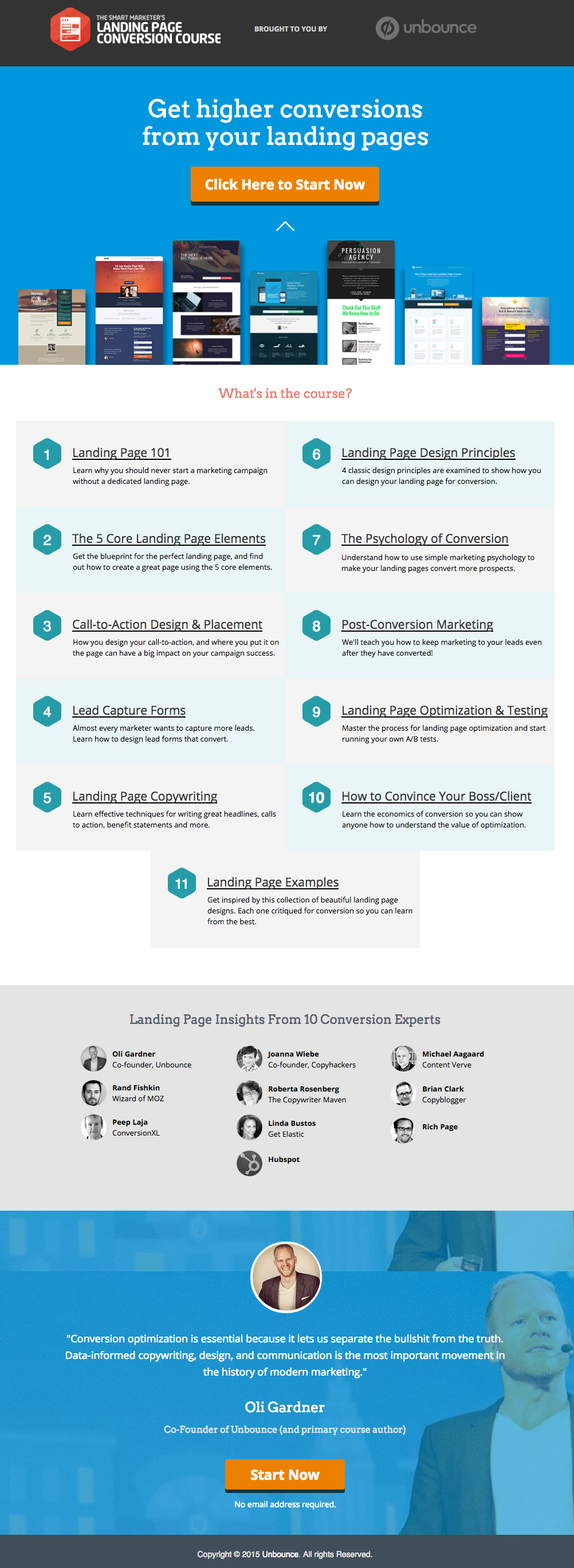
    Unbounce-லிருந்து ஒரு சிறந்த லேண்டிங் பக்கத்திற்கான உதாரணம் இங்கே உள்ளது, இது எங்களுக்கு மிகவும் பிடித்த ஒன்று:

    This has all of the right elements you need to execute the perfect landing page: it’s got just the right amount of text (which is really helpful for boosting SEO), and it’s packaged in a way that it’s not too heavy or intimidating for site visitors.

    The imagery is great as well, and the placement of the two call-to-action (or CTA) buttons give the visitors just enough cues to sign up for their service. Not too little, but not too much either.

    (குறிப்பு: Unbounce லேண்டிங் பக்கம் பார்ப்பதற்கு மிகவும் பிரமாதமாகத் தெரிகிறது – உங்கள் சொந்த லேண்டிங் பக்கத்தில் அதே போன்ற பாணியை உருவாக்க முயற்சிக்கும்போது ஒருவேளை சற்று அச்சுறுத்தலாகக் கூட இருக்கலாம் – ஆனால் PBS-ஐப் பயன்படுத்தி நீங்கள் இதேபோன்ற மற்றும் அவ்வளவு சிறப்பான தோற்றமுடைய பக்கத்தை உருவாக்க முடியும்).

    MAKE YOUR OWN LANDING PAGE: If you’re new to design, First Site Guide’s Elements & Principles of Design Cheat Sheet proves to be friendly and reliable for beginners.

    Take note though, that Unbounce’s example isn’t the only way you can create your landing page.

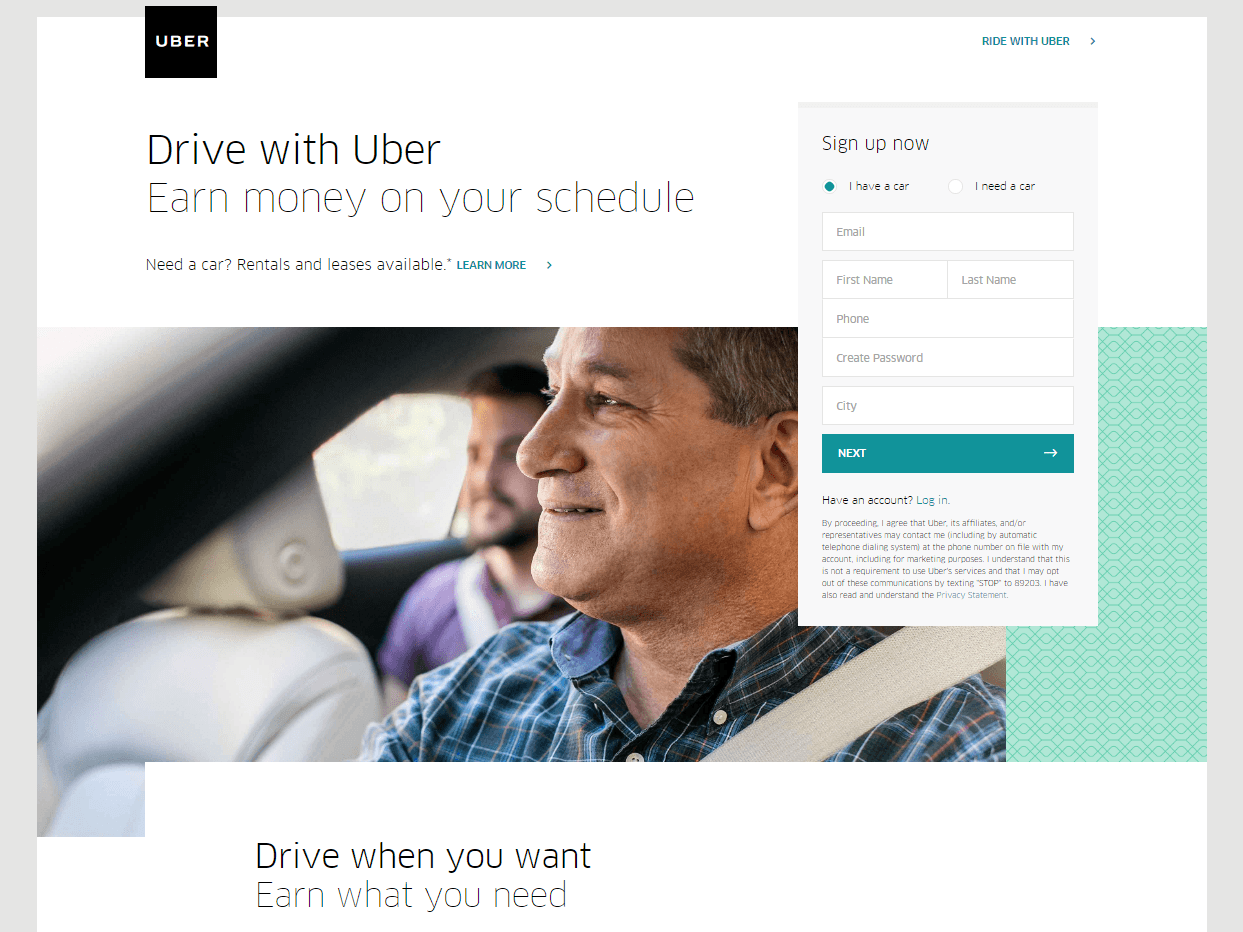
    You can always go for a simpler, cleaner look, like Uber’s landing page below:

    The text’s placement, along with the sign-up forms look crisp and clean. There’s also minimal distractions on this landing page, which prompts its visitors to sign up right away.

    MAKE YOUR OWN LANDING PAGE: First Site Guide’s Psychology of Color Cheat Sheet is a huge helA, which can help you balance out the right kind of colors that create a minimal yet classy effect for your landing pages.

    You can have more than one

    This is a little tricky because you have to learn how to strike a balance, but if you think it’ll help generate more leads,  you can actually build more than one landing page. Again, different landing pages cater to different needs.

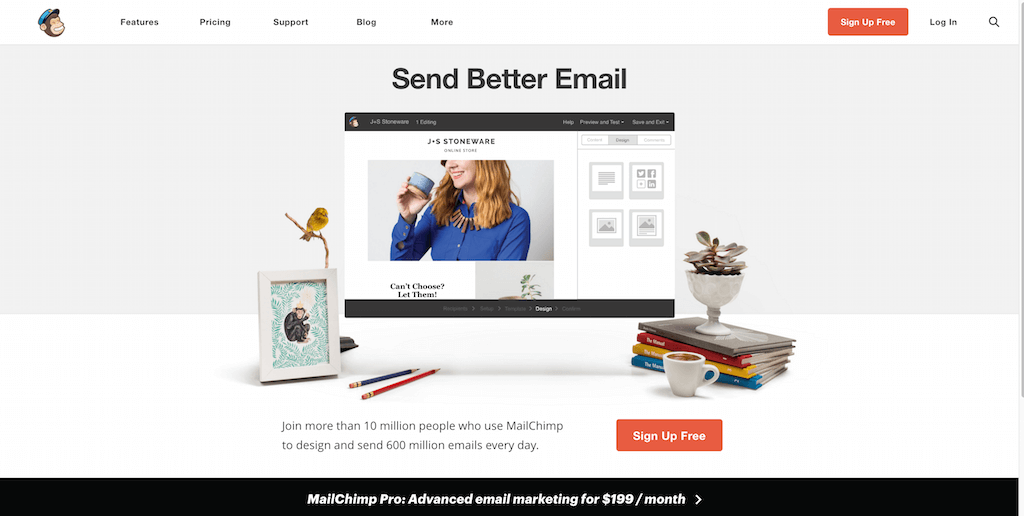
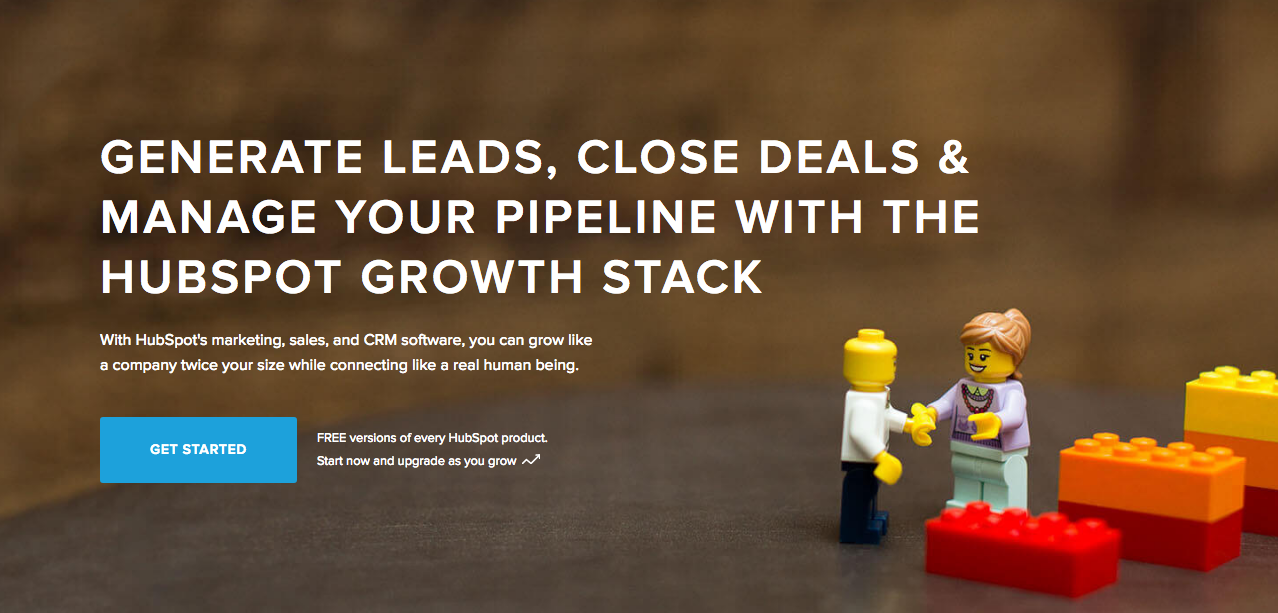
    உதாரணமாக MailChimp-லிருந்து இதை (பலவற்றில் ஒன்றை) எடுத்துக் கொள்ளுங்கள், இது அதன் பார்வையாளர்களை அவர்களின் சேவைகளுக்கு இலவசமாக பதிவு செய்யும்படி தூண்டுகிறது:

    (It worked by the way, as we use MailChimp for our newsletter service, too).

    Take note of the text – it’s straight to the point, and addresses the target’s audience needs in just three simple, albeit powerful words; enough to catch the visitor’s attention, and convert into a lead.

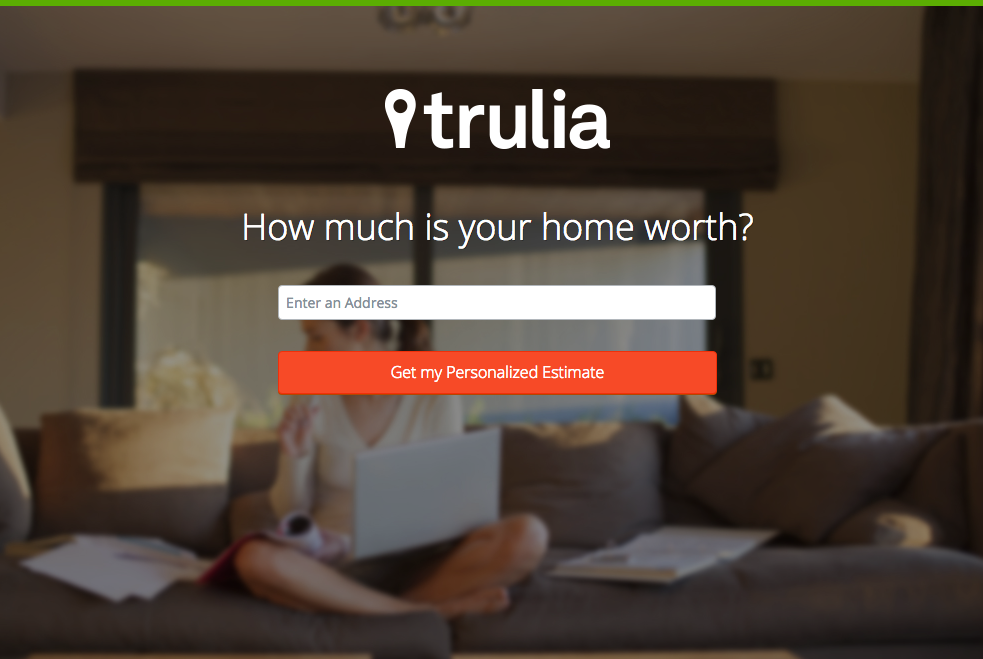
    Here’s another from Truila, which helps its users get an estimate of how much their houses are worth.

    Unlike the previous examples, Truilia doesn’t offer a catch to their customers in this particular landing page. They simply offer to give the visitor a chance to test out their service.

    Again, take note of the copy: no fluff, and it gets straight to the point.

    Usually, landing pages like these direct you towards another, one that has more information about what the website is offering. This is also a great technique used to capture more leads.

    MAKE YOUR OWN LANDING PAGE: Did you know that “Under Construction” pages count as landing pages, too? This blog post by First Site Guide teaches you how to make one.

    More doesn’t always mean merrier

    It’s important to remember that the problem isn’t the lack of landing pages per se – but the lack of well-created, successful landing pages.

    எந்தவொரு வலைத்தளமும் அவற்றில் பலவற்றை உருவாக்க முடியும், ஆனால் அது தானாகவே வெற்றிகரமான லீட் மாற்றங்களை வழங்கிவிடாது.

    மீண்டும் கூறுகிறோம், லேண்டிங் பக்கங்களின் பணி மிகவும் நுணுக்கமானது – எனவே அதன் பின்னணியில் உள்ள கலை மற்றும் அறிவியலைப் படிப்பதில் முதலீடு செய்ய உங்களுக்கு வசதியிருந்தால், நீங்கள் அதைச் செய்வது மிகவும் பரிந்துரைக்கப்படுகிறது.

    Here are some websites that’ll be really helpful in your journey to creating landing pages

    Landing Folio

    http://www.landingfolio.com/

    Landing Folio is an extensive gallery that’s really useful when it comes to getting inspiration for landing page designs. They also offer some kick-ass, friendly courses on how to perfect the art of creating landing pages. Plus, all the designs are pretty and fun to look at as well.

    First Site Guide

    http://firstsiteguide.com

    First Site Guide என்பது இணையத்தில் உள்ள மிகவும் பயனுள்ள வலைத்தளங்களில் ஒன்றாகும், குறிப்பாக நீங்கள் இணையத்திற்கு புதியவராகவும், அதன் மூலம் எதையாவது உருவாக்க விரும்பினாலும் இது மிகவும் உதவும். உள்ளடக்கத்தை உருவாக்கும் கருவிகளின் பட்டியல்கள், தயாரிப்பு மதிப்புரைகள் மற்றும் ஒப்பீடுகள், இன்போ கிராபிக்ஸ், எளிமையான வீடியோ பயிற்சிகள் மற்றும் பலவற்றை உள்ளடக்கிய ஆதாரங்கள் அவர்களிடம் உள்ளன. உங்கள் முதல் லேண்டிங் பக்கத்தை உருவாக்கத் தொடங்குகிறீர்கள் என்றால் இது நிச்சயமாக உதவியாக இருக்கும்.

    Conversion Lab

    http://conversionlab.no/

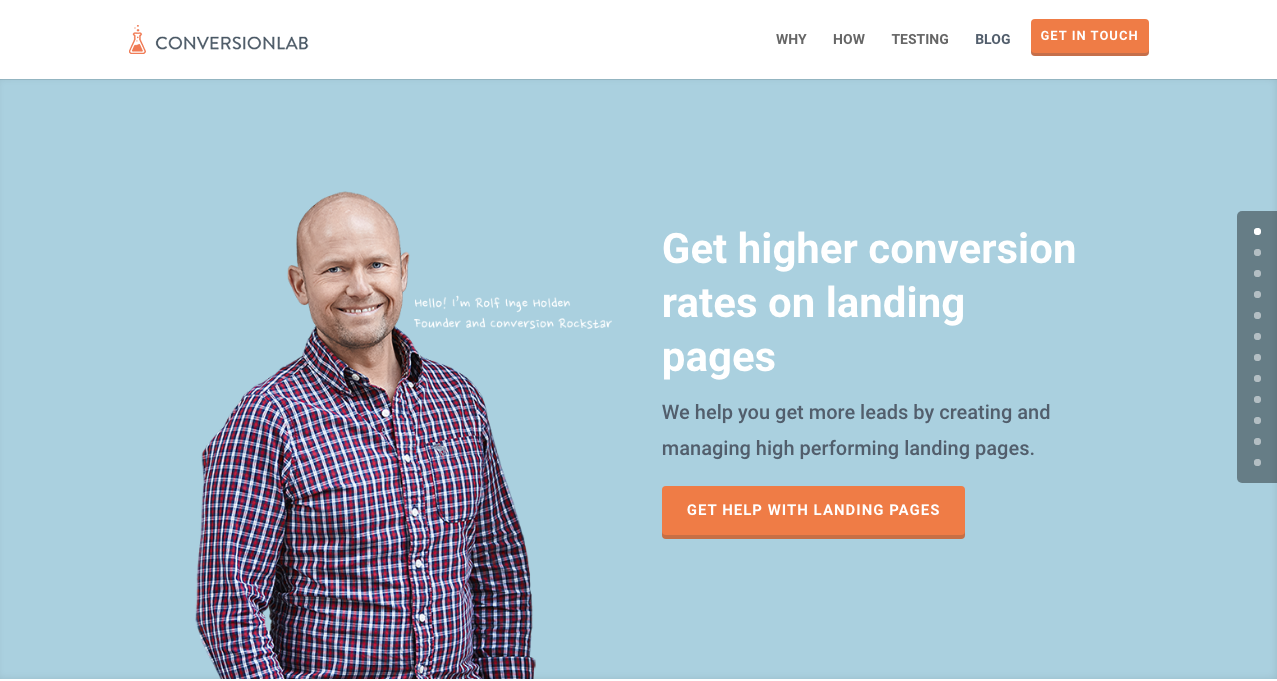
    Apart from the fact that their own landing page is pretty well-crafted itself, Conversion Lab does exactly what they say they do: they help you get conversions. They also help out with testing too, which is crucial to any website that’s trying to raise their conversion rates.

    Hubspot

    https://blog.hubspot.com/marketing

    Hubspot is an all-around help site that lends you a hand in almost anything and everything related to online marketing.

    வணிகத் திட்டங்களை உருவாக்குவது முதல் உள்ளடக்கம் மற்றும் உள்வரும் மார்க்கெட்டிங் (inbound marketing), மற்றும் நிச்சயமாக லேண்டிங் பக்கங்கள் வரை பல்வேறு வகையான கட்டுரைகளின் தொகுப்பை அவர்கள் கொண்டுள்ளனர். டிஜிட்டல் மார்க்கெட்டிங் துறைக்கு இன்னும் புதியவராக இருக்கும் எவருக்கும் இது ஒரு சிறந்த ஆதாரமாகும்.

    முடிவுரை

    லேண்டிங் பக்கங்கள் மிகவும் தந்திரமானவையாக இருக்கலாம், குறிப்பாக நீங்கள் எந்த வகையான வணிகத்திலும் புதிதாகத் தொடங்கும்போது.

    ஆனால் அவை எவ்வாறு செயல்படுகின்றன என்பதையும் அவற்றை எவ்வாறு உருவாக்குவது என்பதையும் கற்றுக்கொள்வதில் முதலீடு செய்வது உங்கள் நேரத்திற்கு பயனுள்ளது என்பதை நினைவில் கொள்ளுங்கள். ஏன்? ஏனெனில் அவை லீட்களை உருவாக்குகின்றன, மேலும் லீட்கள் வருவாயை உருவாக்குகின்றன.

    Take note that digital marketing trends are changing rapidly. You have to keep with these trends in order for your business to not only survive, but to also thrive.

    Do you have any other tips or resources that you’d like to share with us? Comment below, or send us an email at [email protected] if you’d like to get featured as a resource in one of our articles.

    மகிழ்ச்சியான பக்க உருவாக்கம்!

  • குறுகிய குறியீடு மேப்பர் செருகுநிரல் அம்சம்: மாடர்ன் ட்ரைப் வழங்கும் தி ஈவென்ட்ஸ் கேலெண்டர்

    shortcode-mapper-plugin-feature-the-events-calendar-by-modern-tribePlugins of the same category, but with respective features, are developed and enhanced every day. This gave birth to the variety of WordPress-powered websites – and later on, websites catering to several functions. For instance, there is a number of plugins which enables a developer and/or user to create, schedule, invite an interested person to an event.

    The Events Calendar is the events calendar you’ll need

    There are a lot of available events calendar in the WordPress market. So how do you choose? There are recommendation blogs, plugin face-off blogs, and of course testimonials from different users. All of these have one thing in common: they include The Events Calendar by Modern Tribe in their list.

    screenshot-2016-10-05-20-00-09
    An example of a minimal event post of The Events Calendar

    The Events Calendar-இல் அப்படி என்னதான் இருக்கிறது?

    Modern Tribe-இன் The Events Calendar என்பது இந்த குறிப்பிட்ட பிரிவில் முன்னணி செருகுநிரலாகும் (plugin). இது நிகழ்வுப் பதிவுகளுக்கு தொழில்முறைத் தரத்தை வழங்குகிறது. இது மேலே தலைப்பு, தேதி மற்றும் நேரம், பொருந்தினால் கட்டணம், சிறப்புக் படம் மற்றும்/அல்லது வரைபடம், மற்றும் நிகழ்வு பற்றிய கூடுதல் விவரங்களுடன் மிகவும் எளிமையான இடைமுகத்தைக் கொண்டுள்ளது. நீங்கள் Pro பதிப்பைப் பயன்படுத்தினால், உங்கள் அனைத்து நிகழ்வுகளையும் தேதி, முக்கியச் சொல் மற்றும் இருப்பிடம் வாரியாகப் பார்க்கலாம்.

    You can do much more with The Events Calendars Pro and its official add-ons:

    The Events Calendar PRO

    • Recurring events
    • Week view
    • Photo view
    • Location search
    • Map view
    • Venue and organizer view
    • Advanced widgets
    • Additional fields

    The Events Calendar ADD-ONs

    • RSVP tickets
    • Event ticket plus via WooCommerce, Shopp, WPeCommerce, Easy Digital Downloads)
    • Community Events
    • Community Tickets
    • Filter Bar
    • Facebook Events
    • iCal Importer
    • Eventbrite Tickets

    Page Builder Sandwich உடன் இதை ஒருங்கிணைப்பது இன்னும் சிறந்ததாக்குகிறது

    screenshot-2016-10-04-17-46-04Recent posts were made to highlight the benefits of using PBS and its Shortcode Mapper. This is to make sure that you guys are taking advantage of the latest innovation that the Sandwich Team can develop plus notify the plugin developers that their creation gave birth to another awesome feature.

    The Events Calendar செருகுநிரலைப் பொறுத்தவரை, இந்த இணைப்பு ஏன் இருக்க வேண்டும் என்பதற்கு 2 வியக்கத்தக்க காரணங்களை நாங்கள் கண்டறிந்துள்ளோம்:

    1.      WordPress செருகுநிரல் ஜாம்பவான்களால் மதிப்பாய்வு செய்யப்பட்டது

    The Modern Tribe assured their customers that the product and service they offered was of quality. Creator of Easy Digital Downloads, Pippin Williamson gave his inputs about The Events Calendar. Alongside him was Mark Jaquith, one of the leading WordPress developers, who made sure that the plugin was secure.

    Page Builder Sandwich was also reviewed recently by Pippin, together with the other established and rising page builders in the market. In his in-depth critique, he concluded that indeed, PBS is one of the most powerful drag-and-drop page builders. He highlighted that only  Page Builder Sandwich was able to create a functioning Shortcode Mapper.

    2.      ஷார்ட்கோட் தேர்வுகள்: பின்தளத்திலிருந்து (backend) முன்தள (frontend) எடிட்டிங்கிற்கு

    இயல்பாகவே, இந்த செருகுநிரலின் ஷார்ட்கோட் தேர்வுகளை பின்தள நிர்வாகக் குழுவின் (admin panel) மூலம் அணுக முடியும். பின்னர், பிற பின்தள செருகுநிரல்களின் அதே செயல்முறை நிகழ்கிறது: பின்தள எடிட்டருக்குச் செல்லவும், தேவையான மாற்றங்களை உள்ளிடவும், பின்னர் சேமிக்கவும். ரெஃப்ரெஷ் பொத்தானைக் கிளிக் செய்த பின்னரே திருத்தப்பட்ட உள்ளடக்கத்தைக் காண முடியும். மொத்தத்தில், இது 4 படிகள் ஆகும்.

    ஆனால் அந்த நீண்ட செயல்முறையை Page Builder Sandwich நிகழ்நேர முன்தள எடிட்டிங்காக மாற்றியுள்ளது – வெறும் 2 படிகளில்:

    1. Instead of going to the backend panel to access the shortcode options, click on the Shortcode Mapper and select on The Events Calendar. You’d be redirected to a pop-up window as seen below. Click on The Events Calendar.
      screenshot-2016-10-04-17-43-37
      View of The Events Calendar in the Page Builder Sandwich Shortcode Mapper
    2. screenshot-2016-10-05-19-57-11
      Close look at The Events Calendar Shortcode Properties
      The Inspector on the left displays the initial properties of the shortcode. Clicking on the “Open Editor” button, the shortcode controls displayed at the backend can now be accessed on the frontend via a pop-up window.
    screenshot-2016-10-06-13-25-04
    See? The Events Calendar looks like you’re just making an event post.

    screenshot-2016-10-06-14-37-52

    இதில் பல நன்மைகள் உள்ளன, சரிதானே?

    With the integration of a page builder that doesn’t lock you in and leaves shortcode mess, and the most popular events calendar, your workflow would not only smoothen but also increase in productivity. Additionally, you can look into what Modern Tribe offers: the bundle of plugins that go with The Events Calendar.

    இதுவரை, Modern Tribe-இன் The Events Calendar செருகுநிரல் மட்டுமே எங்கள் Shortcode Mapper-இல் இணைக்கப்பட்டுள்ளது. இருப்பினும் வரைபடமாக்கல் (mapping) இத்துடன் முடிந்துவிட்டது என்று அர்த்தமல்ல. எங்கள் Shortcode Mapper-இல் நீங்கள் காண விரும்பும் Modern Tribe-இன் பிற செருகுநிரல் எது என்பதை பின்னூட்டத்தில் (comment) தெரிவிக்கவும்.

  • Page Builder Sandwich பதிப்பு 3 இன் ஒரு சுற்றுப்பயணம்

    a-tour-of-page-builder-sandwich-version-3

    Page Builder Sandwich பதிப்பு 3-இல் நாங்கள் பல மாற்றங்களைச் செய்துள்ளோம். நீங்கள் நீண்ட காலமாக Page Builder Sandwich-ஐப் பயன்படுத்தி வருகிறீர்கள் என்றால், மாற்றங்கள் மிகவும் கணிசமாக இருப்பதை நீங்கள் கவனிப்பீர்கள். பதிப்பு 1, பதிப்பு 2 மற்றும் தற்போதைய பதிப்பிற்கு இடையே ஒரு பெரிய வித்தியாசம் உள்ளது. முந்தைய பதிப்புகளில், அனைத்தும் பக்கவாட்டில் உள்ள இன்ஸ்பெக்டரில் அமைந்திருந்தன. அதன்பிறகு நாங்கள் அதன் கூறுகளை வெவ்வேறு, மிகவும் தர்க்கரீதியான பிரிவுகளாகப் பிரித்துள்ளோம். இந்த மேம்படுத்தலுக்கான காரணங்களை முந்தைய வலைப்பதிவு இடுகையில் பட்டியலிட்டுள்ளோம்.

    தற்போதைய பயனர்கள் ஆரம்பத்தில் மாற்றங்களைச் சற்று சிரமமாகக் காணலாம். சில நிமிடங்கள் முயற்சித்துப் பாருங்கள், நீங்கள் இயல்பாகப் பழகுவதை உணர்வீர்கள் என்று நாங்கள் நம்புகிறோம். சொல் செயலிகளில் (word processors) உங்களுக்கு இயல்பாக இருக்கும் பழக்கம் இணையதள உருவாக்கத்திலும் செயல்படும் வகையில் இடைமுகத்தின் ஒவ்வொரு அம்சத்தையும் நாங்கள் கவனமாக வடிவமைத்துள்ளோம்.

    புதிய இடைமுகத்தின் அறிமுகத்தைக் காணுங்கள்

  • விடுமுறைக்கால விற்பனை: குறைந்த காலத்திற்கு அனைத்து உரிமங்களுக்கும் 30% தள்ளுபடியைப் பெறுங்கள்!

    ஆம், நீங்கள் கேட்டது சரிதான்! Page Builder Sandwich இன்று, 17 டிசம்பர் 2016 முதல் 1 ஜனவரி 2017 வரை முன்கூட்டிய விடுமுறையைத் தொடங்குகிறது! ஆம், தொடர்ந்து 15 நாட்களுக்கு அனைத்து உரிமங்களுக்கும் 30% தள்ளுபடி வழங்குகிறோம்! கூப்பன் குறியீடு தேவையில்லை. உண்மையிலேயே இனிய விடுமுறை நாட்கள்.

    "Christmas ornaments - HBW" by Bhavna Sayana is licensed under CC BY
    “Christmas ornaments – HBW” – Bhavna Sayana வழங்கியது, CC BY உரிமத்தின் கீழ் உள்ளது

    இதனுடன், வரவிருக்கும் PBS-இன் முதலாவது ஆண்டுவிழா ஜனவரி 14 அன்று நடைபெறவுள்ளதை இந்த வாய்ப்பின் மூலம் அறிவிக்க விரும்புகிறோம். உங்களுக்காக பல சிறப்பான அம்சங்களை வைத்திருக்கிறோம், எங்களைப் போலவே நீங்களும் ஆர்வமாக இருப்பீர்கள் என நம்புகிறோம்! அவற்றில் சில இதோ:

    • பேரலாக்ஸ் ஸ்க்ரோலிங்
    • வீடியோ பின்னணிகள்
    • ஒற்றைப் பக்க டெம்ப்ளேட்டுகள்
    • ரெஸ்பான்சிவ் கட்டுப்பாடுகள்
    • தனிப்பயன் CSS ஸ்டைலிங்

    ஆண்டுவிழா புதுப்பிப்பில் எதிர்பார்க்கப்படும் புதிய அம்சங்களின் முழுமையான பட்டியல் அடங்கிய கட்டுரையை விரைவில் வெளியிடுவோம். புதிய புதுப்பிப்பு குறித்த அறிவிப்பைப் பெற கீழே உள்ள எங்கள் செய்திமடலுக்கு குழுசேருங்கள்!

    இனிய விடுமுறை மற்றும் இனிய வலைத்தள உருவாக்க வாழ்த்துகள்!


  • Shortcode Mapper செருகுநிரல் அம்சம்: Automattic-இன் WP Job Manager

    how-to-create-a-website-from-scratch-for-under-100Page Builder Sandwich-இன் புதிய அம்சமான Shortcode Mapper-ஐ நாங்கள் வெளியிட்டு ஒரு மாதம் கடந்துவிட்டது. அவற்றில் உள்ள ஷார்ட்கோட்களின் எண்ணிக்கையைப் பொருட்படுத்தாமல் 100-க்கும் மேற்பட்ட செருகுநிரல்களை (துல்லியமாகச் சொன்னால் 144 செருகுநிரல்கள்) நாங்கள் ஒருங்கிணைத்துள்ளோம். இது ஒரு சவாலான பணியாக இருந்தது, ஆனால் நாங்கள் அதைச் செய்து முடித்தோம்!

    இதைப் பற்றி உங்களுக்கு மேலும் தெரியப்படுத்துவதற்காக, Page Builder Sandwich உடன் முழுமையாக ஒருங்கிணைக்கப்பட்ட செருகுநிரல்களை நாங்கள் காட்சிப்படுத்தத் தொடங்கியுள்ளோம். முதல் நிறுத்தம்: Automattic-இன் WP Job Manager.

    WP Job Manager ஒரு பார்வை

    screenshot-2016-09-16-03-21-46

    அடிப்படையில் WP Job Manager என்பது நீங்கள் வருமானம் ஈட்டுவதற்கான செருகுநிரலாகச் செயல்படுகிறது – அதாவது உங்கள் வலைத்தளத்திற்கு வேலைவாய்ப்பு பலகை (job board) செயல்பாடு தேவைப்படும் ஒரு வாடிக்கையாளர் உங்களிடம் இருக்கலாம் அல்லது உங்கள் வளர்ந்து வரும் நிறுவனத்திற்கு அதிக நபர்கள் தேவைப்படுவதை நீங்கள் உணரலாம்.

    இந்தச் செருகுநிரலை வாங்குவதற்கு மிகவும் சிறந்த ஒன்றாக மாற்றுவது என்னவென்றால், உங்கள் சாத்தியமான பணியாளர்கள் மடிக்கணினிகளை மட்டுமே பயன்படுத்த வேண்டும் என்ற கட்டுப்பாடு இல்லை. WP Job Manager-இல் வருவாய் வரவை உண்டாக்கும் மொபைல் ஆதரவு அம்சம் உள்ளது. இது தேடல் மற்றும் வடிகட்டுதல் இடைமுகத்துடன் பயன்படுத்த எளிதானது. அதனுடன் வேலை மற்றும் நிறுவனத் தகவல்களும் உள்ளன, அதாவது நிறுவனத்தின் நம்பகத்தன்மையை தனியாகத் தேட வேண்டிய அவசியமில்லை. ஒரே வேலைத் தேடலில் அனைத்தும் வழங்கப்படுகின்றன.

    உங்களுக்குப் பணியிடங்களை நிரப்ப வேண்டும் என்றால், விண்ணப்பங்களை ஏற்றுக்கொள்வதை WP Job Manager எளிதான காரியமாக்குகிறது.

    Page Builder Sandwich, WP Job Manager-ஐப் பயன்படுத்துவதை எளிதாக்குகிறது

    பக்க கட்டமைப்பாளரையும் (page builder) செருகுநிரலையும் இணைக்க நீங்கள் கண்களைச் சுருக்கவோ எதிலிருந்தும் தகவல்களைப் பிழிந்தெடுக்கவோ தேவையில்லை. இவை இரண்டும் ஒன்றுக்கொன்று இணக்கமாக இருப்பதற்கான 3 காரணங்கள் இதோ:

    screenshot-2016-09-16-03-24-32
    Page Builder Sandwich மற்றும் WP Job Manager எவ்வாறு இணைந்து செயல்படுகின்றன என்பதன் மேலோட்டப் பார்வை

    வேலை ஷார்ட்கோட்களை விரைவாகச் செருகவும்

    செருகுநிரலில் பயன்படுத்தப்பட்ட 6 ஷார்ட்கோட்களை PBS Shortcode Mapper கண்டறிந்தது, மேலும் நாங்கள் அவை அனைத்தையும் ஒருங்கிணைத்துள்ளோம். ஒவ்வொரு ஷார்ட்கோடிலும் வெவ்வேறு ஆர்குமென்ட்கள் உள்ளன, அவை வேலை தேடல் படிவத்தையோ அல்லது வேலைவாய்ப்பின் விவரங்களையோ காண்பிக்க உங்களை அனுமதிக்கின்றன. ஒவ்வொரு ஷார்ட்கோடின் விவரங்களும் அவற்றின் தளத்தின் ஷார்ட்கோட் குறிப்பில் கிடைக்கின்றன. இப்போது இந்த ஷார்ட்கோட்களை எவ்வாறு மாற்றியமைப்பது என்பதற்கான ஆவணங்களை நீங்கள் சரிபார்க்க வேண்டியதில்லை, அனைத்து ஷார்ட்கோட்களும் அவற்றின் பண்புக்கூறுகளும் விளக்கங்களுடன் PBS-இல் முழுமையாக வழங்கப்பட்டுள்ளன.

    screenshot-2016-09-15-18-58-29
    WP Job Manager-இன் கிடைக்கக்கூடிய ஷார்ட்கோட்கள்

    screenshot-2016-09-15-18-54-362
    Jobs Shortcode பண்புக்கூறுகள்

    இது எந்த தீமுடனும் செயல்படும்

    இயல்பாகவே, Page Builder Sandwich-ஐ உங்கள் பக்க கட்டமைப்பாளர் எடிட்டராகப் பயன்படுத்துவது நீங்கள் பயன்படுத்தத் தேர்ந்தெடுத்த தீமைப் பாதிக்காது. மேலும் முழுமையான வலைத்தள உகப்பாக்கத்தை உறுதிசெய்ய, நாங்கள் PBS Shortcode Mapper-ஐ உருவாக்கியுள்ளோம். இதே கொள்கை WP Job Manager-க்கும் பொருந்தும்! ThemeForest-இல் உள்ள தீம் உருவாக்குநர்களில் ஒருவரான Astoundify, தங்களின் Listify – WordPress Directory Theme-இல் குறிப்பிட்ட செருகுநிரலை ஆதரிக்கிறது. WP Job Manager முழுமையாக ஒருங்கிணைக்கப்பட்ட கூடுதல் தீம்களுக்கு, அவற்றின் அதிகாரப்பூர்வப் பட்டியலைப்.

    முன்முனையில் வேலைகளை நிர்வகிக்கவும்

    முன்முனைக்கும் பின்முனைக்கும் (backend) இடையில் மாறி மாறிச் செயல்படுவதற்கான முயற்சியைக் குறைப்பதும், செய்யப்பட்ட மாற்றங்களைக் காண பக்கத்தை மீண்டும் ஏற்றுவதைத் தவிர்ப்பதும் தான் எங்கள் நோக்கமாகும். PBS உடன், நீங்கள் பின்முனையைச் சரிபார்க்காமலேயே நீங்கள் தேர்ந்தெடுத்த வேலைகளைத் திருத்தலாம், மேலும் உங்கள் பக்கத்தைத் திருத்தும் போதே செருகுநிரலின் அமைப்புகளையும் திருத்த முடியும். PBS இல்லாமல், பயனர்கள் கூடுதல் முயற்சி எடுக்க வேண்டியிருக்கும், மேலும் பிற WordPress திட்டங்களை உருவாக்க ஒதுக்கக்கூடிய அதிக நேரம் இதற்குத் தேவைப்படும். WP Job Manager-இன் இந்த அம்சம் தான் எங்களுக்கு மிகவும் பிடித்த ஒன்று!

    இறுதி எண்ணங்கள்

    WordPress.com-ஐ உருவாக்கிய அதே நிறுவனத்தால் உருவாக்கப்பட்டதால், இந்தச் செருகுநிரல் ஏற்கனவே வெளிச்சத்தில் இருப்பதன் நன்மையைப் பெற்றுள்ளது. ஆனால் இது WordPress உருவாக்குநர்கள் முதல் தீவிர WordPress ஆர்வலர்கள் வரை பலரின் பெரும் எதிர்பார்ப்புகளையும் சுமந்துள்ளது. இதுவரை, இலகுரக வேலைவாய்ப்பு பலகை செயல்பாட்டைப் பொறுத்தவரை இது அனைவரின் தேவைகளையும் பூர்த்தி செய்துள்ளது. WordPress உருவாக்குநர்கள் இந்தச் செருகுநிரலை மிகவும் விரும்பியதால், செருகுநிரலின் பயன்பாட்டை மேம்படுத்த அவர்கள் நீட்டிப்புகளைக் கூட உருவாக்கியுள்ளனர்.

    வரவிருக்கும் வாரங்களில் மேலும் பல செருகுநிரல்கள் காட்சிப்படுத்தப்படும்! அடுத்து யாரைப் பற்றியும் எதைப் பற்றியும் நாம் எழுத வேண்டும் என்ற ஆலோசனைகள் உங்களிடம் இருந்தால், கீழே கருத்து தெரிவிக்கவும்.

    விரைவில் சந்திப்போம்!

  • Page Builder Sandwich பதிப்பு 4.0-ஐ அறிமுகப்படுத்துகிறோம்

    2015-ஆம் ஆண்டின் தொடக்கத்தில் நாங்கள் PBS-ஐ உருவாக்கத் தொடங்கியபோது, அதன் வரம்புகளைத் தாண்டி வளரும் அதன் திறனை நாங்கள் எப்போதும் நம்பினோம். அது வெளியானதிலிருந்து கடந்த ஒரு வருடமாக, PBS அதைச் சாதிக்க வேண்டும் என்பதற்காக எங்கள் குழு மிகவும் கடினமாக உழைத்து, கூடுதல் முயற்சிகளை மேற்கொண்டு வருகிறது.

    In 2016, we’ve managed to release three versions of PBS, each one surpassing their predecessors with more advantageous updates after the next. Today, in 2017, we’re finally releasing Page Builder Sandwich Version 4.0 in commemoration of its very first birthday.

    நாங்கள் உண்மையைச் சொல்கிறோம்: இது எளிதானதாக இருக்கவில்லை.

    ஆனால் 2015-இல் அதன் எளிமையான தொடக்கத்துடன் ஒப்பிடும்போது, Page Builder Sandwich அதன் பீட்டா நாட்களில் இருந்து நிச்சயமாக நீண்ட தூரம் வந்துள்ளது என்று இப்போது எங்களால் நம்பிக்கையுடன் கூற முடியும்.

    Then vs Now

    Taking a step back and looking at the different versions that PBS went through, it has really changed for the better.  Some learning mistakes just made us cringe and laugh!

    Enhanced User Interface

    For versions 3.0 and 4.0, we’ve made some major improvements with regards to the user interface. Pippin’s insight really made a wake-up call to us!

    The old interface of PBS Version 2.0  (left) vs Version 4.0’s cleaner, more efficient UI (right)

    Engaging in conversation and taking note of feedback has always been important to us, and is (and always will be) an integral part of Page Builder Sandwich’s continued growth. Out of all of PBS’ features though, we’ve received quite a number of critiques regarding the previous versions’ UI’s. All of them had one common denominator that many believed was detrimental to PBS’ functionality: the color scheme. According to most, it was too aggressive and did not compliment WordPress’ color palette. We’ve since addressed this issue in Version 4.0, constructing an improved UI with toned-down colors, all while still keeping PBS’ signature drag-and-drop UI intact.

    Mobile Responsiveness

    டேப்லெட்டுகள் மற்றும் செல்போன்கள் போன்ற சாதனங்கள் சந்தையில் அதிகளவில் ஆதிக்கம் செலுத்துவதால், பெரும்பாலான பேஜ் பில்டர்கள் ஏற்றுக்கொள்ளும் மற்றொரு பொதுவான அம்சம் மொபைல் ரெஸ்பான்சிவ்னஸின் தேவையாகும்.

    Because of this, we’ve tackled mobile responsiveness in Version 4.0’s release. Viewing pages built with PBS now becomes a smoother, more efficient experience, with your page’s UI adapting to your device’s screen resolutions.

    இது தவிர, PBS இப்போது டெஸ்க்டாப்பில் மொபைல் முன்னோட்டங்களையும் ஆதரிக்கிறது. இதன் மூலம், மொபைல் அல்லது டேப்லெட் ஆகிய இரண்டையும் பயன்படுத்த வேண்டிய அவசியமின்றி, உங்களுக்குத் தேவையான எந்தப் பயன்முறையிலும் உங்கள் பக்கம் எவ்வாறு காட்சியளிக்கிறது என்பதை எளிதாக முன்னோட்டம் பார்க்க முடியும்.

    மேலும், PBS இப்போது பயனர்கள் மற்ற திரை அளவுகளைப் பாதிக்காமல், டெஸ்க்டாப், மொபைல் மற்றும் டேப்லெட் ஆகியவற்றில் மாற்றங்களைச் செய்ய அனுமதிக்கிறது.

    What’s New: Features

    Full Page Templates

    PBS அறிமுகப்படுத்தப்பட்டதிலிருந்து நாங்கள் கவனித்த மற்றொரு விஷயம் என்னவென்றால், பயனர்கள் குறிப்பிட்ட முக்கியப் பிரிவுகளை அடிப்படையாகக் கொண்டு பக்கங்களை உருவாக்கும் போக்கு உள்ளது. பக்கங்களை உருவாக்கும் போது இது இயல்பான ஒன்றுதான், ஆனால் பயனருக்கு, இந்த முக்கியப் பிரிவு சார்ந்த பக்கங்களை உருவாக்கும் போது இது ஒரு சிறிய பிரச்சனையாக மாறுகிறது. எடுத்துக்காட்டாக, போட்டோ கேலரியுடன் கூடிய வழக்கமான, அன்றாட வலைப்பதிவுடன் ஒப்பிடும்போது, Page Builder Sandwich மூலம் புதிதாக ஒரு இ-காமர்ஸ் தளத்தை உருவாக்க அதிக நேரம் ஆகலாம். எனவே இவ்வகை வலைத்தளங்களுக்கான தேவை தொடர்ந்து அதிகரித்து வருவதால், PBS-இன் முழுப் பக்க டெம்ப்ளேட்களை அறிமுகப்படுத்தும் தீர்வை நாங்கள் இறுதியாகக் கொண்டு வந்துள்ளோம்..

    முழுப் பக்க டெம்ப்ளேட்கள் முன்பே வடிவமைக்கப்பட்ட பிரிவுகளில் இருந்து எவ்வாறு வேறுபடுகின்றன?

    PBS actually has a feature similar to the Full Page Templates, the Pre-Designed Sections. Since our team has been aware that there are users who lack the time to design and layout their pages and sites, the Pre-Designed Sections were built for this specific purpose. The Pre-Designed Sections are small, individual layouts professionally designed to be mixed and matched together to build a page. However, while they are pre-designed, they aren’t full page, and are not niche-based.

    The Full Page Templates are different in that they’re designed to be used for an entire landing page, and they’re laden with features that commonly go with a particular niche. For example, upon accessing PBS’ Hotel Template, you’ll find that with it comes a map, contact details, and sections specifically designed for enumerating the hotel’s amenities. Similarly, the PBS Fashion Template includes a carousel feature for showcasing fashion ensembles for modern shops. These templates can also be tweaked and adjusted to suit the user’s needs and taste, of course.

    மூன்றாம் தரப்பு செருகுநிரல்களை எளிதாக அணுகுதல்

    WooCommerce, Advanced Custom Fields, Events Calendar, Instagram Feed, Contact Form 7, NextGen Gallery, among others, are now more accessible with Version 4.0. This means that if you have these plugins activated in your PBS-run site, you can now add them with more ease.

    அதிகம் கோரப்பட்ட கூறுகள் மற்றும் அம்சங்கள்: மேம்படுத்தப்பட்ட செயல்பாடு மற்றும் கூடுதல் வடிவமைப்பு அம்சங்கள்

    In the span of a year, we would regularly receive suggestions and requests for features that are currently in-demand in the page builder market. Among these include Parallax Scrolling, Video Backgrounds, Ken Burns Backgrounds, features that increase the aesthetic value of your page; and elements such as Pricing Tables, Testimonials, Countdowns, and Milestones to enhance your page’s functionality. With the release of Version 4.0, we’ve finally accomplished these and more. We’re sure your PBS experience will be even more worthwhile this time around.

    PBS-இன் அடுத்த கட்டம் என்ன?

    ஜனவரி 2016-இல் எங்கள் ஆரம்ப வெளியீட்டிற்குப் பிறகு நாங்கள் நீண்ட தூரம் வந்துள்ளோம். நாங்கள் பெரிய மேம்பாடுகளைச் செய்துள்ளோம், மேலும் இந்த பணி எளிதானது அல்ல என்றாலும், இது நிச்சயமாக மிகுந்த பலனளிப்பதாக உள்ளது. பதிப்பு 4.0 என்பது PBS-இல் இன்னும் பல மேம்பாடுகளுக்கான தொடக்கமே ஆகும், மேலும் இந்த 2017-ஆம் ஆண்டில், PBS தொடர்ந்து மேலும் மேலும் சிறப்பாக மாறுவதை உறுதிசெய்ய நாங்கள் தொடர்ந்து கடினமாக உழைப்போம். இப்போதைக்கு, நீங்கள் இந்த புதிய அம்சங்களை முழுமையாகப் பயன்படுத்திக் கொள்ள முடியும் என்றும், அவை PBS உடனான உங்கள் அனுபவத்தை மிகவும் பயனுள்ளதாக மாற்றும் என்றும் நம்புகிறோம்.

    இனிய வலைத்தள உருவாக்க வாழ்த்துகள்!

  • PBS பிளாக் ஃப்ரைடே விற்பனை: அனைத்து உரிமங்களுக்கும் 30% தள்ளுபடி!

    page-builder-sandwich-black-friday-deals

    நாம் நன்றி கூற வேண்டிய அனைத்து சிறந்த விஷயங்களையும் நினைவுகூரும் ஆண்டின் அந்த நேரம் மீண்டும் வந்துவிட்டது– அந்தப் பட்டியலில் நிச்சயமாக, எப்போதும் புகழ்பெற்ற பிளாக் ஃப்ரைடே விற்பனையும் இணைகிறது! இணையச் சந்தையில் உள்ள அனைத்து தள்ளுபடிகள், கூப்பன்கள் மற்றும் அற்புதமான சலுகைகள் இந்த நேரத்தில் பெறக்கூடியதாக உள்ளன, மேலும் இதில் இன்று, நவம்பர் 24 முதல் நவம்பர் 29, 2016 வரை நடைபெறும் Page Builder Sandwich-ன் பிரம்மாண்டமான பிளாக் ஃப்ரைடே மற்றும் சைபர் மண்டே விற்பனையும்

    அது உண்மைதான். அனைத்து Page Builder Sandwich உரிமங்களுக்கும் 5 நாட்களுக்கு 30% தள்ளுபடியை நாங்கள் வழங்குகிறோம்! எனவே விரைந்து செயல்பட்டு, இந்த சலுகை முடிவதற்குள் பெற்றுக்கொள்ளுங்கள்! எல்லாவற்றிற்கும் மேலாக, பிளாக் ஃப்ரைடே உண்மையில் வருடத்திற்கு ஒரு முறை மட்டுமே வருகிறது. இந்தச் சலுகையைப் பெற BLACKFRIDAY2016 என்ற கூப்பன் குறியீட்டைப் பயன்படுத்துங்கள்!

    அதுவரை, மகிழ்ச்சியான ஷாப்பிங், மகிழ்ச்சியான தள உருவாக்கம், மற்றும் இனிய, இனிய நன்றி தெரிவித்தல் நாள் வாழ்த்துகள்!