ผู้เขียน: Neil Lock

  • ทำไมคุณจึงควรเพิ่ม URL ลงใน Whitelist บนไฟร์วอลล์ของ Wordfence (และวิธีทำ)

    If you’re using Page Builder Sandwich along with Wordfence Security, there’s a chance you might have encountered something called a 403 error.

    Now, according to WordPress resource site WPBeginner, 403 errors occur when server permissions don’t allow access to a specific page.

    แต่ข้อผิดพลาด 403 หมายถึงอะไร และเหตุใดจึงเกิดขึ้นใน Page Builder Sandwich ตั้งแต่แรก?

    The 403 Error Explained

    สาเหตุที่พบบ่อยที่สุดของข้อผิดพลาด 403 คือเมื่อปลั๊กอินความปลอดภัยไม่ได้ถูกกำหนดค่าตามลักษณะหรือมาตรฐานเฉพาะ

    Like WordFence, most security plugins from WordPress restrict some actions if they’re suspected or proven to be malicious. These scenarios usually occur on your WP Admin or WP Login page, or show up as pop-ups alerting you that you don’t have authorization to view your page.

    นี่คือลักษณะของป๊อปอัปหากคุณพบเจอใน Sandwich:

    So what does this mean? Is Sandwich safe to use? Is WordFence bad? And does the 403 error warrant bad points for both Wordfence and Page Builder Sandwich?

    ก็ไม่ใช่เสียทีเดียว

    All of this just means that Wordfence is extra careful when scanning your external plugins.

    And that’s actually a really good thing, especially since they’re a security plugin.

    WordFence is Legit…

    WordFence คือ หนึ่งใน ปลั๊กอินความปลอดภัยที่ได้รับความนิยมมากที่สุดสำหรับ WordPress มีการติดตั้งที่ใช้งานอยู่มากกว่าหนึ่งล้านครั้ง ดังนั้นจึงมีโอกาสสูงที่ปลั๊กอินนี้จะได้รับการติดตั้งในเว็บไซต์ WP ของคุณเช่นกัน พวกเขามีอยู่เพื่อจุดประสงค์ที่ดีเยี่ยม: ไม่ใช่แค่เพื่อดูแลเว็บไซต์ของคุณให้ปลอดภัย แต่ยังช่วยลดความเสี่ยงด้านความปลอดภัย และปรับปรุงความปลอดภัยโดยรวมของเว็บไซต์คุณอีกด้วย

    สรุปสั้นๆ คือ WordFence นั้นเชื่อถือได้จริง

    …And So is Sandwich. But Why Does It Need Whitelisting?

    ไม่ใช่แค่ Sandwich เท่านั้นที่ WordFence บล็อก

    ปลั๊กอินและ URL อื่นๆ ก็จำเป็นต้องเพิ่มลงใน Whitelist (ตรงกันข้ามกับ Blacklist) ใน WordFence เช่นกัน ปลั๊กอินยอดนิยมบางตัวอาจได้รับการอนุญาตล่วงหน้าแล้วโดย Wordfence

    แล้วเกิดอะไรขึ้นเบื้องหลัง และข้อผิดพลาด 403 มาจากไหนกันแน่?

    Ajax Functions and Page Builder Sandwich

    Page Builder Sandwich ทำงานด้วยฟังก์ชัน ajax ตลอดประสบการณ์การแก้ไขของคุณ ปลั๊กอินบางตัวก็ทำงานเช่นนี้เช่นกัน

    W3Schools ได้อธิบายเกี่ยวกับ ajax เพิ่มเติมไว้ดังนี้:

    AJAX is a technique for creating fast and dynamic web pages. It allows web pages to be updated asynchronously by exchanging small amounts of data with the server behind the scenes. This means that it is possible to update parts of a web page, without reloading the whole page.

    Chart taken from W3Schools

    ใน Page Builder Sandwich การเรียกใช้ ajax มีตั้งแต่การดึงข้อมูลการจับคู่ชอร์ตโค้ด การเรนเดอร์ชอร์ตโค้ด ไปจนถึงการบันทึกการเปลี่ยนแปลงของคุณ สิ่งนี้อาจทำให้คุณประสบปัญหา เช่น ข้อผิดพลาด 403 ปัญหาในการบันทึกผลลัพธ์ หรือชอร์ตโค้ดที่ไม่แสดงผล นี่คือช่วงเวลาที่คุณอาจจำเป็นต้องเพิ่มการเรียก ajax เฉพาะสำหรับ Page Builder Sandwich ลงใน Whitelist

    Whitelisting Page Builder Sandwich on WordFence

    หากต้องการเพิ่ม PBS ลงใน Whitelist ในไฟร์วอลล์ของ Wordfence ให้เพิ่มรายการในส่วน Whitelisted URLs ด้วยพารามิเตอร์เหล่านี้:

    URL: /wp-admin/admin-ajax.php

    Param Name: main-content

    Param: POST Body

    สำหรับการติดตั้ง WordPress แบบหลายไซต์ (Multisite) ขอแนะนำให้ระบุชื่อโฟลเดอร์ของไซต์ของคุณลงใน URL ด้านบนด้วย ตัวอย่างเช่น: /my-multisite/wp-admin/admin-ajax.php

    หลังจากเพิ่มค่าเหล่านี้แล้ว ข้อผิดพลาด 403 ควรได้รับการแก้ไขอย่างถูกต้อง และคุณจะสามารถบันทึกผลลัพธ์รวมทั้งสร้างชอร์ตโค้ดที่เรนเดอร์ได้อีกครั้ง

    นี่คือลักษณะที่ควรจะเป็นภายใต้การตั้งค่า WordFence Firewall ของคุณ:

    Ta-da!

    Conclusion

    ใช่ Page Builder Sandwich ปลอดภัยในการใช้งาน

    ยิ่งไปกว่านั้น ปลั๊กอินจะดำเนินการคำสั่ง ajax เฉพาะเมื่ออยู่ในโหมดแก้ไขเท่านั้น และยังเข้ากันได้กับปลั๊กอินและธีมภายนอก (ตราบใดที่เป็นไปตามมาตรฐานการเขียนโค้ดของ WordPress)

    WordFence Security ก็ไม่ต่างกัน

    แต่ข้อดีของพวกเขาคือการมอบโอกาสให้ผู้ใช้ WordPress สามารถรักษาเว็บไซต์ของตนให้ปลอดภัยและมั่นคง พร้อมตัวเลือกเพิ่มเติมที่ให้คุณตัดสินใจได้ว่าปลั๊กอินใดปลอดภัยและปลั๊กอินใดไม่ปลอดภัย

  • เพิ่มฟอร์มสมัครรับจดหมายข่าวทางอีเมลได้อย่างง่ายดาย

    Easily-Add-Email-Newsletter-Signup-FormsAdding an email newsletter sign up form to your site is a great way to grow your website’s following and to keep your website visitors interested in your site or product. And now you can easily add and customize newsletter sign up forms directly in your designs.

    preview-newsletterNew in Page Builder Sandwich is the Newsletter Element (check the short gif above). Now you can add a newsletter sign up form for your MailChimp, AWeber or MailPoet newsletter lists directly into your designs.
    ตามปกติแล้ว คุณจะต้องติดตั้งปลั๊กอินอื่น จากนั้นอาจต้องใส่ชอร์ตโค้ดที่ไหนสักแห่ง หรือต้องผ่านหน้าต่างป็อปอัปแล้วกรอกข้อมูลในช่องต่างๆ หรืออาจต้องตั้งค่าวิดเจ็ตเพื่อให้แบบฟอร์มสมัครรับจดหมายข่าวของคุณใช้งานได้ แต่ตอนนี้ ความยุ่งยากทั้งหมดในการเพิ่มแบบฟอร์มสมัครรับจดหมายข่าวได้หมดไปแล้ว เพียงแค่เพิ่ม Newsletter Element ลงในหน้าเว็บของคุณ ใส่คีย์ API ของรายชื่อผู้รับ แล้วแบบฟอร์มก็จะพร้อมใช้งานได้ทันที

    คุณสามารถปรับแต่งแบบฟอร์มสมัครรับจดหมายข่าวเพิ่มเติมได้ง่ายๆ เพียงคลิกที่ช่องกรอกอีเมล ซึ่งคุณสามารถเปลี่ยนสี ขนาด เส้นขอบ และอื่นๆ อีกมากมาย หรือคลิกที่ปุ่มเพื่อเพิ่มไอคอน เปลี่ยนขนาดปุ่ม หรือแม้กระทั่งตั้งค่าให้ปุ่มแสดงขึ้นมาเฉพาะตอนที่ผู้เข้าชมเริ่มพิมพ์ที่อยู่อีเมลของพวกเขา คุณสามารถปรับแต่งรูปลักษณ์ได้อย่างเต็มที่เพื่อให้เข้ากับการออกแบบของคุณ ต้องการให้ช่องเปลี่ยนสีเมื่อผู้ใช้กำลังพิมพ์ใช่ไหม? คุณทำได้ง่ายๆ ด้วยเครื่องมือเลือกสี ต้องการดีไซน์แบบมินิมอลโดยให้ช่องมีเพียงแค่เส้นขอบใช่ไหม? ไม่มีปัญหา!

    ข้อดีอย่างหนึ่งคือ Newsletter Element จะไม่รบกวนการใช้งานของผู้ใช้บนเว็บไซต์ของคุณ เมื่อพวกเขาสมัครสมาชิกแล้ว หน้าเว็บจะไม่รีเฟรช และแบบฟอร์มสมัครจะถูกแทนที่ด้วยข้อความ “ขอบคุณ” ทันที ซึ่งข้อความนี้รวมถึงสีสันก็สามารถปรับแต่งได้เช่นกัน

    เช่นเดียวกับส่วนอื่นๆ ของ Page Builder Sandwich คุณสามารถวางแบบฟอร์มสมัครรับจดหมายข่าวใหม่ของคุณไว้ที่ใดก็ได้ตามต้องการ เพียงลากไปวางในแถวของคุณหรือในตำแหน่งอื่น

    รายชื่อผู้รับอีเมลมีความสำคัญหรือไม่?

    คำตอบสั้นๆ คือ ใช่ หากคุณมีบัญชี Twitter ผู้ใช้ Twitter คนอื่นๆ ก็สามารถ “ติดตาม” คุณและเห็นทวีตของคุณได้ รายชื่อผู้รับอีเมลก็เปรียบเสมือนวิธีที่ผู้เข้าชมสามารถติดตามเว็บไซต์ของคุณผ่านทางอีเมลได้เช่นเดียวกัน

    ยังไม่มีรายชื่อผู้รับอีเมลใช่ไหม?

    If you don’t have a mailing list yet, now is a good time to get started. Getting a newsletter service like MailChimp or AWeber is good since they do the heavy lifting of managing your subscribers and blasting an email to your subscribers easily. They also have newsletter builders that will let you create a newsletter campaign easily. The good thing is they have free plans, so you won’t need to shell out cash in order to try it out.

    If you’re more of a I-like-to-handle-it-myself guy or gal, then you might consider using MailPoet. It’s downloadable free from wordpress.org and they have a paid model as well. With MailPoet, you’ll be able to see your subscribers within your dashboard and you can also send out emails from there. It’s easy to use as well and just takes literally less than 5 minutes to fully set up in your site (Yes, I’ve tried).

    เรียนรู้เพิ่มเติมเกี่ยวกับ Page Builder Sandwich

  • กลยุทธ์โซเชียลมีเดีย: บทบาทสำคัญในการสร้างเว็บไซต์

    social-media-strategy-its-important-role-in-site-building

    เมื่อสองสามทศวรรษที่แล้ว นักวิทยาศาสตร์และผู้เชี่ยวชาญต่างพยายามขบคิดอย่างหนักเพื่อค้นหาทางเลือกที่ดีกว่าการส่งจดหมายแบบเดิมๆ เราเคยมีเพจเจอร์อยู่ช่วงหนึ่ง รวมถึงโทรศัพท์มือถือเครื่องใหญ่เกินไปที่ไม่สามารถใส่ไว้ในกระเป๋าเสื้อหรือกางเกงได้ แม้จะชวนให้นึกถึงความหลังอันงดงาม แต่เทคโนโลยีในอดีตก็ไม่อาจเทียบได้กับวิธีการสื่อสารในศตวรรษที่ 21 เลยอย่างแน่นอน ปัจจุบัน ในปี 2016 เราสามารถติดต่อเพื่อน ครอบครัว และเพื่อนร่วมงานได้ภายในเวลาเพียงเสี้ยววินาที ดังคำกล่าวติดปากที่ว่า: “ทุกสิ่งอยู่แค่เพียงปลายนิ้วสัมผัสอย่างแท้จริง” อย่างแท้จริง

    ค่อยๆ เบนเข็มออกจากวิถีเดิมๆ?

    ยากที่จะปฏิเสธว่าเราต้องละทิ้งกิจวัตรแบบดั้งเดิมไปมากเพียงใดเนื่องจากนวัตกรรมที่เปลี่ยนแปลงไปอย่างรวดเร็วในปัจจุบัน มันอาจทำให้เราต้องปรับตัวอยู่บ้าง (โดยเฉพาะสำหรับคนรุ่นก่อนๆ) แต่บอกตามตรง นี่ไม่ใช่เรื่องแย่เลย ในความเป็นจริง มันตรงกันข้าม

    ตัวอย่างเช่น ในปี 1993 เวลาและความพยายามที่คนทำขนมปังคนหนึ่งต้องใช้เพื่อสอบถามเกี่ยวกับเตาอบรุ่นใหม่มักจะใช้เวลาหลายสัปดาห์ หรืออาจเป็นเดือนๆ แต่ในปัจจุบัน งานเดียวกันนี้สามารถทำได้สำเร็จในปี 2016 เพียงแค่เข้าไปดูที่เว็บไซต์ของผู้ผลิตเตาอบ ยิ่งไปกว่านั้น หากบริษัทเตาอบแห่งเดิมประกาศว่าจะมีการลดราคาในสุดสัปดาห์หน้า และคนทำขนมปังต้องการบอกต่อเพื่อนๆ สิ่งที่พวกเขาต้องทำก็มีเพียงแค่โพสต์เกี่ยวกับเรื่องนี้บน Facebook, Twitter หรือเว็บไซต์โซเชียลมีเดียยอดนิยมอื่นๆ ในยุคสมัยนี้ เราทุกคนต่างเคยผ่านกิจวัตรแบบนี้มาแล้วในบางช่วงของชีวิต ดังนั้นเราจึงค่อนข้างมั่นใจว่าคุณคุ้นเคยกับขั้นตอนนี้ดี

    ตัวอย่างที่เห็นได้ชัดคือ โซเชียลมีเดียเป็นวิธีที่ยอดเยี่ยมในการเผยแพร่ข่าวสารสู่สาธารณะเกี่ยวกับแทบทุกเรื่อง อิทธิพลของมันในปัจจุบันทรงพลังอย่างเหลือเชื่อ และด้วยเหตุนี้ การมีตัวตนในโลกออนไลน์ของคุณจึงเป็นปัจจัยสำคัญต่อความสำเร็จในการสร้างเว็บไซต์ รวมถึงการดูแลรักษาเว็บไซต์นั้นด้วย อันที่จริง นิตยสารที่วางขายตามแผงหนังสือเป็นประจำ เช่น Time และ The Economist ต่างก็มีเนื้อหาให้อ่านทั้งในรูปแบบเล่มพิมพ์และแบบออนไลน์ ซึ่งทำให้เข้าถึงกลุ่มผู้อ่านที่กว้างขวางยิ่งขึ้น ในทำนองเดียวกัน หากมีบุคคลที่มีอิทธิพลบังเอิญเปิดมาเจอเว็บไซต์ของคุณ และพบว่าพวกเขาชื่นชอบเนื้อหาของคุณ (หรืออย่างน้อยก็พบว่ามีประโยชน์เพียงพอที่จะแชร์) พวกเขาก็มักจะเผยแพร่เนื้อหาของคุณต่อไปยังช่องทางโซเชียลมีเดียอื่นๆ เช่นกัน

    อย่างไรก็ตาม พึงระลึกไว้ว่าไม่จำเป็นต้องพึ่งพาบุคคลที่มีชื่อเสียงเสมอไปในการช่วยกระจายข่าวสารเกี่ยวกับเว็บไซต์ของคุณ เพียงแค่การแชร์ผลงานของคุณด้วยตัวคุณเอง (หรือด้วยความช่วยเหลือจากผู้อื่นอีกสองสามคน) ผ่านทางโซเชียลมีเดียก็สามารถเปิดประตูสู่โอกาสมากมายให้กับคุณได้เช่นกัน ไม่ว่ากลุ่มเป้าหมายของคุณจะเป็นใครก็ตาม อันที่จริง บทความจาก BrandWatch.com ระบุว่ามีผู้คนถึง 2.3 พันล้านคน (จากประชากรทั้งหมดทั่วโลก 3.17 พันล้านคน) ที่ใช้งานโซเชียลมีเดีย

    นั่นเป็นจำนวนผู้คนที่มหาศาลมาก มั่นใจได้เลยว่ากลุ่มเป้าหมายของคุณจะต้องอยู่ในกลุ่มประชากรกลุ่มนั้นอย่างแน่นอน

    การขยายขอบเขตการทำงานของโซเชียลมีเดีย

    นอกเหนือจากการนำเสนอเนื้อหาของคุณสู่สาธารณะแล้ว ความสำคัญของโซเชียลมีเดียยังครอบคลุมไปถึงการติดตามเทรนด์ล่าสุดในกลุ่มผู้ชมหรือตลาดใดๆ อีกด้วย สิ่งนี้จะเห็นผลอย่างยิ่งเมื่อต้องการประเมินความต้องการและความจำเป็นของกลุ่มเป้าหมาย และจะขยายผลต่อไปยังวิธีที่คุณสามารถเข้าถึงและตอบสนองพวกเขาได้ดียิ่งขึ้น โปรดจำไว้ว่า การเข้าถึงผู้คนเป็นปัจจัยสำคัญเสมอต่อความสำเร็จของเว็บไซต์คุณ

    แม้ว่าคุณอาจจะไม่ได้มีผู้ติดตาม 15,000 คนอย่างน่าอัศจรรย์ในเดือนแรก หรือแม้กระทั่งในช่วงขวบปีแรกของเว็บไซต์คุณ แต่การมีตัวตนบนโลกออนไลน์ที่มีความเคลื่อนไหวผ่านบัญชีโซเชียลมีเดียจะช่วยส่งเสริมคุณได้อย่างมากในระยะยาว ไม่ทางใดก็ทางหนึ่ง จำไว้ว่า: กรุงโรมไม่ได้สร้างเสร็จในวันเดียว ดังนั้นจงมุ่งมั่นต่อไป!

    อาจมีมากกว่านั้น

    วิดีโอระดับพรีเมียมบน Treehouse.com ระบุว่า เมื่อเทียบกับอีเมลและกิจกรรมส่งเสริมการขายแบบดั้งเดิมแล้ว โซเชียลมีเดียมีประสิทธิภาพมากกว่าวิธีการเข้าถึงผู้ชมแบบอื่นๆ ถึงสองเท่า โซเชียลมีเดียยังคงเป็นเครื่องมืออันทรงพลังที่สามารถสร้างความแตกต่างอย่างมหาศาลในการเข้าถึงกลุ่มผู้ชมของคุณ สิ่งที่พลิกโฉมวงการสำหรับโซเชียลมีเดียก็คือ ส่วนใหญ่แล้วมันใช้งานได้ฟรี (และต้องขอบคุณสิ่งนั้นอย่างยิ่ง) ดังนั้นจงใช้มันให้เป็นประโยชน์กับคุณ!

    ขอให้มีความสุขกับการสร้างเว็บไซต์!

  • Landing Page คืออะไร (และทำไมฉันถึงจำเป็นต้องมี)?

    In a previous article, we mentioned that 84% of website conversions occur on the first visit. And during this first visit, the average site visitor is only going to stay on your website for about 10 seconds.

    That means that’s all the time you have to make a good impression, convince your visitors to stay on your site, and to (hopefully) convert that site visit into a lead.

    พอคิดดูแล้วมันก็สร้างแรงกดดันอยู่เหมือนกัน

    But not to worry- landing pages help you do just that. More specifically though, well-crafted landing pages help you to do just that.

    So what are they?

    In the simplest terms, a landing page is any page that gets traffic from anywhere other than the usual pages on your site (like your Homepage, FAQ, or Contact Us page).

    The difference between these “usual pages” though, is that landing pages reel in your audience using content that creates a sense of urgency – like call-to-action buttons and promo pages, for example – and they do it all in one page with a specific goal set in mind: They make your audience take action.

    And if all goes as expected, you get to convert your audience and site visitors into leads. This is called lead generation.

    แลนดิ้งเพจเป็นส่วนสำคัญอย่างยิ่งของทุกเว็บไซต์ โดยเฉพาะอย่างยิ่งเมื่อคุณพยายามสร้างกลุ่มเป้าหมายและสร้างลีด นอกจากนี้ยังเป็นปัจจัยสำคัญในการสร้างรายได้อีกด้วย

    What do they look like and when do I start making one?

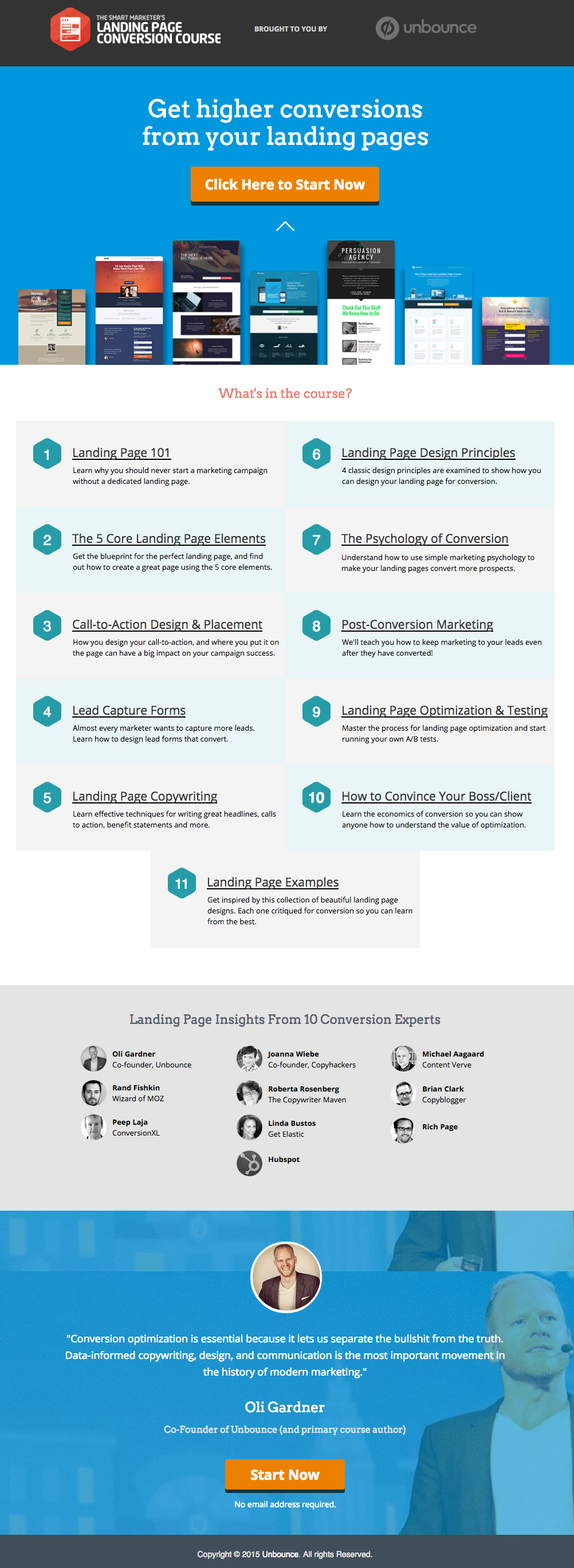
    นี่คือตัวอย่างแลนดิ้งเพจที่ยอดเยี่ยมจาก Unbounce ซึ่งเราชอบมาก:

    This has all of the right elements you need to execute the perfect landing page: it’s got just the right amount of text (which is really helpful for boosting SEO), and it’s packaged in a way that it’s not too heavy or intimidating for site visitors.

    The imagery is great as well, and the placement of the two call-to-action (or CTA) buttons give the visitors just enough cues to sign up for their service. Not too little, but not too much either.

    (เคล็ดลับ: แลนดิ้งเพจของ Unbounce ดูค่อนข้างหรูหรา – อาจดูน่าเกรงขามอยู่บ้างหากคุณพยายามเลียนแบบสไตล์ที่คล้ายกันบนแลนดิ้งเพจของคุณเอง – แต่จริงๆ แล้วคุณสามารถสร้างหน้าที่คล้ายกันและดูยอดเยี่ยมได้ขนาดนี้โดยใช้ PBS)

    MAKE YOUR OWN LANDING PAGE: If you’re new to design, First Site Guide’s Elements & Principles of Design Cheat Sheet proves to be friendly and reliable for beginners.

    Take note though, that Unbounce’s example isn’t the only way you can create your landing page.

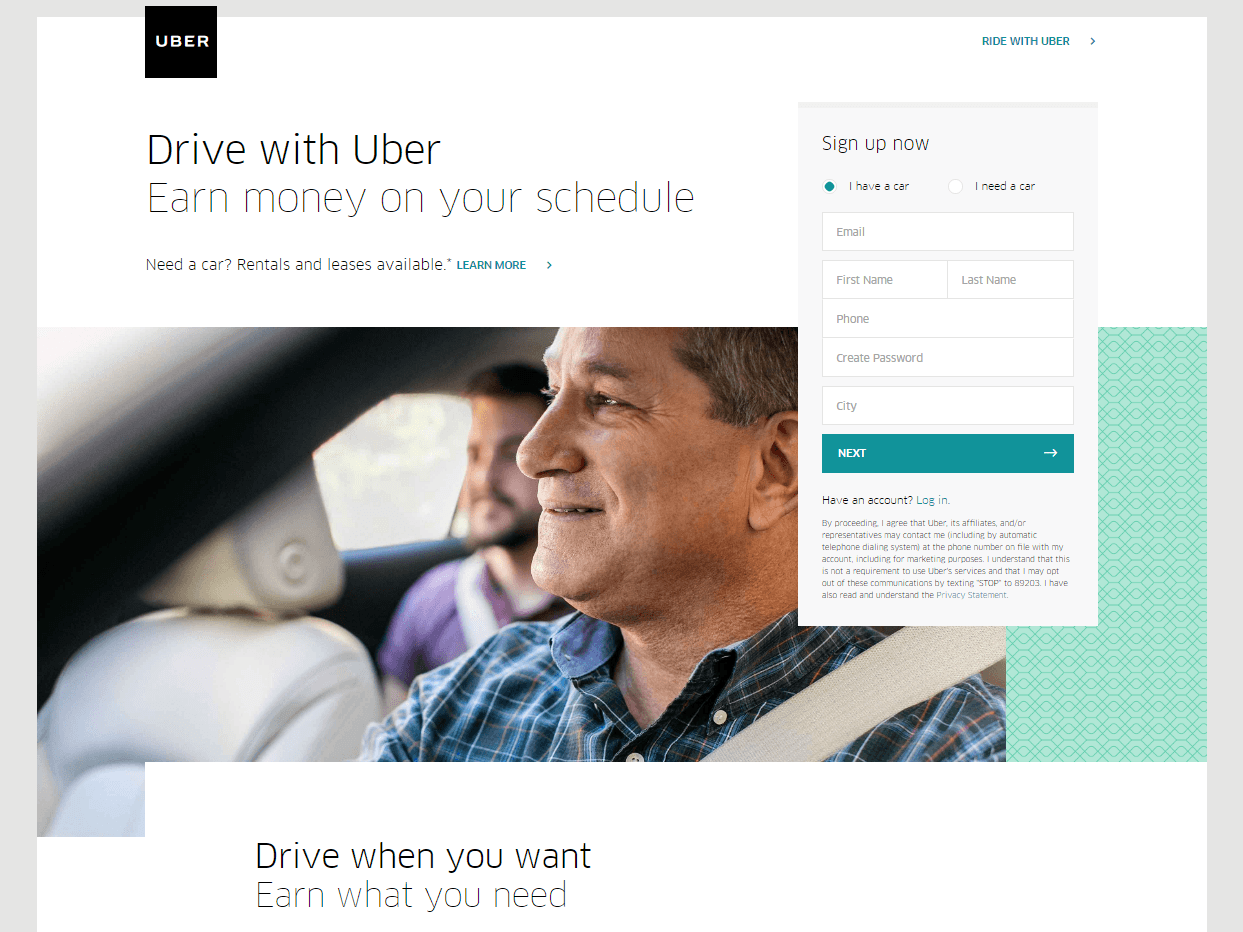
    You can always go for a simpler, cleaner look, like Uber’s landing page below:

    The text’s placement, along with the sign-up forms look crisp and clean. There’s also minimal distractions on this landing page, which prompts its visitors to sign up right away.

    MAKE YOUR OWN LANDING PAGE: First Site Guide’s Psychology of Color Cheat Sheet is a huge helA, which can help you balance out the right kind of colors that create a minimal yet classy effect for your landing pages.

    You can have more than one

    This is a little tricky because you have to learn how to strike a balance, but if you think it’ll help generate more leads,  you can actually build more than one landing page. Again, different landing pages cater to different needs.

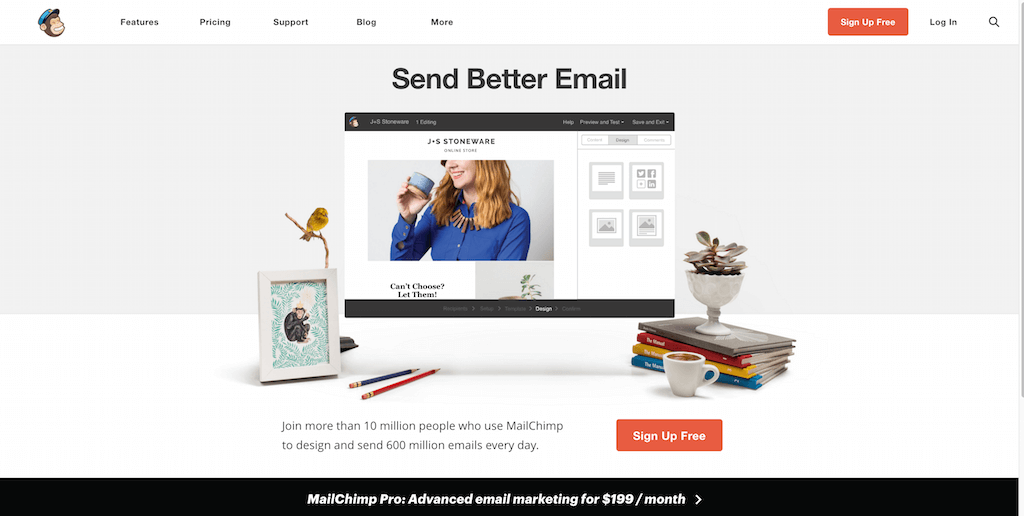
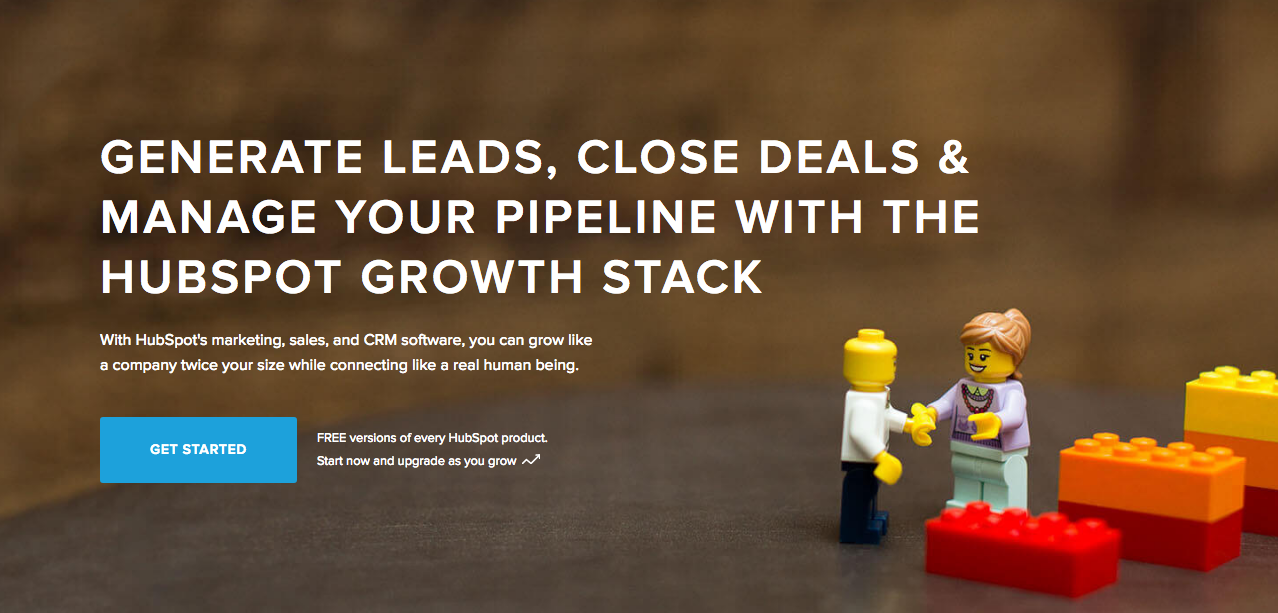
    ลองดูตัวอย่างนี้ (จากหลายๆ ตัวอย่าง) จาก MailChimp ซึ่งกระตุ้นให้ผู้ชมลงทะเบียนใช้บริการของพวกเขาได้ฟรี:

    (It worked by the way, as we use MailChimp for our newsletter service, too).

    Take note of the text – it’s straight to the point, and addresses the target’s audience needs in just three simple, albeit powerful words; enough to catch the visitor’s attention, and convert into a lead.

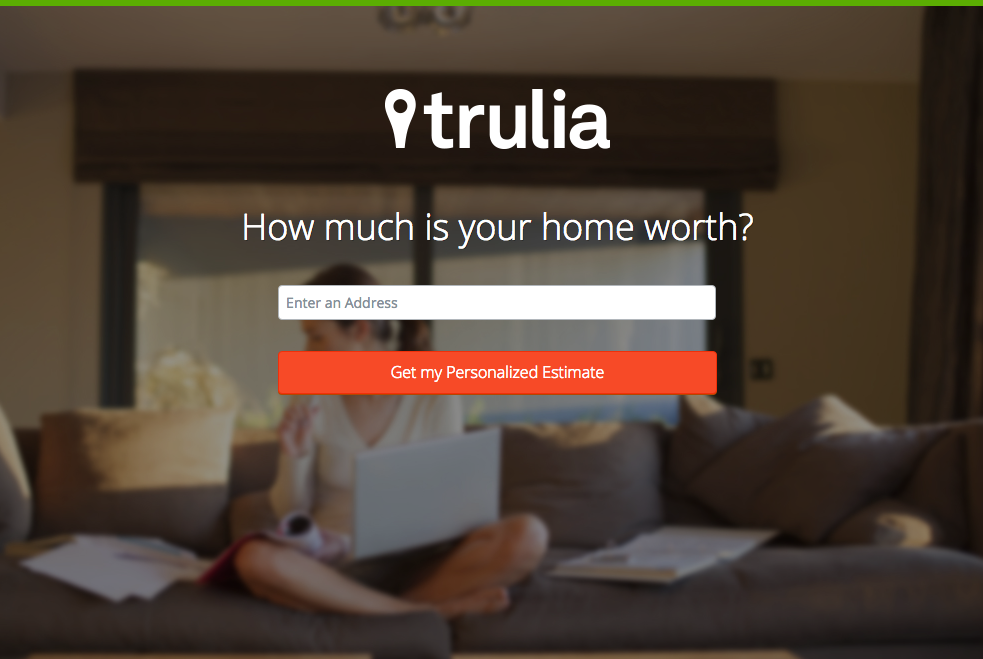
    Here’s another from Truila, which helps its users get an estimate of how much their houses are worth.

    Unlike the previous examples, Truilia doesn’t offer a catch to their customers in this particular landing page. They simply offer to give the visitor a chance to test out their service.

    Again, take note of the copy: no fluff, and it gets straight to the point.

    Usually, landing pages like these direct you towards another, one that has more information about what the website is offering. This is also a great technique used to capture more leads.

    MAKE YOUR OWN LANDING PAGE: Did you know that “Under Construction” pages count as landing pages, too? This blog post by First Site Guide teaches you how to make one.

    More doesn’t always mean merrier

    It’s important to remember that the problem isn’t the lack of landing pages per se – but the lack of well-created, successful landing pages.

    เว็บไซต์ไหนๆ ก็สร้างหน้าเหล่านี้ขึ้นมาได้มากมาย แต่นั่นไม่ได้หมายความว่าจะเปลี่ยนเป็นลีดที่ประสบความสำเร็จได้โดยอัตโนมัติ

    ขอย้ำอีกครั้งว่า ศาสตร์ของแลนดิ้งเพจนั้นมีความซับซ้อนมาก ดังนั้นหากคุณพอมีเวลาและกำลังที่จะลงทุนศึกษาศิลปะและวิทยาศาสตร์ที่อยู่เบื้องหลัง ขอแนะนำเป็นอย่างยิ่งให้คุณทำ

    Here are some websites that’ll be really helpful in your journey to creating landing pages

    Landing Folio

    http://www.landingfolio.com/

    Landing Folio is an extensive gallery that’s really useful when it comes to getting inspiration for landing page designs. They also offer some kick-ass, friendly courses on how to perfect the art of creating landing pages. Plus, all the designs are pretty and fun to look at as well.

    First Site Guide

    http://firstsiteguide.com

    First Site Guide เป็นหนึ่งในเว็บไซต์ที่มีแหล่งข้อมูลครบครันที่สุดบนอินเทอร์เน็ต โดยเฉพาะอย่างยิ่งหากคุณเพิ่งเริ่มเข้าสู่แวดวงเว็บและต้องการสร้างอะไรบางอย่างให้เป็นรูปเป็นร่าง พวกเขามีแหล่งข้อมูลตั้งแต่รายชื่อเครื่องมือสำหรับสร้างคอนเทนต์ บทวิจารณ์และการเปรียบเทียบผลิตภัณฑ์ อินโฟกราฟิก วิดีโอสอนการใช้งานที่เข้าใจง่าย และอื่นๆ อีกมากมาย มีประโยชน์อย่างยิ่งหากคุณเพิ่งเริ่มต้นสร้างแลนดิ้งเพจแรกของคุณ

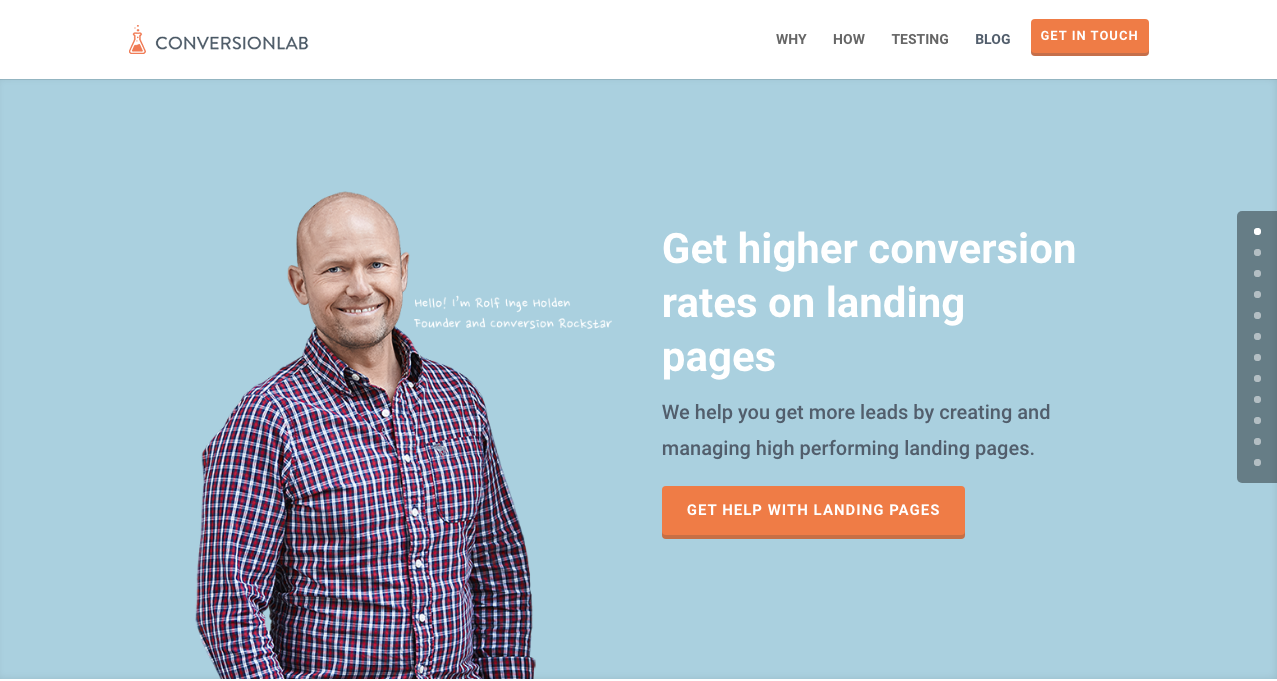
    Conversion Lab

    http://conversionlab.no/

    Apart from the fact that their own landing page is pretty well-crafted itself, Conversion Lab does exactly what they say they do: they help you get conversions. They also help out with testing too, which is crucial to any website that’s trying to raise their conversion rates.

    Hubspot

    https://blog.hubspot.com/marketing

    Hubspot is an all-around help site that lends you a hand in almost anything and everything related to online marketing.

    พวกเขามีคอลเลกชันบทความที่หลากหลายตั้งแต่การสร้างแผนธุรกิจ ไปจนถึงคอนเทนต์และ Inbound Marketing และแน่นอนว่ารวมถึงแลนดิ้งเพจด้วย นี่เป็นแหล่งข้อมูลที่ยอดเยี่ยมสำหรับผู้ที่ยังใหม่ต่อแวดวงการตลาดดิจิทัล

    บทสรุป

    แลนดิ้งเพจอาจเป็นเรื่องที่ซับซ้อนมาก โดยเฉพาะหากคุณเพิ่งเริ่มต้นทำธุรกิจไม่ว่าประเภทใดก็ตาม

    แต่จำไว้ว่ามันคุ้มค่ากับเวลาที่จะลงทุนเพื่อเรียนรู้ว่ามันทำงานอย่างไรและจะสร้างมันขึ้นมาได้อย่างไร ทำไมล่ะ? เพราะมันช่วยสร้างลีด และลีดก็ช่วยสร้างรายได้

    Take note that digital marketing trends are changing rapidly. You have to keep with these trends in order for your business to not only survive, but to also thrive.

    Do you have any other tips or resources that you’d like to share with us? Comment below, or send us an email at [email protected] if you’d like to get featured as a resource in one of our articles.

    ขอให้มีความสุขกับการสร้างเพจ!

  • ฟีเจอร์ปลั๊กอิน Shortcode Mapper: The Events Calendar โดย Modern Tribe

    shortcode-mapper-plugin-feature-the-events-calendar-by-modern-tribePlugins of the same category, but with respective features, are developed and enhanced every day. This gave birth to the variety of WordPress-powered websites – and later on, websites catering to several functions. For instance, there is a number of plugins which enables a developer and/or user to create, schedule, invite an interested person to an event.

    The Events Calendar is the events calendar you’ll need

    There are a lot of available events calendar in the WordPress market. So how do you choose? There are recommendation blogs, plugin face-off blogs, and of course testimonials from different users. All of these have one thing in common: they include The Events Calendar by Modern Tribe in their list.

    screenshot-2016-10-05-20-00-09
    An example of a minimal event post of The Events Calendar

    แล้ว The Events Calendar คืออะไรกันแน่?

    The Events Calendar โดย Modern Tribe เป็นปลั๊กอินระดับแนวหน้าในหมวดหมู่นี้ ซึ่งมอบคุณภาพระดับมืออาชีพสำหรับโพสต์กิจกรรม มีอินเทอร์เฟซที่เรียบง่าย โดยมีชื่อเรื่องอยู่ด้านบน วันที่และเวลา ราคา (ถ้ามี) รูปภาพเด่นและ/หรือแผนที่ รวมถึงรายละเอียดเพิ่มเติมเกี่ยวกับกิจกรรม คุณสามารถดูกิจกรรมทั้งหมดตามวันที่ คำสำคัญ และสถานที่ได้หากใช้เวอร์ชัน Pro

    You can do much more with The Events Calendars Pro and its official add-ons:

    The Events Calendar PRO

    • Recurring events
    • Week view
    • Photo view
    • Location search
    • Map view
    • Venue and organizer view
    • Advanced widgets
    • Additional fields

    The Events Calendar ADD-ONs

    • RSVP tickets
    • Event ticket plus via WooCommerce, Shopp, WPeCommerce, Easy Digital Downloads)
    • Community Events
    • Community Tickets
    • Filter Bar
    • Facebook Events
    • iCal Importer
    • Eventbrite Tickets

    การผสานรวมเข้ากับ Page Builder Sandwich ทำให้ยิ่งเจ๋งขึ้นไปอีก

    screenshot-2016-10-04-17-46-04Recent posts were made to highlight the benefits of using PBS and its Shortcode Mapper. This is to make sure that you guys are taking advantage of the latest innovation that the Sandwich Team can develop plus notify the plugin developers that their creation gave birth to another awesome feature.

    สำหรับกรณีของปลั๊กอิน The Events Calendar เรามี 2 เหตุผลสุดทึ่งว่าทำไมการผสานรวมนี้จึงควรเกิดขึ้น:

    1.      ได้รับการรีวิวโดยผู้มีชื่อเสียงแห่งวงการปลั๊กอิน WordPress

    The Modern Tribe assured their customers that the product and service they offered was of quality. Creator of Easy Digital Downloads, Pippin Williamson gave his inputs about The Events Calendar. Alongside him was Mark Jaquith, one of the leading WordPress developers, who made sure that the plugin was secure.

    Page Builder Sandwich was also reviewed recently by Pippin, together with the other established and rising page builders in the market. In his in-depth critique, he concluded that indeed, PBS is one of the most powerful drag-and-drop page builders. He highlighted that only  Page Builder Sandwich was able to create a functioning Shortcode Mapper.

    2.      ตัวเลือกชอร์ตโค้ด: จากการแก้ไขหลังบ้านสู่การแก้ไขหน้าบ้าน

    ตามค่าเริ่มต้น ตัวเลือกชอร์ตโค้ดของปลั๊กอินสามารถเข้าถึงได้ผ่านแผงควบคุมผู้ดูแลระบบหลังบ้าน จากนั้นกระบวนการแบบเดิมของปลั๊กอินหลังบ้านก็เกิดขึ้น: ไปที่ตัวแก้ไขหลังบ้าน ป้อนการเปลี่ยนแปลงที่ต้องการ แล้วบันทึก เฉพาะเมื่อกดปุ่มรีเฟรชเท่านั้นจึงจะมองเห็นเนื้อหาที่แก้ไขแล้ว ทั้งหมดนี้รวมเป็น 4 ขั้นตอน.

    แต่ขั้นตอนที่ยาวนานนั้นถูกเปลี่ยนเป็นการแก้ไขหน้าบ้านแบบเรียลไทม์โดย Page Builder Sandwich – ในเวลาเพียง 2 ขั้นตอน:

    1. Instead of going to the backend panel to access the shortcode options, click on the Shortcode Mapper and select on The Events Calendar. You’d be redirected to a pop-up window as seen below. Click on The Events Calendar.
      screenshot-2016-10-04-17-43-37
      View of The Events Calendar in the Page Builder Sandwich Shortcode Mapper
    2. screenshot-2016-10-05-19-57-11
      Close look at The Events Calendar Shortcode Properties
      The Inspector on the left displays the initial properties of the shortcode. Clicking on the “Open Editor” button, the shortcode controls displayed at the backend can now be accessed on the frontend via a pop-up window.
    screenshot-2016-10-06-13-25-04
    See? The Events Calendar looks like you’re just making an event post.

    screenshot-2016-10-06-14-37-52

    มีข้อดีมากมายเลยใช่ไหม?

    With the integration of a page builder that doesn’t lock you in and leaves shortcode mess, and the most popular events calendar, your workflow would not only smoothen but also increase in productivity. Additionally, you can look into what Modern Tribe offers: the bundle of plugins that go with The Events Calendar.

    จนถึงขณะนี้ ปลั๊กอิน The Events Calendar โดย Modern Tribe เป็นเพียงปลั๊กอินเดียวที่ถูกแมปไว้ใน Shortcode Mapper ของเรา แต่นี่ไม่ได้หมายความว่าการแมปจะหยุดอยู่แค่นี้ เพียงแสดงความคิดเห็นว่าคุณต้องการเห็นปลั๊กอินใดของ Modern Tribe ใน Shortcode Mapper ของเรา

  • พาชม Page Builder Sandwich เวอร์ชัน 3

    a-tour-of-page-builder-sandwich-version-3

    เราได้เปลี่ยนแปลงสิ่งต่างๆ มากมายใน Page Builder Sandwich เวอร์ชัน 3 หากคุณใช้งาน Page Builder Sandwich มาระยะหนึ่งแล้ว คุณจะสังเกตเห็นว่าการเปลี่ยนแปลงนั้นค่อนข้างมากเลยทีเดียว มีความแตกต่างอย่างมากระหว่างเวอร์ชัน 1, เวอร์ชัน 2 และเวอร์ชันปัจจุบัน ในเวอร์ชันก่อนหน้านี้ ทุกอย่างจะรวมอยู่ในแถบเครื่องมือ inspector ด้านข้าง จากนั้นเราจึงได้ปรับปรุงและแยกส่วนประกอบต่างๆ ออกเป็นส่วนๆ ที่สมเหตุสมผลและเป็นระบบมากยิ่งขึ้น เราได้ระบุเหตุผลสำหรับการอัปเกรดนี้ไว้ในบล็อกโพสต์ก่อนหน้าแล้ว

    ผู้ใช้ปัจจุบันอาจรู้สึกว่าการเปลี่ยนแปลงนี้ดูยุ่งยากในตอนแรก แต่เมื่อลองใช้งานดูสักสองสามนาที เราเชื่อมั่นว่าคุณจะรู้สึกคุ้นเคยและใช้งานได้อย่างคล่องตัว เราได้ออกแบบทุกๆ องค์ประกอบของอินเทอร์เฟซอย่างพิถีพิถัน เพื่อให้ความคุ้นเคยตามธรรมชาติของคุณจากโปรแกรมประมวลผลคำสามารถนำมาใช้กับการสร้างเว็บไซต์ได้อย่างลงตัว

    รับชมการแนะนำอินเทอร์เฟซใหม่

  • ลดราคาช่วงเทศกาลวันหยุด: รับส่วนลด 30% สำหรับทุกใบอนุญาตในเวลาจำกัด!

    ใช่แล้ว คุณได้ยินไม่ผิด! Page Builder Sandwich เริ่มต้นเทศกาลวันหยุดล่วงหน้าตั้งแต่วันนี้ 17 ธันวาคม 2016 ไปจนถึง 1 มกราคม 2017! ถูกต้องแล้ว—เราขอมอบส่วนลด 30% สำหรับทุกใบอนุญาตติดต่อกันนานถึง 15 วัน! ไม่จำเป็นต้องใช้โค้ดคูปอง ขอให้มีความสุขในเทศกาลวันหยุดอย่างแท้จริง

    "Christmas ornaments - HBW" โดย Bhavna Sayana เผยแพร่ภายใต้สัญญาอนุญาต CC BY
    “Christmas ornaments – HBW” โดย Bhavna Sayana เผยแพร่ภายใต้สัญญาอนุญาต CC BY

    นอกจากนี้ เรายังอยากถือโอกาสนี้ประกาศถึงวันครบรอบ 1 ปี ในวันที่ 14 มกราคม ที่กำลังจะมาถึงของ PBS เรามีสิ่งดีๆ มากมายเตรียมไว้สำหรับคุณ และเราหวังว่าคุณจะตื่นเต้นกับสิ่งเหล่านี้เช่นเดียวกับเรา! นี่เป็นเพียงตัวอย่างบางส่วนเท่านั้น:

    • Parallax Scrolling
    • วิดีโอพื้นหลัง
    • เทมเพลต One-Pager
    • การควบคุมแบบ Responsive
    • การปรับแต่งสไตล์ CSS เอง

    เราจะเผยแพร่บทความพร้อมรายการฟีเจอร์ใหม่ทั้งหมดที่คุณจะได้พบในการอัปเดตฉลองครบรอบเร็วๆ นี้ สมัครรับจดหมายข่าวของเราที่ด้านล่างเพื่อรับการแจ้งเตือนเกี่ยวกับการอัปเดตใหม่!

    สุขสันต์วันหยุดและขอให้มีความสุขกับการสร้างเว็บไซต์!


  • ฟีเจอร์ปลั๊กอิน Shortcode Mapper: WP Job Manager โดย Automattic

    how-to-create-a-website-from-scratch-for-under-100หนึ่งเดือนผ่านไปแล้วนับตั้งแต่ที่เราได้เปิดตัวฟีเจอร์ใหม่ล่าสุดของ Page Builder Sandwich – นั่นคือ Shortcode Mapper เราได้ผสานการทำงานเข้ากับปลั๊กอินมากกว่า 100 รายการ (144 ปลั๊กอินอย่างแน่นอน) โดยไม่จำกัดจำนวนชอร์ตโค้ดที่ปลั๊กอินเหล่านั้นมี มันเป็นงานที่น่าเบื่อแต่พวกเรา ก็ทำได้สำเร็จ!

    เพื่อให้คุณได้รู้จักกับมันมากขึ้น เราจึงเริ่มนำเสนอปลั๊กอินที่สามารถทำงานร่วมกับ Page Builder Sandwich ได้อย่างเต็มรูปแบบ ป้ายแรก: WP Job Manager โดย Automattic.

    ภาพรวมของ WP Job Manager

    screenshot-2016-09-16-03-21-46

    โดยพื้นฐานแล้ว WP Job Manager ทำหน้าที่เป็นปลั๊กอินที่ช่วยสร้างรายได้ให้กับคุณ – ไม่ว่าคุณจะมีลูกค้าที่ต้องการฟังก์ชันกระดานรับสมัครงานสำหรับเว็บไซต์ของพวกเขา หรือคุณเพียงแค่พบว่าบริษัทที่กำลังเติบโตของคุณต้องการบุคลากรเพิ่มขึ้น

    สิ่งที่ทำให้ปลั๊กอินนี้คุ้มค่าแก่การลงทุนอย่างยิ่งคือ ผู้สมัครงานที่เป็นไปได้ของคุณไม่จำเป็นต้องใช้งานผ่านแล็ปท็อปเท่านั้น WP Job Manager มีฟีเจอร์รองรับการใช้งานบนมือถือที่ช่วยให้รายได้ไหลเวียน นอกจากนี้ยังใช้งานง่ายด้วยอินเทอร์เฟซการค้นหาและตัวกรอง พร้อมทั้งมีข้อมูลตำแหน่งงานและบริษัท ซึ่งหมายความว่าไม่จำเป็นต้องค้นหาความน่าเชื่อถือของบริษัทเพิ่มเติม ในการค้นหางานเพียงครั้งเดียว ข้อมูลทุกอย่างก็พร้อมให้ครบถ้วน

    หากคุณต้องการหาคนมาเติมเต็มตำแหน่งงาน WP Job Manager จะช่วยให้การรับใบสมัครกลายเป็นเรื่องง่าย

    Page Builder Sandwich ช่วยให้การใช้งาน WP Job Manager ง่ายยิ่งขึ้น

    คุณไม่จำเป็นต้องหรี่ตาเพ่งหรือเค้นหาข้อมูลใดๆ เพื่อเชื่อมต่อเครื่องมือสร้างหน้าเว็บเข้ากับปลั๊กอินนี้ นี่คือ 3 เหตุผลที่สองสิ่งนี้เข้ากันได้เป็นอย่างดี:

    screenshot-2016-09-16-03-24-32
    ภาพรวมของการทำงานร่วมกันระหว่าง Page Builder Sandwich และ WP Job Manager

    แทรกชอร์ตโค้ดเกี่ยวกับงานได้รวดเร็วยิ่งขึ้น

    PBS Shortcode Mapper ตรวจพบ 6 ชอร์ตโค้ด ที่ใช้ในปลั๊กอินนี้ และเราได้ผสานการทำงานทั้งหมดเข้าด้วยกัน แต่ละชอร์ตโค้ดมีอาร์กิวเมนต์ที่แตกต่างกันซึ่งช่วยให้คุณแสดงแบบฟอร์มค้นหางาน หรือรายละเอียดเฉพาะของการลงประกาศงานได้ รายละเอียดของแต่ละชอร์ตโค้ดสามารถดูได้ในเอกสารอ้างอิงชอร์ตโค้ดของเว็บไซต์ ตอนนี้คุณไม่จำเป็นต้องเข้าไปดูเอกสารเพื่อหาวิธีปรับแต่งชอร์ตโค้ดเหล่านี้อีกต่อไป ชอร์ตโค้ดและแอตทริบิวต์ทั้งหมดจะแสดงขึ้นมาใน PBS พร้อมคำอธิบายที่สมบูรณ์

    screenshot-2016-09-15-18-58-29
    ชอร์ตโค้ดที่มีให้ใช้งานจาก WP Job Manager

    screenshot-2016-09-15-18-54-362
    แอตทริบิวต์ของชอร์ตโค้ด Jobs

    ทำงานได้กับทุกธีม

    การใช้ Page Builder Sandwich เป็นโปรแกรมแก้ไขหน้าเว็บของคุณ โดยค่าเริ่มต้นจะไม่ทำให้ธีมที่คุณเลือกใช้เสียหาย ยิ่งไปกว่านั้น เพื่อให้แน่ใจว่าเว็บไซต์ได้รับการปรับให้มีประสิทธิภาพสูงสุดอย่างสมบูรณ์แบบ เราจึงได้สร้าง PBS Shortcode Mapper ขึ้นมา หลักการเดียวกันนี้ก็ใช้ได้กับ WP Job Manager! Astoundify หนึ่งในผู้พัฒนาธีมบน ThemeForest รองรับปลั๊กอินดังกล่าวใน Listify – WordPress Directory Theme สำหรับธีมเพิ่มเติมที่มีการผสานการทำงานกับ WP Job Manager อย่างเต็มรูปแบบ สามารถดูได้จากรายการอย่างเป็นทางการ.

    จัดการงานได้จากหน้าร้าน (Frontend)

    การลดความยุ่งยากในการสลับไปมาระหว่างหน้าบ้านและหลังบ้าน รวมถึงการรีเฟรชหน้าเว็บเพื่อดูการเปลี่ยนแปลง คือสิ่งที่เรามุ่งมั่นแก้ไข ด้วย PBS คุณสามารถแก้ไขงานที่คุณเลือกได้โดยไม่ต้องเข้าไปดูที่หลังบ้าน และคุณยังสามารถแก้ไขการตั้งค่าของปลั๊กอินขณะที่กำลังแก้ไขหน้าเว็บของคุณได้อีกด้วย หากไม่มี PBS ผู้ใช้จะต้องใช้ความพยายามมากขึ้น และต้องเสียเวลามากเกินไปซึ่งควรนำไปใช้ในการพัฒนาโปรเจกต์ WordPress อื่นๆ ฟีเจอร์นี้ของ WP Job Manager คือสิ่งที่เราชื่นชอบมากที่สุด!

    ข้อคิดส่งท้าย

    ด้วยการพัฒนาโดยบริษัทเดียวกับที่สร้าง WordPress.com ปลั๊กอินนี้จึงได้เปรียบในการตกเป็นจุดสนใจอยู่แล้ว แต่มันก็มาพร้อมกับความคาดหวังอย่างมากเช่นกัน ไม่ว่าจะเป็นจากนักพัฒนา WordPress ไปจนถึงผู้คลั่งไคล้ WordPress ที่เหนียวแน่น จนถึงตอนนี้ ปลั๊กอินนี้ตอบโจทย์ความต้องการของทุกคนได้อย่างครบถ้วน – ในแง่ของฟังก์ชันกระดานรับสมัครงานที่มีขนาดเบา นักพัฒนา WordPress ชื่นชอบปลั๊กอินนี้มากจนถึงขั้นที่สร้างส่วนขยายเพิ่มเติมขึ้นมาเองเพื่อเพิ่มประโยชน์การใช้งานของปลั๊กอิน

    จะมีปลั๊กอินอื่นๆ มาร่วมนำเสนออีกในสัปดาห์ต่อๆ ไป! หากคุณมีข้อเสนอแนะว่าเราควรเขียนถึงใครและเรื่องอะไรต่อไป สามารถแสดงความคิดเห็นได้ที่ด้านล่างนี้

    แล้วพบกันใหม่เร็วๆ นี้!

  • ขอแนะนำ Page Builder Sandwich เวอร์ชัน 4.0

    เมื่อเราเริ่มพัฒนา PBS ย้อนกลับไปในช่วงต้นปี 2015 เราเชื่อมั่นในศักยภาพของมันที่จะก้าวข้ามขีดจำกัดอยู่เสมอ ตลอดปีที่ผ่านมานับตั้งแต่เปิดตัว ทีมงานของเราทำงานอย่างหนัก ทุ่มเทอย่างเต็มที่อยู่เสมอเพื่อให้ PBS ทำได้เช่นนั้น

    In 2016, we’ve managed to release three versions of PBS, each one surpassing their predecessors with more advantageous updates after the next. Today, in 2017, we’re finally releasing Page Builder Sandwich Version 4.0 in commemoration of its very first birthday.

    เราบอกตามตรงว่ามันไม่ใช่เรื่องง่ายเลย

    แต่เมื่อเทียบกับจุดเริ่มต้นเล็กๆ ในปี 2015 ตอนนี้เรามั่นใจพอที่จะบอกได้ว่า Page Builder Sandwich ได้พัฒนามาไกลมากอย่างแน่นอนนับตั้งแต่วันที่ยังเป็นเวอร์ชันเบต้า

    Then vs Now

    Taking a step back and looking at the different versions that PBS went through, it has really changed for the better.  Some learning mistakes just made us cringe and laugh!

    Enhanced User Interface

    For versions 3.0 and 4.0, we’ve made some major improvements with regards to the user interface. Pippin’s insight really made a wake-up call to us!

    The old interface of PBS Version 2.0  (left) vs Version 4.0’s cleaner, more efficient UI (right)

    Engaging in conversation and taking note of feedback has always been important to us, and is (and always will be) an integral part of Page Builder Sandwich’s continued growth. Out of all of PBS’ features though, we’ve received quite a number of critiques regarding the previous versions’ UI’s. All of them had one common denominator that many believed was detrimental to PBS’ functionality: the color scheme. According to most, it was too aggressive and did not compliment WordPress’ color palette. We’ve since addressed this issue in Version 4.0, constructing an improved UI with toned-down colors, all while still keeping PBS’ signature drag-and-drop UI intact.

    Mobile Responsiveness

    คุณสมบัติทั่วไปอีกอย่างหนึ่งที่ตัวสร้างหน้าเว็บส่วนใหญ่เห็นตรงกันคือความจำเป็นในการรองรับการแสดงผลบนอุปกรณ์เคลื่อนที่ (mobile responsiveness) เนื่องจากอุปกรณ์อย่างแท็บเล็ตและโทรศัพท์มือถือกำลังครองตลาดมากขึ้นเรื่อยๆ

    Because of this, we’ve tackled mobile responsiveness in Version 4.0’s release. Viewing pages built with PBS now becomes a smoother, more efficient experience, with your page’s UI adapting to your device’s screen resolutions.

    นอกจากนี้ ตอนนี้ PBS ยังรองรับการดูตัวอย่างบนอุปกรณ์เคลื่อนที่ผ่านเดสก์ท็อปอีกด้วย วิธีนี้จะช่วยให้คุณดูตัวอย่างหน้าเว็บของคุณในโหมดใดก็ได้ที่คุณต้องการ ไม่ว่าจะเป็นมุมมองมือถือหรือแท็บเล็ต โดยไม่จำเป็นต้องใช้อุปกรณ์จริงเหล่านั้นเลย

    ยิ่งไปกว่านั้น ปัจจุบัน PBS ยังอนุญาตให้ผู้ใช้ทำการเปลี่ยนแปลงในมุมมองเดสก์ท็อป มือถือ และแท็บเล็ต โดยไม่ส่งผลกระทบต่อขนาดหน้าจออื่นๆ

    What’s New: Features

    Full Page Templates

    อีกสิ่งหนึ่งที่เราสังเกตเห็นนับตั้งแต่การเปิดตัว PBS คือผู้ใช้มักจะสร้างหน้าเว็บตามประเภทธุรกิจหรือความสนใจเฉพาะทาง (niche) แน่นอนว่านี่เป็นเรื่องปกติในการสร้างหน้าเว็บ แต่สำหรับผู้ใช้แล้ว มันกลายเป็นปัญหาเล็กน้อยในการสร้างหน้าเว็บเฉพาะทางเหล่านี้ ตัวอย่างเช่น เว็บไซต์อีคอมเมิร์ซที่สร้างด้วย Page Builder Sandwich มักจะใช้เวลาในการสร้างตั้งแต่เริ่มต้นมากกว่าบล็อกทั่วไปที่มีแกลเลอรีรูปภาพ ดังนั้น เนื่องจากความต้องการเว็บไซต์ประเภทนี้เพิ่มขึ้นอย่างต่อเนื่อง ในที่สุดเราจึงได้คิดค้นวิธีแก้ปัญหาโดยการนำเสนอ Full Page Templates ของ PBS..

    Full Page Templates แตกต่างจาก Pre-Designed Sections อย่างไร?

    PBS actually has a feature similar to the Full Page Templates, the Pre-Designed Sections. Since our team has been aware that there are users who lack the time to design and layout their pages and sites, the Pre-Designed Sections were built for this specific purpose. The Pre-Designed Sections are small, individual layouts professionally designed to be mixed and matched together to build a page. However, while they are pre-designed, they aren’t full page, and are not niche-based.

    The Full Page Templates are different in that they’re designed to be used for an entire landing page, and they’re laden with features that commonly go with a particular niche. For example, upon accessing PBS’ Hotel Template, you’ll find that with it comes a map, contact details, and sections specifically designed for enumerating the hotel’s amenities. Similarly, the PBS Fashion Template includes a carousel feature for showcasing fashion ensembles for modern shops. These templates can also be tweaked and adjusted to suit the user’s needs and taste, of course.

    เข้าถึงปลั๊กอินภายนอกได้ง่ายขึ้น

    WooCommerce, Advanced Custom Fields, Events Calendar, Instagram Feed, Contact Form 7, NextGen Gallery, among others, are now more accessible with Version 4.0. This means that if you have these plugins activated in your PBS-run site, you can now add them with more ease.

    องค์ประกอบและฟีเจอร์ที่มีผู้ขอเข้ามามากที่สุด: การทำงานที่ได้รับการปรับปรุงและฟีเจอร์การออกแบบที่มากขึ้น

    In the span of a year, we would regularly receive suggestions and requests for features that are currently in-demand in the page builder market. Among these include Parallax Scrolling, Video Backgrounds, Ken Burns Backgrounds, features that increase the aesthetic value of your page; and elements such as Pricing Tables, Testimonials, Countdowns, and Milestones to enhance your page’s functionality. With the release of Version 4.0, we’ve finally accomplished these and more. We’re sure your PBS experience will be even more worthwhile this time around.

    ก้าวต่อไปของ PBS คืออะไร?

    เราพัฒนามาไกลมากนับตั้งแต่การเปิดตัวครั้งแรกในเดือนมกราคม 2016 เราได้ทำการปรับปรุงครั้งใหญ่ และแม้ว่างานนี้จะไม่ใช่งานง่าย แต่ผลลัพธ์ที่ได้นั้นคุ้มค่าอย่างยิ่ง เวอร์ชัน 4.0 เป็นเพียงจุดเริ่มต้นของการปรับปรุงที่ดียิ่งขึ้นไปอีกใน PBS และในปี 2017 นี้ เราจะยังคงทำงานอย่างหนักต่อไปเพื่อให้แน่ใจว่า PBS จะพัฒนาและดียิ่งขึ้นเรื่อยๆ แต่สำหรับตอนนี้ เราหวังว่าคุณจะสามารถใช้ประโยชน์จากฟีเจอร์ใหม่ๆ เหล่านี้ได้อย่างเต็มที่ และฟีเจอร์เหล่านี้จะทำให้ประสบการณ์การใช้งาน PBS ของคุณคุ้มค่ายิ่งขึ้น

    ขอให้มีความสุขกับการสร้างเว็บไซต์!

  • PBS BLACK FRIDAY SALE: ลด 30% สำหรับใบอนุญาตทั้งหมด!

    page-builder-sandwich-black-friday-deals

    เวียนมาถึงช่วงเวลานี้ของปีอีกครั้งที่เราจะได้นึกถึงสิ่งดีๆ ทั้งหมดที่เรารู้สึกขอบคุณ– และสิ่งที่เพิ่มเข้ามาในรายการนั้นแน่นอนว่าคือ เทศกาลลดราคา Black Friday อันเลื่องชื่อ! ส่วนลด คูปอง และดีลสุดพิเศษมากมายในโลกไซเบอร์พร้อมให้คุณจับจองในช่วงเวลานี้ และนั่นรวมถึงมหกรรมลดราคาครั้งใหญ่ Black Friday และ Cyber Monday ของ Page Builder Sandwich ซึ่งเริ่มต้นตั้งแต่วันนี้ 24 พฤศจิกายน ไปจนถึง 29 พฤศจิกายน 2016!

    ถูกต้องแล้ว เราขอมอบส่วนลด 30% สำหรับใบอนุญาตการใช้งาน Page Builder Sandwich ทุกประเภท เป็นเวลา 5 วัน! ดังนั้นรีบคว้าข้อเสนอนี้ไว้ก่อนที่จะหมดเขต! เพราะ Black Friday มีเพียงปีละครั้งเท่านั้น ใช้รหัสคูปอง BLACKFRIDAY2016 เพื่อรับสิทธิ์โปรโมชันนี้!

    ขอให้มีความสุขกับการช้อปปิ้ง สนุกกับการสร้างเว็บไซต์ และสุขสันต์วันขอบคุณพระเจ้า!