Author: Neil Lock

  • Wordfence ఫైర్‌వాల్‌లో మీరు URLలను ఎందుకు వైట్‌లిస్ట్ చేయాలి (మరియు దీన్ని ఎలా చేయాలి)

    If you’re using Page Builder Sandwich along with Wordfence Security, there’s a chance you might have encountered something called a 403 error.

    Now, according to WordPress resource site WPBeginner, 403 errors occur when server permissions don’t allow access to a specific page.

    కానీ 403 ఎర్రర్ అంటే ఏమిటి, అసలు అది Page Builder Sandwich లో ఎందుకు వస్తోంది?

    The 403 Error Explained

    సెక్యూరిటీ ప్లగిన్‌లు ఒక నిర్దిష్ట పద్ధతిలో లేదా ప్రమాణంలో కాన్ఫిగర్ చేయబడనప్పుడు 403 ఎర్రర్ రావడం సర్వసాధారణమైన కారణం.

    Like WordFence, most security plugins from WordPress restrict some actions if they’re suspected or proven to be malicious. These scenarios usually occur on your WP Admin or WP Login page, or show up as pop-ups alerting you that you don’t have authorization to view your page.

    మీరు Sandwich లో ఎదుర్కొంటే ఆ పాప్-అప్ ఎలా కనిపిస్తుందో ఇక్కడ చూడవచ్చు:

    So what does this mean? Is Sandwich safe to use? Is WordFence bad? And does the 403 error warrant bad points for both Wordfence and Page Builder Sandwich?

    నిజానికి, కాదు.

    All of this just means that Wordfence is extra careful when scanning your external plugins.

    And that’s actually a really good thing, especially since they’re a security plugin.

    WordFence is Legit…

    WordFence అనేది WordPress కోసం అత్యంత ప్రజాదరణ పొందిన సెక్యూరిటీ ప్లగిన్‌లలో ఒకటి. ఇది మిలియన్‌కు పైగా యాక్టివ్ ఇన్‌స్టాల్‌లను కలిగి ఉంది, కాబట్టి ఇది బహుశా మీ WP వెబ్‌సైట్‌లో కూడా ఇన్‌స్టాల్ చేయబడి ఉండవచ్చు. అవి ఒక గొప్ప ఉద్దేశం కోసం ఉన్నాయి: మీ వెబ్‌సైట్‌ను సురక్షితంగా ఉంచడమే కాకుండా, భద్రతా ప్రమాదాలను తగ్గించడానికి మరియు మొత్తంమీద మీ వెబ్‌సైట్ భద్రతను మెరుగుపరచడానికి కూడా.

    tl;dr WordFence నమ్మదగినది.

    …And So is Sandwich. But Why Does It Need Whitelisting?

    WordFence బ్లాక్ చేసేది కేవలం Sandwich ను మాత్రమే కాదు.

    ఇతర ప్లగిన్‌లు మరియు URLలను కూడా WordFence లో వైట్‌లిస్ట్ (బ్లాక్‌లిస్ట్‌కి వ్యతిరేకం) చేయాల్సి ఉంటుంది. కొన్ని మరింత ప్రజాదరణ పొందిన ప్లగిన్‌లను Wordfence ఇప్పటికే అనుమతించి ఉండవచ్చు.

    మరి తెరవెనుక ఏమి జరుగుతోంది, మరియు 403 ఎర్రర్ ఎక్కడి నుండి వస్తోంది?

    Ajax Functions and Page Builder Sandwich

    మీ ఎడిటింగ్ అనుభవమంతటా Page Builder Sandwich ajax ఫంక్షన్‌లను నిర్వహిస్తుంది. కొన్ని ప్లగిన్‌లు కూడా అలానే చేస్తాయి.

    W3Schools ajax గురించి మరింత వివరంగా వివరిస్తుంది:

    AJAX is a technique for creating fast and dynamic web pages. It allows web pages to be updated asynchronously by exchanging small amounts of data with the server behind the scenes. This means that it is possible to update parts of a web page, without reloading the whole page.

    Chart taken from W3Schools

    Page Builder Sandwich లో, ajax కాల్‌లు షార్ట్‌కోడ్ మ్యాపింగ్‌లను పొందడం, షార్ట్‌కోడ్‌లను రెండర్ చేయడం నుండి మీ మార్పులను సేవ్ చేయడం వరకు ఉంటాయి. దీనివల్ల మీరు 403 ఎర్రర్, మీ అవుట్‌పుట్‌ను సేవ్ చేయడంలో సమస్యలు లేదా అన్‌రెండర్ చేయబడిన షార్ట్‌కోడ్‌లు వంటి సమస్యలను ఎదుర్కొనే అవకాశం ఉంది. ఇలాంటప్పుడే మీరు Page Builder Sandwich కి సంబంధించిన నిర్దిష్ట ajax కాల్‌లను వైట్‌లిస్ట్ చేయాల్సి రావచ్చు.

    Whitelisting Page Builder Sandwich on WordFence

    Wordfence ఫైర్‌వాల్‌లో PBS ని వైట్‌లిస్ట్ చేయడానికి, Whitelisted URLs విభాగంలో ఈ పారామితులతో ఒక ఎంట్రీని జోడించండి:

    URL: /wp-admin/admin-ajax.php

    Param Name: main-content

    Param: POST Body

    మల్టీసైట్ WordPress ఇన్‌స్టాలేషన్‌ల కోసం, ఎగువన ఉన్న URLలో మీ సైట్ ఫోల్డర్ పేరును చేర్చడం మంచిది. ఉదాహరణకు: /my-multisite/wp-admin/admin-ajax.php

    ఈ విలువలను జోడించిన తర్వాత, 403 ఎర్రర్ సరిగ్గా పరిష్కరించబడాలి, మరియు మీరు మీ అవుట్‌పుట్‌ను సేవ్ చేయగలరు అలాగే మళ్లీ రెండర్ చేయబడిన షార్ట్‌కోడ్‌లను రూపొందించగలరు.

    మీ WordFence ఫైర్‌వాల్ సెట్టింగ్‌ల కింద ఇది ఈ విధంగా కనిపించాలి:

    Ta-da!

    Conclusion

    అవును, Page Builder Sandwich ను ఉపయోగించడం సురక్షితం.

    అంతే కాకుండా, ఇది ఎడిటింగ్ మోడ్‌లో ఉన్నప్పుడు మాత్రమే ajax చర్యలను నిర్వహిస్తుంది, మరియు ఇది బాహ్య ప్లగిన్‌లు అలాగే థీమ్‌లతో అనుకూలంగా ఉంటుంది (అవి WordPress కోడింగ్ ప్రమాణాలకు అనుగుణంగా ఉన్నంత వరకు).

    WordFence Security కూడా దీనికి భిన్నమైనదేమీ కాదు.

    కానీ వాటిలో గొప్ప విషయమేమిటంటే, ఏ ప్లగిన్‌లు సురక్షితమైనవి మరియు ఏవి కావు అని మీరు నిర్ణయించుకోవడానికి అదనపు అవకాశాన్ని అందిస్తూ, WordPress వినియోగదారులకు వారి సైట్‌లను సురక్షితంగా మరియు భద్రంగా ఉంచుకునే అవకాశాన్ని అవి కల్పిస్తాయి.

  • ఇమెయిల్ న్యూస్‌లెటర్ సైన్అప్ ఫారమ్‌లను సులభంగా జోడించండి

    Easily-Add-Email-Newsletter-Signup-FormsAdding an email newsletter sign up form to your site is a great way to grow your website’s following and to keep your website visitors interested in your site or product. And now you can easily add and customize newsletter sign up forms directly in your designs.

    preview-newsletterNew in Page Builder Sandwich is the Newsletter Element (check the short gif above). Now you can add a newsletter sign up form for your MailChimp, AWeber or MailPoet newsletter lists directly into your designs.
    సాధారణంగా, మీ న్యూస్‌లెటర్ సైన్ అప్ ఫారమ్ పని చేయడానికి మీరు వేరొక ప్లగిన్‌ను ఇన్‌స్టాల్ చేయాల్సి ఉంటుంది, ఆపై ఎక్కడైనా షార్ట్‌కోడ్‌ను జోడించాల్సి ఉంటుంది, లేదా మీరు పాపప్ ద్వారా వెళ్లి కొన్ని ఫీల్డ్‌లను పూరించాల్సి రావచ్చు, లేదా విడ్జెట్‌ను సెటప్ చేయాల్సి రావచ్చు. ఇప్పుడు, న్యూస్‌లెటర్ సైన్అప్ ఫారమ్‌లను జోడించడంలో ఉండే సంక్లిష్టతలన్నీ తొలగిపోయాయి. మీ పేజీలో కేవలం Newsletter Elementను జోడించండి, మీ జాబితా API కీలను జోడించండి, అంతే అది వెంటనే పనిచేస్తుంది.

    మీరు ఈమెయిల్ ఫీల్డ్‌పై క్లిక్ చేయడం ద్వారా మీ సైన్ అప్ ఫారమ్‌ను మరింత అనుకూలీకరించవచ్చు – ఇక్కడ మీరు దాని రంగులు, పరిమాణం, సరిహద్దు మరియు ఇంకా మరెన్నో మార్చవచ్చు, లేదా బటన్‌పై క్లిక్ చేసి – చిహ్నాలను జోడించవచ్చు, మీ బటన్ పరిమాణాన్ని మార్చవచ్చు లేదా మీ సందర్శకుడు వారి ఈమెయిల్ చిరునామాను టైప్ చేయడం ప్రారంభించినప్పుడు మాత్రమే అది కనిపించేలా కూడా చేయవచ్చు. మీ డిజైన్‌కు సరిపోయేలా రూపాన్ని మీరు పూర్తిగా అనుకూలీకరించవచ్చు. వినియోగదారు టైప్ చేస్తున్నప్పుడు ఫీల్డ్ రంగులు మారాలని మీరు కోరుకుంటున్నారా? కలర్ పికర్‌తో మీరు దాన్ని సులభంగా చేయవచ్చు. మినిమలిస్ట్ డిజైన్ కావాలా మరియు ఫీల్డ్ కేవలం సరిహద్దుగా మాత్రమే ఉండాలా, ఏ సమస్యా లేదు!

    ఒక గొప్ప విషయం ఏమిటంటే, ఈ న్యూస్‌లెటర్ ఎలిమెంట్ మీ సైట్‌లో యూజర్ యొక్క ప్రవాహానికి ఆటంకం కలిగించదు. వారు సబ్‌స్క్రైబ్ చేసిన తర్వాత, పేజీ రిఫ్రెష్ అవ్వదు మరియు సైన్అప్ ఫారమ్ స్థానంలో ఒక “ధన్యవాదాలు” సందేశం వస్తుంది. ఈ సందేశం మరియు దాని రంగులను కూడా అనుకూలీకరించుకోవచ్చు.

    Page Builder Sandwich లోని మిగిలిన భాగాల మాదిరిగానే, మీరు మీ సరికొత్త న్యూస్‌లెటర్ సైన్అప్ ఫారమ్‌ను మీకు నచ్చిన చోట ఉంచవచ్చు, కేవలం దానిని మీ వరుసల (రోస్) లోపల లేదా మరొక ప్రదేశంలోకి లాగండి (డ్రాగ్ చేయండి).

    మెయిలింగ్ జాబితాలు ముఖ్యమైనవేనా?

    దీనికి సంక్షిప్త సమాధానం అవును. మీకు Twitter ఖాతా ఉంటే, ఇతర Twitter వినియోగదారులు మిమ్మల్ని ఎలాగైతే “ఫాలో” అవుతారో మరియు మీ ట్వీట్‌లను చూస్తారో, అలాగే మీ సందర్శకులు ఈమెయిల్ ద్వారా మీ సైట్‌ను ఫాలో అవ్వడానికి మెయిలింగ్ జాబితా ఉపయోగపడుతుంది.

    ఇంకా మెయిలింగ్ జాబితా లేదా?

    If you don’t have a mailing list yet, now is a good time to get started. Getting a newsletter service like MailChimp or AWeber is good since they do the heavy lifting of managing your subscribers and blasting an email to your subscribers easily. They also have newsletter builders that will let you create a newsletter campaign easily. The good thing is they have free plans, so you won’t need to shell out cash in order to try it out.

    If you’re more of a I-like-to-handle-it-myself guy or gal, then you might consider using MailPoet. It’s downloadable free from wordpress.org and they have a paid model as well. With MailPoet, you’ll be able to see your subscribers within your dashboard and you can also send out emails from there. It’s easy to use as well and just takes literally less than 5 minutes to fully set up in your site (Yes, I’ve tried).

    పేజ్ బిల్డర్ శాండ్‌విచ్ గురించి మరింత తెలుసుకోండి

  • సోషల్ మీడియా వ్యూహం: సైట్ నిర్మాణంలో దాని ముఖ్యమైన పాత్ర

    social-media-strategy-its-important-role-in-site-building

    కొన్ని దశాబ్దాల క్రితం, శాస్త్రవేత్తలు మరియు నిపుణులు సాధారణ పోస్టల్ మెయిల్‌కు (స్నెయిల్-మెయిల్) మెరుగైన ప్రత్యామ్నాయాన్ని కనుగొనడానికి తీవ్రంగా ఆలోచించారు. కొంతకాలం మన వద్ద బీపర్లు, అలాగే జేబుల్లో పెట్టుకోలేనంత పెద్దగా ఉండే సెల్‌ఫోన్లు ఉండేవి. అయితే అవి గత జ్ఞాపకాలను గుర్తుచేసుకునేందుకు బాగున్నప్పటికీ, గతంలోని సాంకేతికత 21వ శతాబ్దపు కమ్యూనికేషన్ పద్ధతులతో ఏమాత్రం సరితూగదు. ఇప్పుడు, 2016 సంవత్సరంలో, మన స్నేహితులు, కుటుంబ సభ్యులు మరియు సహోద్యోగులను కేవలం క్షణాల వ్యవధిలోనే సంప్రదించవచ్చు. సాధారణంగా చెప్పుకునే నానుడి ప్రకారం: “ప్రతిదీ అక్షరాలా మన వేలికొనల వద్దే ఉంది”. అక్షరాలా.

    సాంప్రదాయానికి నెమ్మదిగా దూరమవుతున్నామా?

    నేటి వేగవంతమైన ఆవిష్కరణల కారణంగా మనం ఎన్ని సాంప్రదాయ పద్ధతులను వదులుకోవాల్సి వచ్చిందో కాదనడం కష్టం. దానికి అలవాటు పడటానికి మనకు కొంత సమయం పట్టింది (ముఖ్యంగా పాత తరాల వారికి), కానీ నిజం చెప్పాలంటే, ఇది ఎంతమాత్రం చెడ్డ విషయం కాదు. నిజానికి, ఇది దానికి వ్యతిరేకం.

    ఉదాహరణకు, 1993లో ఒక బేకర్ కొత్త ఓవెన్ మోడల్ గురించి విచారించడానికి పట్టే సమయం మరియు శ్రమ నెలలు కాకపోయినా సాధారణంగా వారాలు పట్టేది. ఇప్పుడు, 2016లో ఓవెన్ తయారీదారు వెబ్‌సైట్‌ను చూడటం ద్వారా అదే పనిని సులభంగా పూర్తి చేయవచ్చు. అంతేకాకుండా, అదే ఓవెన్ కంపెనీ రాబోయే వారాంతంలో సేల్ ఉంటుందని ప్రకటిస్తే, మరియు ఆ బేకర్ దాని గురించి తన స్నేహితులకు చెప్పాలనుకుంటే, వారు చేయాల్సిందల్లా Facebook, Twitter లేదా ఇతర ప్రముఖ సోషల్ మీడియా వెబ్‌సైట్లలో దాని గురించి పోస్ట్ చేయడమే. ఈ కాలంలో, మన జీవితంలో ఏదో ఒక సమయంలో మనమందరం ఈ విధానానికి అలవాటు పడ్డాము, కాబట్టి ఈ ప్రక్రియ మీకు సుపరిచితమేనని మేము ఖచ్చితంగా విశ్వసిస్తున్నాము.

    సారాంశమేమిటంటే, దాదాపు దేని గురించైనా బహిరంగంగా తెలియజేయడానికి సోషల్ మీడియా ఒక గొప్ప మార్గం. నేడు దాని ప్రభావం అనూహ్యంగా శక్తివంతమైనది, మరియు దీని కారణంగా, మీ వెబ్‌సైట్ నిర్మాణ ప్రయాణం అలాగే దాని నిర్వహణ విజయవంతం కావడానికి ఆన్‌లైన్‌లో మీ ఉనికి కీలకమైన అంశం కావచ్చు. నిజానికి, న్యూస్‌స్టాండ్‌లలో క్రమం తప్పకుండా అమ్ముడయ్యే మ్యాగజైన్‌లు— Time మరియు The Economist వంటివి– వాటి కంటెంట్‌ను ప్రింట్ కాపీలు మరియు ఆన్‌లైన్ రెండింటి ద్వారా అందుబాటులో ఉంచాయి, ఇది మరింత విస్తృతమైన ప్రేక్షకులను చేరుకోవడానికి వీలు కల్పించింది. అలాగే, ప్రభావవంతమైన వ్యక్తి ఎవరైనా మీ సైట్‌ను చూసి, మీ కంటెంట్‌ను ఇష్టపడితే (లేదా కనీసం షేర్ చేయడానికి తగినంత ఉపయోగకరంగా భావిస్తే), వారు మీ కంటెంట్‌ను ఇతర సోషల్ మీడియా మాధ్యమాల ద్వారా కూడా వ్యాప్తి చేసే అవకాశం ఉంది.

    అయితే మీ సైట్ గురించి ప్రచారం చేయడానికి ప్రభావవంతమైన వ్యక్తే ఉండాల్సిన అవసరం లేదని గుర్తుంచుకోండి; మీ లక్షిత ప్రేక్షకులు ఎవరైనప్పటికీ, సోషల్ మీడియా ద్వారా మీ కంటెంట్‌ను మీరే (లేదా మరికొందరి సహాయంతో) పంచుకోవడం ద్వారా కూడా మీకు ఎన్నో అవకాశాలు లభిస్తాయి. నిజానికి, BrandWatch.com నుండి వచ్చిన ఒక కథనం ప్రకారం ప్రపంచ జనాభాలోని 3.17 బిలియన్లలో 2.3 బిలియన్ల మంది సోషల్ మీడియాలో ఉన్నారు.

    అది చాలా పెద్ద సంఖ్య. నిస్సందేహంగా, మీ లక్షిత ప్రేక్షకులు ఆ జనాభా విభాగంలోనే ఉంటారు.

    సోషల్ మీడియా పనితీరును విస్తరించడం

    మీ కంటెంట్‌ను అందరికీ తెలిసేలా చేయడమే కాకుండా, సోషల్ మీడియా ప్రాముఖ్యత ఏదైనా ప్రేక్షకులు లేదా మార్కెట్‌లోని సరికొత్త ట్రెండ్‌లకు అనుగుణంగా అప్‌డేట్‌గా ఉండటానికి కూడా విస్తరిస్తుంది. మీ ప్రేక్షకుల కోరికలు మరియు అవసరాలు ఏమిటో అంచనా వేసేటప్పుడు ఇది ప్రత్యేకంగా నిజమవుతుంది, మరియు మీరు వారిని మరింత మెరుగ్గా ఎలా చేరుకోవచ్చో మరియు వారికి ఎలా సేవలందించవచ్చో అనే అంశానికి మరింత విస్తరిస్తుంది; గుర్తుంచుకోండి, ప్రేక్షకులను చేరుకోవడం అనేది ఎల్లప్పుడూ మీ సైట్ విజయానికి ఒక ముఖ్యమైన అంశం.

    మీరు మీ సైట్ యొక్క మొదటి నెలలో లేదా మొదటి సంవత్సరాల్లోనే అద్భుతంగా 15,000 మంది ఫాలోవర్లను పొందలేకపోవచ్చు, కానీ సోషల్ మీడియా ఖాతాలలో చురుకైన ఆన్‌లైన్ ఉనికిని కలిగి ఉండటం దీర్ఘకాలంలో ఏదో ఒక విధంగా ఖచ్చితంగా మీకు గణనీయమైన ప్రోత్సాహాన్ని ఇస్తుంది. గుర్తుంచుకోండి: రోమ్ ఒక్క రోజులో నిర్మించబడలేదు, కాబట్టి పట్టుదలతో ఉండండి!

    బహుశా మరిన్ని

    Treehouse.com లోని ఒక ప్రీమియం వీడియో ప్రకారం, ఇ-మెయిల్ మరియు సాంప్రదాయ ప్రచార కార్యక్రమాలతో పోలిస్తే, ప్రేక్షకులను చేరుకోవడానికి ఇతర మార్గాల కంటే సోషల్ మీడియా రెండింతలు ప్రభావవంతంగా ఉంటుంది. నిజానికి, సోషల్ మీడియా మీ ప్రేక్షకుల పరిధిలో భారీ వ్యత్యాసాన్ని చూపగల ఒక శక్తివంతమైన సాధనంగా మిగిలి ఉంది. సోషల్ మీడియాతో ఉన్న అద్భుతమైన విషయం ఏమిటంటే, చాలా సమయం ఇది ఉచితం (మరియు దేవునికి కృతజ్ఞతలు). కాబట్టి దీన్ని మీ ప్రయోజనం కోసం ఉపయోగించుకోండి!

    హ్యాపీ సైట్-బిల్డింగ్!

  • ల్యాండింగ్ పేజీలు అంటే ఏమిటి (మరియు అసలు నాకొకటి ఎందుకు అవసరం)?

    In a previous article, we mentioned that 84% of website conversions occur on the first visit. And during this first visit, the average site visitor is only going to stay on your website for about 10 seconds.

    That means that’s all the time you have to make a good impression, convince your visitors to stay on your site, and to (hopefully) convert that site visit into a lead.

    మీరు దాని గురించి ఆలోచించినప్పుడు అది ఒక విధంగా ఒత్తిడిని కలిగిస్తుంది.

    But not to worry- landing pages help you do just that. More specifically though, well-crafted landing pages help you to do just that.

    So what are they?

    In the simplest terms, a landing page is any page that gets traffic from anywhere other than the usual pages on your site (like your Homepage, FAQ, or Contact Us page).

    The difference between these “usual pages” though, is that landing pages reel in your audience using content that creates a sense of urgency – like call-to-action buttons and promo pages, for example – and they do it all in one page with a specific goal set in mind: They make your audience take action.

    And if all goes as expected, you get to convert your audience and site visitors into leads. This is called lead generation.

    ల్యాండింగ్ పేజీలు ఏదైనా వెబ్‌సైట్‌లో కీలకమైన భాగం, ప్రత్యేకించి మీరు ప్రేక్షకులను నిర్మించుకోవడానికి మరియు లీడ్స్‌ను రూపొందించడానికి ప్రయత్నిస్తున్నప్పుడు. అవి రాబడిని సంపాదించడంలో కూడా ఒక పెద్ద అంశం.

    What do they look like and when do I start making one?

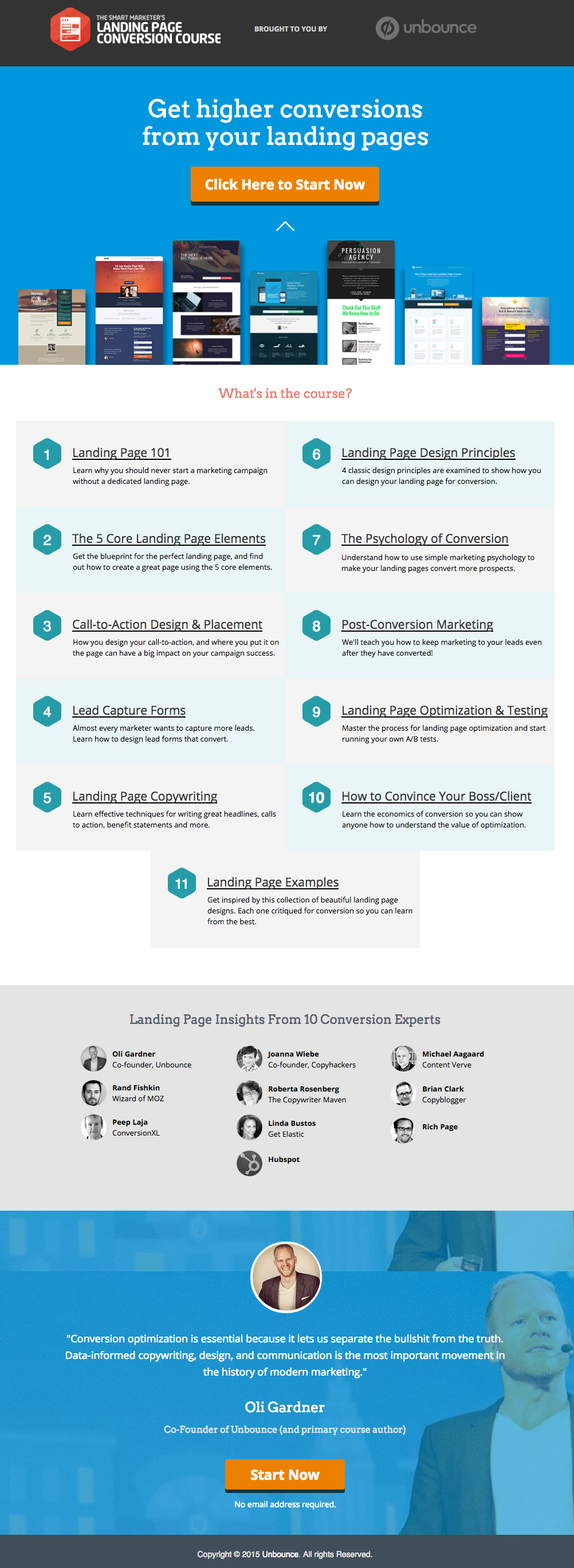
    మాకు ఎంతో నచ్చిన అన్‌బౌన్స్ (Unbounce) నుండి ఒక గొప్ప ల్యాండింగ్ పేజీకి ఉదాహరణ ఇక్కడ ఉంది:

    This has all of the right elements you need to execute the perfect landing page: it’s got just the right amount of text (which is really helpful for boosting SEO), and it’s packaged in a way that it’s not too heavy or intimidating for site visitors.

    The imagery is great as well, and the placement of the two call-to-action (or CTA) buttons give the visitors just enough cues to sign up for their service. Not too little, but not too much either.

    (చిట్కా: అన్‌బౌన్స్ ల్యాండింగ్ పేజీ చాలా ఆకర్షణీయంగా కనిపిస్తుంది – మీరు మీ స్వంత ల్యాండింగ్ పేజీలో ఇలాంటి శైలిని పునరావృతం చేయడానికి ప్రయత్నిస్తుంటే కొద్దిగా భయంకరంగా కూడా అనిపించవచ్చు – కానీ మీరు వాస్తవానికి PBS ఉపయోగించి సమానమైన మరియు అంతే అద్భుతంగా కనిపించే పేజీని సృష్టించవచ్చు).

    MAKE YOUR OWN LANDING PAGE: If you’re new to design, First Site Guide’s Elements & Principles of Design Cheat Sheet proves to be friendly and reliable for beginners.

    Take note though, that Unbounce’s example isn’t the only way you can create your landing page.

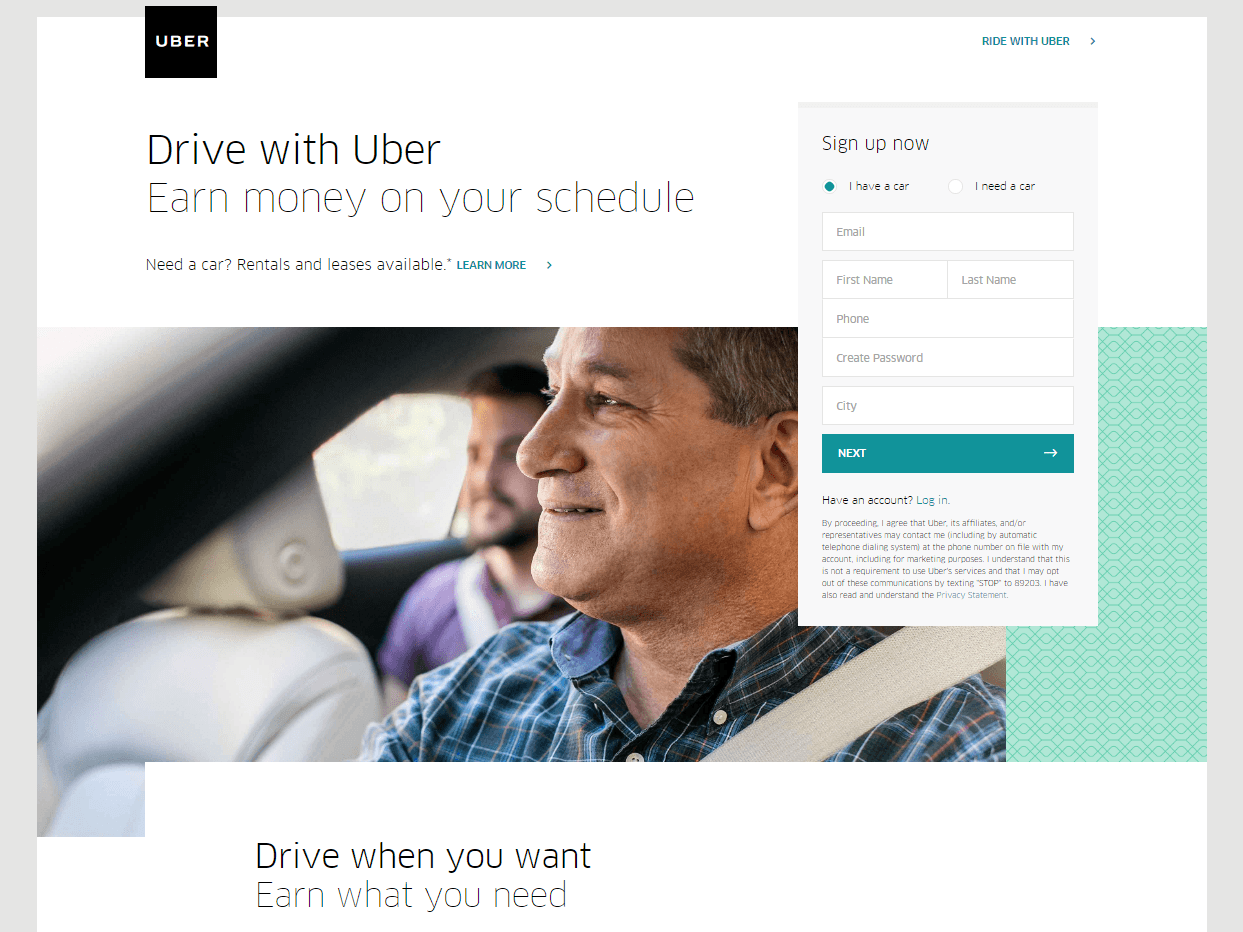
    You can always go for a simpler, cleaner look, like Uber’s landing page below:

    The text’s placement, along with the sign-up forms look crisp and clean. There’s also minimal distractions on this landing page, which prompts its visitors to sign up right away.

    MAKE YOUR OWN LANDING PAGE: First Site Guide’s Psychology of Color Cheat Sheet is a huge helA, which can help you balance out the right kind of colors that create a minimal yet classy effect for your landing pages.

    You can have more than one

    This is a little tricky because you have to learn how to strike a balance, but if you think it’ll help generate more leads,  you can actually build more than one landing page. Again, different landing pages cater to different needs.

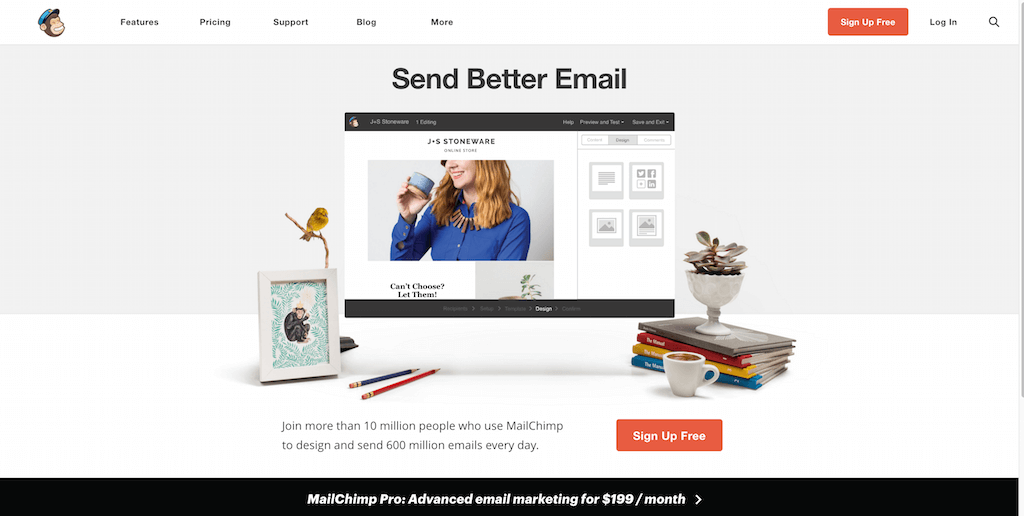
    ఉదాహరణకు మెయిల్‌చింప్ (MailChimp) నుండి దీన్ని (చాలా వాటిలో ఒకదాన్ని) చూడండి, ఇది వారి సేవలకు ఉచితంగా సైన్ అప్ చేయమని తన ప్రేక్షకులను ప్రోత్సహిస్తుంది:

    (It worked by the way, as we use MailChimp for our newsletter service, too).

    Take note of the text – it’s straight to the point, and addresses the target’s audience needs in just three simple, albeit powerful words; enough to catch the visitor’s attention, and convert into a lead.

    Here’s another from Truila, which helps its users get an estimate of how much their houses are worth.

    Unlike the previous examples, Truilia doesn’t offer a catch to their customers in this particular landing page. They simply offer to give the visitor a chance to test out their service.

    Again, take note of the copy: no fluff, and it gets straight to the point.

    Usually, landing pages like these direct you towards another, one that has more information about what the website is offering. This is also a great technique used to capture more leads.

    MAKE YOUR OWN LANDING PAGE: Did you know that “Under Construction” pages count as landing pages, too? This blog post by First Site Guide teaches you how to make one.

    More doesn’t always mean merrier

    It’s important to remember that the problem isn’t the lack of landing pages per se – but the lack of well-created, successful landing pages.

    ఏ వెబ్‌సైట్ అయినా వాటిలో చాలా వరకు తయారు చేయగలదు, కానీ అది స్వయంచాలకంగా విజయవంతమైన లీడ్ మార్పిడులను అందించదు.

    మళ్ళీ చెబుతున్నాము, ల్యాండింగ్ పేజీల వ్యవహారం చాలా గమ్మత్తైనది– కాబట్టి మీరు దాని వెనుక ఉన్న కళ మరియు విజ్ఞానాన్ని అధ్యయనం చేయడంలో పెట్టుబడి పెట్టగలిగితే, మీరు అలా చేయడం ఎంతో సిఫార్సు చేయబడింది.

    Here are some websites that’ll be really helpful in your journey to creating landing pages

    Landing Folio

    http://www.landingfolio.com/

    Landing Folio is an extensive gallery that’s really useful when it comes to getting inspiration for landing page designs. They also offer some kick-ass, friendly courses on how to perfect the art of creating landing pages. Plus, all the designs are pretty and fun to look at as well.

    First Site Guide

    http://firstsiteguide.com

    ఫస్ట్ సైట్ గైడ్ అనేది ఇంటర్నెట్‌లోని అత్యంత ఉపయోగకరమైన వెబ్‌సైట్‌లలో ఒకటి, ప్రత్యేకించి మీరు వెబ్‌కు కొత్త అయితే మరియు దాని నుండి ఏదైనా సాధించాలనుకుంటే. వారి వద్ద కంటెంట్‌ను సృష్టించే సాధనాల జాబితాలు, ఉత్పత్తి సమీక్షలు మరియు పోలికలు, ఇన్ఫోగ్రాఫిక్స్, స్నేహపూర్వక వీడియో ట్యుటోరియల్స్ మరియు మరిన్ని వనరులు ఉన్నాయి. మీరు మీ మొదటి ల్యాండింగ్ పేజీని సృష్టించడం ఇప్పుడే ప్రారంభిస్తున్నట్లయితే ఇది ఖచ్చితంగా సహాయపడుతుంది.

    Conversion Lab

    http://conversionlab.no/

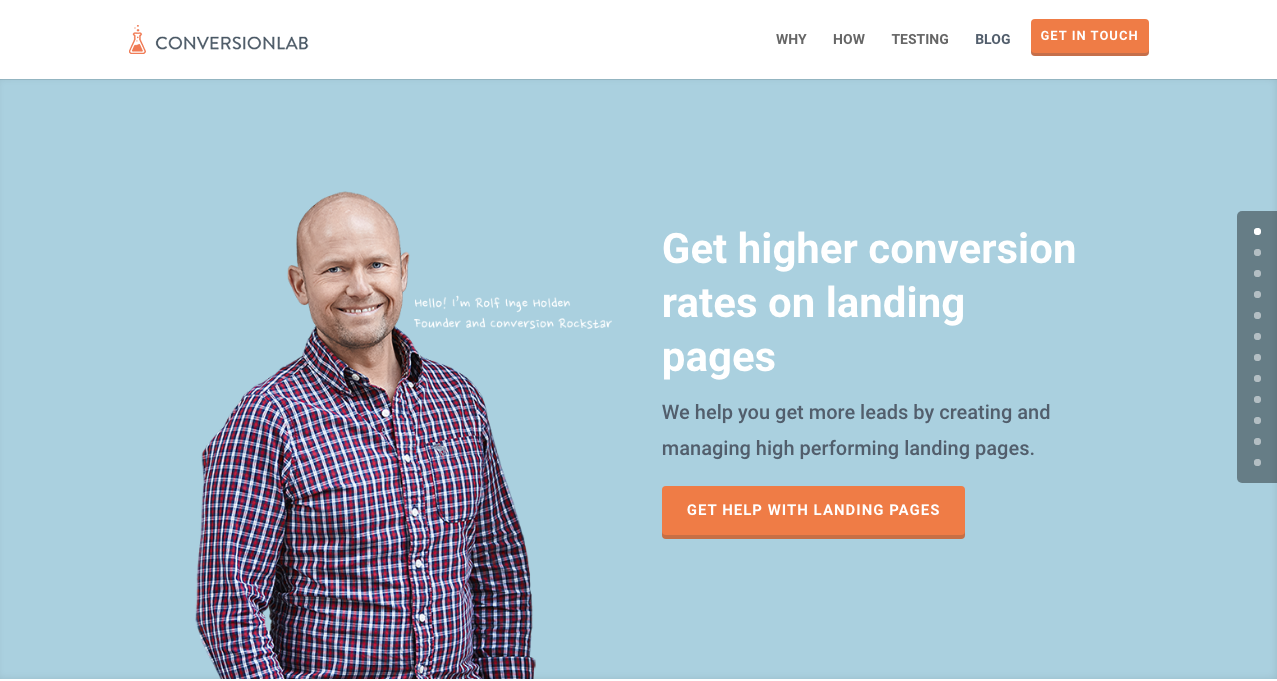
    Apart from the fact that their own landing page is pretty well-crafted itself, Conversion Lab does exactly what they say they do: they help you get conversions. They also help out with testing too, which is crucial to any website that’s trying to raise their conversion rates.

    Hubspot

    https://blog.hubspot.com/marketing

    Hubspot is an all-around help site that lends you a hand in almost anything and everything related to online marketing.

    వ్యాపార ప్రణాళికలను రూపొందించడం నుండి కంటెంట్ మరియు ఇన్‌బౌండ్ మార్కెటింగ్, మరియు ఖచ్చితంగా ల్యాండింగ్ పేజీల వరకు విభిన్న కథనాల సేకరణ వారి వద్ద ఉంది. డిజిటల్ మార్కెటింగ్ రంగానికి ఇంకా కొత్తగా ఉన్న ఎవరికైనా ఇది గొప్ప వనరు.

    ముగింపు

    ల్యాండింగ్ పేజీలు నిజంగా గమ్మత్తైనవిగా ఉంటాయి, ప్రత్యేకించి మీరు ఎలాంటి వ్యాపారమైనా ఇప్పుడే ప్రారంభిస్తున్నట్లయితే.

    కానీ అవి ఎలా పనిచేస్తాయో మరియు వాటిని ఎలా తయారు చేయాలో తెలుసుకోవడానికి సమయాన్ని వెచ్చించడం విలువైనదని గుర్తుంచుకోండి. ఎందుకు? ఎందుకంటే అవి లీడ్స్‌ను రూపొందిస్తాయి, మరియు లీడ్స్ రాబడిని తెస్తాయి.

    Take note that digital marketing trends are changing rapidly. You have to keep with these trends in order for your business to not only survive, but to also thrive.

    Do you have any other tips or resources that you’d like to share with us? Comment below, or send us an email at [email protected] if you’d like to get featured as a resource in one of our articles.

    హ్యాపీ పేజ్ బిల్డింగ్!

  • షార్ట్‌కోడ్ మ్యాపర్ ప్లగిన్ ఫీచర్: మోడరన్ ట్రైబ్ ద్వారా ది ఈవెంట్స్ క్యాలెండర్

    shortcode-mapper-plugin-feature-the-events-calendar-by-modern-tribePlugins of the same category, but with respective features, are developed and enhanced every day. This gave birth to the variety of WordPress-powered websites – and later on, websites catering to several functions. For instance, there is a number of plugins which enables a developer and/or user to create, schedule, invite an interested person to an event.

    The Events Calendar is the events calendar you’ll need

    There are a lot of available events calendar in the WordPress market. So how do you choose? There are recommendation blogs, plugin face-off blogs, and of course testimonials from different users. All of these have one thing in common: they include The Events Calendar by Modern Tribe in their list.

    screenshot-2016-10-05-20-00-09
    An example of a minimal event post of The Events Calendar

    అసలు The Events Calendar ప్రత్యేకత ఏమిటి?

    Modern Tribe అందించిన The Events Calendar అనేది సదరు విభాగంలో అగ్రగామి ప్లగిన్. ఇది ఈవెంట్ పోస్ట్‌ల కోసం ప్రొఫెషనల్ నాణ్యతను అందిస్తుంది. ఇది చాలా సులభమైన ఇంటర్‌ఫేస్‌ను కలిగి ఉంటుంది, పైభాగంలో శీర్షిక, తేదీ మరియు సమయం, వర్తిస్తే ధర, ఫీచర్ చేయబడిన చిత్రం మరియు లేదా మ్యాప్, ఇంకా ఈవెంట్ గురించిన అదనపు వివరాలు ఉంటాయి. మీరు ప్రో వెర్షన్ అయితే మీ ఈవెంట్‌లన్నింటినీ తేదీ, కీలకపదం మరియు స్థానం ఆధారంగా చూడవచ్చు.

    You can do much more with The Events Calendars Pro and its official add-ons:

    The Events Calendar PRO

    • Recurring events
    • Week view
    • Photo view
    • Location search
    • Map view
    • Venue and organizer view
    • Advanced widgets
    • Additional fields

    The Events Calendar ADD-ONs

    • RSVP tickets
    • Event ticket plus via WooCommerce, Shopp, WPeCommerce, Easy Digital Downloads)
    • Community Events
    • Community Tickets
    • Filter Bar
    • Facebook Events
    • iCal Importer
    • Eventbrite Tickets

    దీన్ని Page Builder Sandwich తో అనుసంధానించడం ద్వారా ఇది మరింత అద్భుతంగా మారుతుంది

    screenshot-2016-10-04-17-46-04Recent posts were made to highlight the benefits of using PBS and its Shortcode Mapper. This is to make sure that you guys are taking advantage of the latest innovation that the Sandwich Team can develop plus notify the plugin developers that their creation gave birth to another awesome feature.

    The Events Calendar ప్లగిన్ విషయానికి వస్తే, ఈ కలయిక ఎందుకు ఉండాలో తెలిపే 2 అద్భుతమైన కారణాలను మేము కనుగొన్నాము:

    1.      WordPress ప్లగిన్ దిగ్గజాలచే సమీక్షించబడింది

    The Modern Tribe assured their customers that the product and service they offered was of quality. Creator of Easy Digital Downloads, Pippin Williamson gave his inputs about The Events Calendar. Alongside him was Mark Jaquith, one of the leading WordPress developers, who made sure that the plugin was secure.

    Page Builder Sandwich was also reviewed recently by Pippin, together with the other established and rising page builders in the market. In his in-depth critique, he concluded that indeed, PBS is one of the most powerful drag-and-drop page builders. He highlighted that only  Page Builder Sandwich was able to create a functioning Shortcode Mapper.

    2.      షార్ట్‌కోడ్ ఎంపికలు: బ్యాకెండ్ నుండి ఫ్రంటెండ్ ఎడిటింగ్ వరకు

    డిఫాల్ట్‌గా, ప్లగిన్ యొక్క షార్ట్‌కోడ్ ఎంపికలను బ్యాకెండ్ అడ్మిన్ ప్యానెల్ ద్వారా యాక్సెస్ చేయవచ్చు. ఆపై, సాధారణ బ్యాకెండ్ ప్లగిన్‌ల ప్రక్రియ జరుగుతుంది: బ్యాకెండ్ ఎడిటర్‌కు వెళ్లడం, కావలసిన మార్పులను నమోదు చేయడం మరియు సేవ్ చేయడం. రీఫ్రెష్ బటన్‌ను క్లిక్ చేసినప్పుడు మాత్రమే సవరించిన కంటెంట్ కనిపిస్తుంది. మొత్తంగా చూస్తే, అది 4 దశల ప్రక్రియ.

    కానీ ఆ సుదీర్ఘ ప్రక్రియను Page Builder Sandwich ద్వారా కేవలం 2 దశల్లో:

    1. Instead of going to the backend panel to access the shortcode options, click on the Shortcode Mapper and select on The Events Calendar. You’d be redirected to a pop-up window as seen below. Click on The Events Calendar.
      screenshot-2016-10-04-17-43-37
      View of The Events Calendar in the Page Builder Sandwich Shortcode Mapper
    2. screenshot-2016-10-05-19-57-11
      Close look at The Events Calendar Shortcode Properties
      The Inspector on the left displays the initial properties of the shortcode. Clicking on the “Open Editor” button, the shortcode controls displayed at the backend can now be accessed on the frontend via a pop-up window.
    screenshot-2016-10-06-13-25-04
    See? The Events Calendar looks like you’re just making an event post.

    screenshot-2016-10-06-14-37-52

    చాలా ప్రయోజనాలు ఉన్నాయి, కదా?

    With the integration of a page builder that doesn’t lock you in and leaves shortcode mess, and the most popular events calendar, your workflow would not only smoothen but also increase in productivity. Additionally, you can look into what Modern Tribe offers: the bundle of plugins that go with The Events Calendar.

    ఇప్పటివరకు, Modern Tribe వారి The Events Calendar ప్లగిన్ మాత్రమే మా షార్ట్‌కోడ్ మ్యాపర్‌లో మ్యాప్ చేయబడింది. అయితే మ్యాపింగ్ ఇక్కడితో ఆగిపోతుందని దీని అర్థం కాదు. మా షార్ట్‌కోడ్ మ్యాపర్‌లో మీరు Modern Tribe యొక్క ఏ ప్లగిన్‌ను చూడాలనుకుంటున్నారో కామెంట్ చేయండి.

  • పేజ్ బిల్డర్ శాండ్‌విచ్ వెర్షన్ 3 టూర్

    a-tour-of-page-builder-sandwich-version-3

    మేము పేజ్ బిల్డర్ శాండ్‌విచ్ వెర్షన్ 3లో చాలా మార్పులు చేశాము. మీరు చాలా కాలంగా పేజ్ బిల్డర్ శాండ్‌విచ్‌ను ఉపయోగిస్తుంటే, ఆ మార్పులు చాలా తీవ్రమైనవిగా ఉన్నాయని మీరు గమనించవచ్చు. వెర్షన్ 1, వెర్షన్ 2 మరియు ప్రస్తుత వెర్షన్ మధ్య చాలా పెద్ద వ్యత్యాసం ఉంది. మునుపటి వెర్షన్లలో, ప్రతిదీ పక్కన ఉన్న ఇన్‌స్పెక్టర్‌లోనే ఉండేది. మేము దానిని సమీక్షించి, దాని భాగాలను విభిన్నమైన, మరింత సహేతుకమైన విభాగాలుగా విభజించాము. ఈ అప్‌గ్రేడ్ కోసం గల కారణాలను మేము మునుపటి బ్లాగ్ పోస్ట్‌లో పేర్కొన్నాము.

    ప్రస్తుత వినియోగదారులకు ప్రారంభంలో ఈ మార్పులు కొద్దిగా ఇబ్బందికరంగా అనిపించవచ్చు. కొన్ని నిమిషాలు ప్రయత్నించి చూడండి, మీరు వెంటనే వీటికి అలవాటు పడతారని మేము విశ్వసిస్తున్నాము. వర్డ్ ప్రాసెసర్లలో మీకు సహజంగా అలవాటైన అనుభవం వెబ్‌సైట్ నిర్మాణంలోనూ ఉపయోగపడేలా మేము ఇంటర్‌ఫేస్‌లోని ప్రతి అంశాన్ని ఎంతో శ్రద్ధతో రూపొందించాము.

    కొత్త ఇంటర్‌ఫేస్ టూర్‌ను చూడండి

  • హాలిడే సేల్: పరిమిత కాలం పాటు అన్ని లైసెన్స్‌లపై 30% తగ్గింపును పొందండి!

    అవును, మీరు విన్నది నిజమే! Page Builder Sandwich ఈరోజు, 17 డిసెంబర్ 2016 నుండి 1 జనవరి 2017 వరకు ముందుగానే సెలవులను ప్రారంభిస్తోంది! నిజమే- మేము వరుసగా 15 రోజుల పాటు అన్ని లైసెన్స్‌లపై 30% తగ్గింపును అందిస్తున్నాము! ఎటువంటి కూపన్ కోడ్ అవసరం లేదు. నిజంగా హ్యాపీ హాలిడేస్.

    "Christmas ornaments - HBW" by Bhavna Sayana is licensed under CC BY
    “Christmas ornaments – HBW” by Bhavna Sayana is licensed under CC BY

    దీనితో పాటు, జనవరి 14న రాబోయే PBS యొక్క మొదటి వార్షికోత్సవాన్ని ప్రకటించడానికి మేము ఈ అవకాశాన్ని ఉపయోగించుకోవాలనుకుంటున్నాము. మీ కోసం మేము ఎన్నో అద్భుతమైన అంశాలను సిద్ధం చేశాము, మరియు మా లాగే మీరు కూడా వీటి పట్ల ఉత్సాహంగా ఉంటారని మేము ఆశిస్తున్నాము! వాటిలో కొన్ని ఇక్కడ ఉన్నాయి:

    • పారలాక్స్ స్క్రోలింగ్
    • వీడియో బ్యాక్‌గ్రౌండ్‌లు
    • వన్-పేజర్ టెంప్లేట్‌లు
    • రెస్పాన్సివ్ కంట్రోల్స్
    • కస్టమ్ CSS స్టైలింగ్

    వార్షికోత్సవ అప్‌డేట్‌లో అందించబోయే కొత్త ఫీచర్ల పూర్తి జాబితాతో త్వరలోనే మేము ఒక కథనాన్ని విడుదల చేస్తాము. కొత్త అప్‌డేట్ గురించి నోటిఫికేషన్ పొందడానికి క్రింద మా న్యూస్‌లెటర్‌కు సభ్యత్వాన్ని పొందండి!

    హ్యాపీ హాలిడేస్ మరియు హ్యాపీ సైట్-బిల్డింగ్!


  • షార్ట్‌కోడ్ మ్యాపర్ ప్లగిన్ ఫీచర్: Automattic ద్వారా WP జాబ్ మేనేజర్

    how-to-create-a-website-from-scratch-for-under-100మేము పేజ్ బిల్డర్ శాండ్‌విచ్ యొక్క సరికొత్త ఫీచర్ అయిన షార్ట్‌కోడ్ మ్యాపర్ను విడుదల చేసి ఒక నెల గడిచింది. వాటిలో ఉన్న షార్ట్‌కోడ్‌ల సంఖ్యతో సంబంధం లేకుండా మేము 100 కంటే ఎక్కువ ప్లగిన్‌లను (ఖచ్చితంగా చెప్పాలంటే 144 ప్లగిన్‌లు) అనుసంధానించాము. ఇది శ్రమతో కూడుకున్న పని, కానీ మేము దాన్ని చేశాము!

    దీని గురించి మీకు మరింత తెలియజేయడానికి, పేజ్ బిల్డర్ శాండ్‌విచ్‌తో పూర్తిగా అనుసంధానించబడిన ప్లగిన్‌లను ఫీచర్ చేయడం ప్రారంభించాము. మొదటిది: ఆటోమాటిక్ వారి WP జాబ్ మేనేజర్.

    WP జాబ్ మేనేజర్ ఒక చూపులో

    screenshot-2016-09-16-03-21-46

    ప్రాథమికంగా WP జాబ్ మేనేజర్ మీరు డబ్బు సంపాదించడానికి ఒక ప్లగిన్‌గా ఉపయోగపడుతుంది – మీ వెబ్‌సైట్ కోసం జాబ్ బోర్డ్ ఫంక్షన్ అవసరమైన క్లయింట్ మీకు ఉన్నా లేదా మీ ఎదుగుతున్న కంపెనీలో మీకు మరింత మంది వ్యక్తులు అవసరమని భావించినా ఇది ఉపయోగపడుతుంది.

    ఈ ప్లగిన్‌ను చాలా మంచి ఎంపికగా మార్చే విషయం ఏమిటంటే, మీ కాబోయే ఉద్యోగులు ల్యాప్‌టాప్‌లను ఉపయోగించడానికే పరిమితం కారు. WP జాబ్ మేనేజర్‌లో రాబడిని పెంచే మొబైల్ సపోర్ట్ ఫీచర్ ఉంది. ఇది సెర్చ్ మరియు ఫిల్టర్ ఇంటర్‌ఫేస్తో ఉపయోగించడం కూడా సులభం. దీనితో పాటు ఉద్యోగం మరియు కంపెనీ సమాచారం కూడా ఉంటుంది, అంటే కంపెనీ ప్రామాణికతను వెతకాల్సిన అవసరం లేదు. ఒకే ఉద్యోగ శోధనలో, ప్రతిదీ అందించబడుతుంది.

    మీరు ఉద్యోగ ఖాళీలను భర్తీ చేయాలనుకుంటే, WP జాబ్ మేనేజర్ దరఖాస్తులను స్వీకరించడాన్ని సులభతరం చేస్తుంది.

    పేజ్ బిల్డర్ శాండ్‌విచ్ WP జాబ్ మేనేజర్‌ను ఉపయోగించడాన్ని సులభతరం చేస్తుంది

    పేజ్ బిల్డర్ మరియు ప్లగిన్‌ను కనెక్ట్ చేయడానికి మీరు కష్టపడాల్సిన అవసరం లేదు మరియు దేని నుంచీ సమాచారాన్ని పిండుకోవాల్సిన పనిలేదు. ఇవి రెండూ ఒకదానితో ఒకటి ఎందుకు సరిపోతాయో చెప్పడానికి ఇక్కడ 3 విషయాలు ఉన్నాయి:

    screenshot-2016-09-16-03-24-32
    పేజ్ బిల్డర్ శాండ్‌విచ్ మరియు WP జాబ్ మేనేజర్ కలిసి ఎలా పనిచేస్తాయనే దాని స్థూలదృష్టి

    ఉద్యోగ షార్ట్‌కోడ్‌లను వేగంగా చొప్పించండి

    PBS షార్ట్‌కోడ్ మ్యాపర్ ఈ ప్లగిన్‌లో ఉపయోగించిన 6 షార్ట్‌కోడ్‌లను గుర్తించింది, మరియు మేము వాటన్నింటినీ అనుసంధానించాము. ప్రతి షార్ట్‌కోడ్‌కు విభిన్న ఆర్గ్యుమెంట్‌లు ఉంటాయి, ఇవి ఉద్యోగ శోధన ఫారమ్‌ను లేదా జాబ్ ప్లేస్‌మెంట్ వివరాలను ప్రదర్శించడానికి మిమ్మల్ని అనుమతిస్తాయి. ప్రతి షార్ట్‌కోడ్ వివరాలు వారి సైట్ యొక్క షార్ట్‌కోడ్ రిఫరెన్స్లో అందుబాటులో ఉన్నాయి. ఇప్పుడు ఈ షార్ట్‌కోడ్‌లను ఎలా సవరించాలో డాక్యుమెంట్‌లను తనిఖీ చేయాల్సిన అవసరం లేదు, అన్ని షార్ట్‌కోడ్‌లు మరియు వాటి లక్షణాలు వివరణలతో సహా PBSలో అందించబడ్డాయి.

    screenshot-2016-09-15-18-58-29
    WP జాబ్ మేనేజర్ నుండి అందుబాటులో ఉన్న షార్ట్‌కోడ్‌లు

    screenshot-2016-09-15-18-54-362
    జాబ్స్ షార్ట్‌కోడ్ లక్షణాలు

    ఇది ఏ థీమ్‌తోనైనా పనిచేస్తుంది

    పేజ్ బిల్డర్ శాండ్‌విచ్‌ను మీ పేజ్ బిల్డర్ ఎడిటర్‌గా ఉపయోగించడం ద్వారా, మీరు ఎంచుకున్న థీమ్ డీఫాల్ట్‌గా పాడవదు. అదనంగా పూర్తి వెబ్‌సైట్ ఆప్టిమైజేషన్‌ను నిర్ధారించడానికి, మేము PBS షార్ట్‌కోడ్ మ్యాపర్‌ను రూపొందించాము. ఇదే సూత్రం WP జాబ్ మేనేజర్‌కు కూడా వర్తిస్తుంది! ThemeForest లోని థీమ్స్ డెవలపర్‌లలో ఒకరైన Astoundify, తమ Listify – WordPress Directory Themeలో సదరు ప్లగిన్‌కు మద్దతు ఇస్తుంది. WP జాబ్ మేనేజర్‌తో పూర్తిగా అనుసంధానించబడిన మరిన్ని థీమ్‌ల కోసం, వారి అధికారిక జాబితా.

    ఫ్రంటెండ్‌లో ఉద్యోగాలను నిర్వహించండి

    ఫ్రంటెండ్ మరియు బ్యాకెండ్ మధ్య మారే శ్రమను తగ్గించడం మరియు చేసిన మార్పులను చూడటానికి పేజీని రిఫ్రెష్ చేయాల్సిన అవసరాన్ని తొలగించడమే మా లక్ష్యం. PBSతో, మీరు బ్యాకెండ్‌ను తనిఖీ చేయకుండానే మీరు ఎంచుకున్న ఉద్యోగాలను సవరించవచ్చు, మీ పేజీని సవరిస్తున్నప్పుడే మీరు ప్లగిన్ సెట్టింగ్‌లను కూడా సవరించగలరు. PBS లేకపోతే, వినియోగదారులు మరింత శ్రమించాల్సి ఉంటుంది మరియు ఇతర వర్డ్‌ప్రెస్ ప్రాజెక్ట్‌లను అభివృద్ధి చేయడానికి కేటాయించగల ఎక్కువ సమయం దీనికి అవసరమవుతుంది. WP జాబ్ మేనేజర్ యొక్క ఈ ఫీచర్ మాకు అత్యంత నచ్చినది!

    తుది ఆలోచనలు

    WordPress.comను రూపొందించిన కంపెనీ ద్వారానే అభివృద్ధి చేయబడటం వల్ల, ఈ ప్లగిన్‌కు ఇప్పటికే వెలుగులో ఉండే ప్రయోజనం ఉంది. అయితే ఇది వర్డ్‌ప్రెస్ డెవలపర్‌ల నుండి విశ్వసనీయ వర్డ్‌ప్రెస్ ఔత్సాహికుల వరకు ఎన్నో అంచనాలను మోస్తుంది. ఇప్పటివరకు, తేలికపాటి జాబ్-బోర్డ్ కార్యాచరణ పరంగా చూస్తే ఇది ప్రతి ఒక్కరి అవసరాలను తీర్చింది. వర్డ్‌ప్రెస్ డెవలపర్‌లు ఈ ప్లగిన్‌ను ఎంతగానో ఇష్టపడ్డారంటే, ఈ ప్లగిన్ యొక్క ఉపయోగాన్ని మరింత పెంచడానికి వారు పొడిగింపులను కూడా తయారు చేశారు.

    రాబోయే వారాల్లో మరిన్ని ప్లగిన్‌లు ఫీచర్ చేయబడతాయి! తదుపరి మేము ఎవరి గురించి మరియు దేని గురించి రాయాలో మీకు సూచనలు ఉంటే, క్రింద వ్యాఖ్యానించండి.

    త్వరలో కలుద్దాం!

  • పేజ్ బిల్డర్ శాండ్‌విచ్ వెర్షన్ 4.0ని పరిచయం చేస్తున్నాం

    మేము 2015 ప్రారంభంలో PBS ను అభివృద్ధి చేయడం ప్రారంభించినప్పుడు, దాని పరిమితులను అధిగమించే దాని సామర్థ్యాన్ని మేము ఎల్లప్పుడూ విశ్వసించాము. ఇది విడుదలైన గత సంవత్సరం నుండి, మా బృందం చాలా కష్టపడి పనిచేస్తోంది, PBS సరిగ్గా అలా చేయగలగడం కోసం ఎల్లప్పుడూ అదనపు కృషిని నిర్ధారిస్తుంది.

    In 2016, we’ve managed to release three versions of PBS, each one surpassing their predecessors with more advantageous updates after the next. Today, in 2017, we’re finally releasing Page Builder Sandwich Version 4.0 in commemoration of its very first birthday.

    మేము నిజాయితీగా ఉంటాము: ఇది అంత సులభం కాదు.

    కానీ 2015లో దాని ప్రారంభ దశతో పోలిస్తే, పేజ్ బిల్డర్ శాండ్‌విచ్ దాని బీటా రోజుల నుండి ఖచ్చితంగా చాలా దూరం వచ్చిందని మేము ఇప్పుడు నమ్మకంగా చెప్పగలం.

    Then vs Now

    Taking a step back and looking at the different versions that PBS went through, it has really changed for the better.  Some learning mistakes just made us cringe and laugh!

    Enhanced User Interface

    For versions 3.0 and 4.0, we’ve made some major improvements with regards to the user interface. Pippin’s insight really made a wake-up call to us!

    The old interface of PBS Version 2.0  (left) vs Version 4.0’s cleaner, more efficient UI (right)

    Engaging in conversation and taking note of feedback has always been important to us, and is (and always will be) an integral part of Page Builder Sandwich’s continued growth. Out of all of PBS’ features though, we’ve received quite a number of critiques regarding the previous versions’ UI’s. All of them had one common denominator that many believed was detrimental to PBS’ functionality: the color scheme. According to most, it was too aggressive and did not compliment WordPress’ color palette. We’ve since addressed this issue in Version 4.0, constructing an improved UI with toned-down colors, all while still keeping PBS’ signature drag-and-drop UI intact.

    Mobile Responsiveness

    టాబ్లెట్‌లు మరియు సెల్‌ఫోన్‌ల వంటి పరికరాలు మార్కెట్‌ను ఎక్కువగా శాసిస్తున్నందున, మొబైల్ రెస్పాన్సివ్‌నెస్ అవసరం అనేది చాలా పేజ్ బిల్డర్‌లు ఏకీభవించే మరొక సాధారణ ఫీచర్.

    Because of this, we’ve tackled mobile responsiveness in Version 4.0’s release. Viewing pages built with PBS now becomes a smoother, more efficient experience, with your page’s UI adapting to your device’s screen resolutions.

    దీనికి అదనంగా, PBS ఇప్పుడు డెస్క్‌టాప్‌పై మొబైల్ ప్రివ్యూలకు కూడా మద్దతు ఇస్తుంది. ఈ విధంగా, మీరు ఏ పరికరాన్నీ ఉపయోగించాల్సిన అవసరం లేకుండానే – మొబైల్ లేదా టాబ్లెట్ ద్వారా – మీకు అవసరమైన మోడ్‌లో మీ పేజీ ఎలా కనిపిస్తుందో సులభంగా ప్రివ్యూ పొందవచ్చు.

    ఇంకా విశేషమేమిటంటే, PBS ఇప్పుడు ఇతర స్క్రీన్ పరిమాణాలను ప్రభావితం చేయకుండా డెస్క్‌టాప్, మొబైల్ మరియు టాబ్లెట్‌లలో మార్పులు చేయడానికి వినియోగదారులను అనుమతిస్తుంది.

    What’s New: Features

    Full Page Templates

    PBS ప్రారంభించినప్పటి నుండి మేము గమనించిన మరో విషయం ఏమిటంటే, వినియోగదారులు నిర్దిష్ట వర్గాల (niches) ఆధారంగా పేజీలను రూపొందించడానికి ఇష్టపడుతున్నారు. పేజీలను సృష్టించే విషయంలో ఇది సహజమైనదే అయినప్పటికీ, వినియోగదారుడికి ఈ నిచ్-ఆధారిత పేజీలను రూపొందించేటప్పుడు ఇది కొద్దిగా సమస్యాత్మకంగా మారుతుంది. ఉదాహరణకు, పేజ్ బిల్డర్ శాండ్‌విచ్‌తో నిర్మించబడిన ఈ-కామర్స్ సైట్‌లను మొదటి నుండి తయారు చేయడానికి సాధారణ ఫోటో గ్యాలరీతో కూడిన రోజువారీ బ్లాగ్‌తో పోలిస్తే ఎక్కువ సమయం పడుతుంది. కాబట్టి ఈ రకమైన వెబ్‌సైట్‌ల అవసరం నిరంతరం పెరుగుతున్నందున, మేము చివరకు PBS యొక్క పూర్తి పేజీ టెంప్లేట్‌లను (Full Page Templates) పరిచయం చేసే పరిష్కారంతో ముందుకు వచ్చాము..

    పూర్తి పేజీ టెంప్లేట్‌లు ముందే రూపొందించిన విభాగాల (Pre-Designed Sections) కంటే ఎలా భిన్నంగా ఉంటాయి?

    PBS actually has a feature similar to the Full Page Templates, the Pre-Designed Sections. Since our team has been aware that there are users who lack the time to design and layout their pages and sites, the Pre-Designed Sections were built for this specific purpose. The Pre-Designed Sections are small, individual layouts professionally designed to be mixed and matched together to build a page. However, while they are pre-designed, they aren’t full page, and are not niche-based.

    The Full Page Templates are different in that they’re designed to be used for an entire landing page, and they’re laden with features that commonly go with a particular niche. For example, upon accessing PBS’ Hotel Template, you’ll find that with it comes a map, contact details, and sections specifically designed for enumerating the hotel’s amenities. Similarly, the PBS Fashion Template includes a carousel feature for showcasing fashion ensembles for modern shops. These templates can also be tweaked and adjusted to suit the user’s needs and taste, of course.

    థర్డ్-పార్టీ ప్లగిన్‌లకు సులభమైన యాక్సెస్

    WooCommerce, Advanced Custom Fields, Events Calendar, Instagram Feed, Contact Form 7, NextGen Gallery, among others, are now more accessible with Version 4.0. This means that if you have these plugins activated in your PBS-run site, you can now add them with more ease.

    ఎక్కువగా అభ్యర్థించబడిన ఎలిమెంట్‌లు మరియు ఫీచర్‌లు: మెరుగైన కార్యాచరణ మరియు మరిన్ని డిజైన్ ఫీచర్‌లు

    In the span of a year, we would regularly receive suggestions and requests for features that are currently in-demand in the page builder market. Among these include Parallax Scrolling, Video Backgrounds, Ken Burns Backgrounds, features that increase the aesthetic value of your page; and elements such as Pricing Tables, Testimonials, Countdowns, and Milestones to enhance your page’s functionality. With the release of Version 4.0, we’ve finally accomplished these and more. We’re sure your PBS experience will be even more worthwhile this time around.

    PBS తర్వాతి అడుగు ఏమిటి?

    జనవరి 2016 లో మా ప్రారంభ ప్రయోగం నుండి మేము చాలా దూరం ప్రయాణించాము. మేము ప్రధాన మెరుగుదలలు చేసాము, ఈ పని అంత తేలికైనది కానప్పటికీ, ఇది ఖచ్చితంగా ఎంతో సంతృప్తికరంగా ఉంది. వెర్షన్ 4.0 అనేది PBS లో మరిన్ని మెరుగుదలలకు నాంది మాత్రమే, మరియు ఈ 2017 లో, PBS మరింత మెరుగ్గా మారేలా చూసేందుకు మేము కష్టపడి పనిచేయడం కొనసాగిస్తాము. ప్రస్తుతానికి, మీరు ఈ కొత్త ఫీచర్‌లను పూర్తిగా ఉపయోగించుకోగలరని మరియు అవి PBS తో మీ అనుభవాన్ని మరింత విలువైనదిగా చేస్తాయని మేము ఆశిస్తున్నాము.

    హ్యాపీ సైట్-బిల్డింగ్!

  • PBS బ్లాక్ ఫ్రైడే సేల్: అన్ని లైసెన్స్‌లపై 30% తగ్గింపు!

    page-builder-sandwich-black-friday-deals

    మనం కృతజ్ఞతతో ఉండే గొప్ప విషయాలన్నింటినీ లెక్కించే సమయం మళ్లీ వచ్చేసింది– మరియు ఆ జాబితాకు తప్పకుండా జోడించాల్సినది ఎంతో ప్రసిద్ధమైన బ్లాక్ ఫ్రైడే సేల్! సైబర్ మార్కెట్‌లోని అన్ని తగ్గింపులు, కూపన్లు మరియు అద్భుతమైన డీల్స్ ఈ సమయంలో అందుబాటులో ఉన్నాయి, మరియు ఇందులో పేజ్ బిల్డర్ శాండ్‌విచ్ యొక్క భారీ బ్లాక్ ఫ్రైడే మరియు సైబర్ మండే సేల్ కూడా ఉంది, ఇది ఈరోజే, నవంబర్ 24 నుండి ప్రారంభమై నవంబర్ 29, 2016 వరకు ఉంటుంది!

    అవును, అది నిజమే. మేము 5 రోజుల పాటు అన్ని పేజ్ బిల్డర్ శాండ్‌విచ్ లైసెన్స్‌లపై 30% తగ్గింపును అందిస్తున్నాము! కాబట్టి త్వరపడండి మరియు ఈ డీల్ ముగిసేలోపే సొంతం చేసుకోండి! బ్లాక్ ఫ్రైడే సంవత్సరానికి ఒకసారి మాత్రమే వస్తుంది కదా. ఈ ప్రోమోను పొందడానికి BLACKFRIDAY2016 కూపన్ కోడ్‌ను ఉపయోగించండి!

    అప్పటి వరకు, హ్యాపీ షాపింగ్, హ్యాపీ సైట్-బిల్డింగ్, మరియు హ్యాపీ, హ్యాపీ థాంక్స్ గివింగ్!